ml_mdm - Matryoshka Diffusion Models
ml_mdm is a python package for efficiently training high quality text-to-image diffusion models — brought to the public by Luke Carlson, Jiatao Gu, Shuangfei Zhai, and Navdeep Jaitly.
This software project accompanies the research paper, Matryoshka Diffusion Models.
Jiatao Gu, Shuangfei Zhai, Yizhe Zhang, Josh Susskind, Navdeep Jaitly
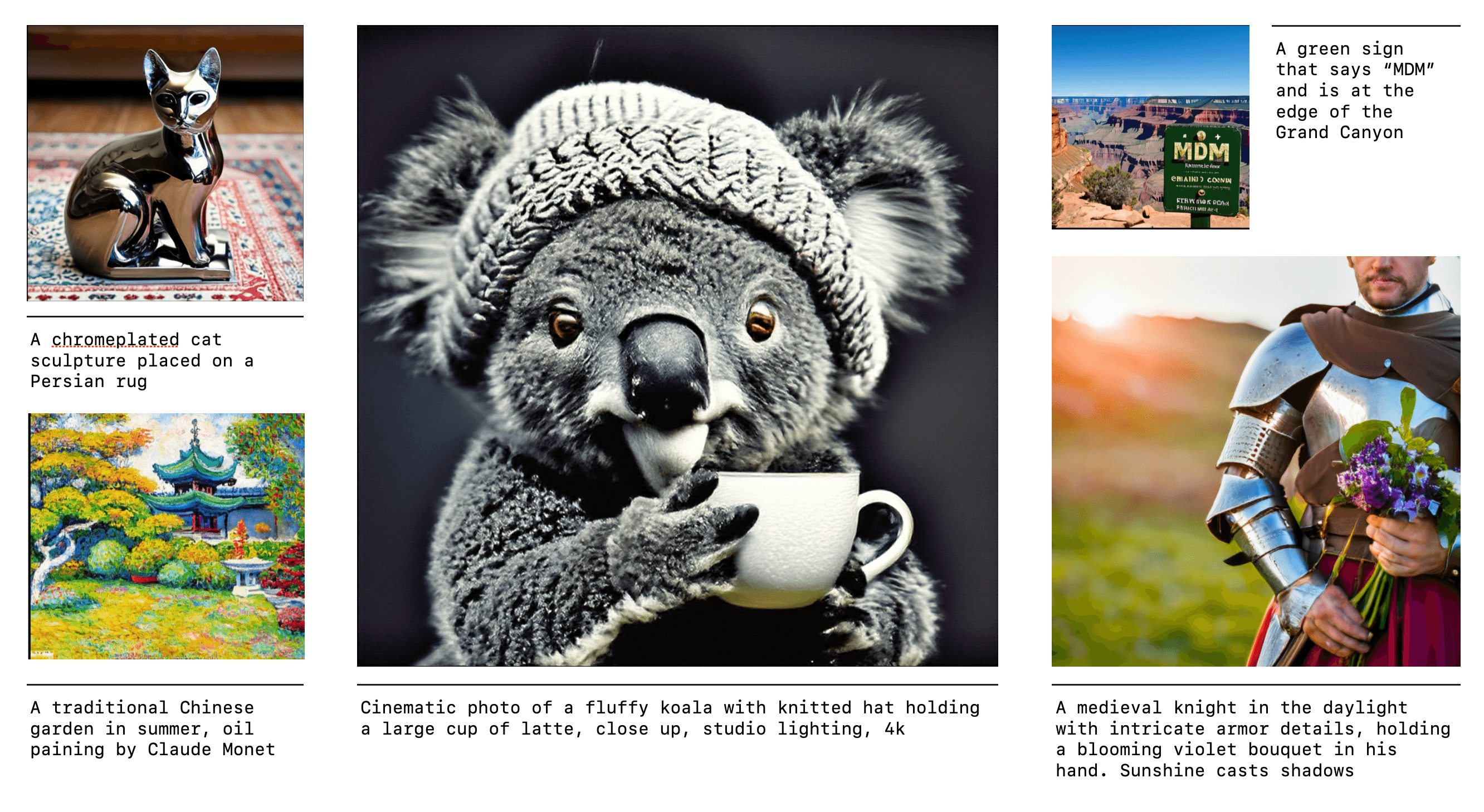
Table of Contents
| Section | Description |
|---|---|
| Introduction | A brief overview of Matryoshka Diffusion Models |
| Installation | Start training models and generating samples with ml_mdm |
| Pretrained Models | Links to download our pretrained models (64, 256, 1024) |
| Web Demo | Generate images with our web UI |
| Codebase Structure | An overview of the python module |
| Concepts | Core concepts and design principles. |
| Tutorial | Step-by-step training of an MDM model on CC12m |
Introduction
Diffusion models are the de facto approach for generating high-quality images and videos, but learning high-dimensional models remains a formidable task due to computational and optimization challenges.
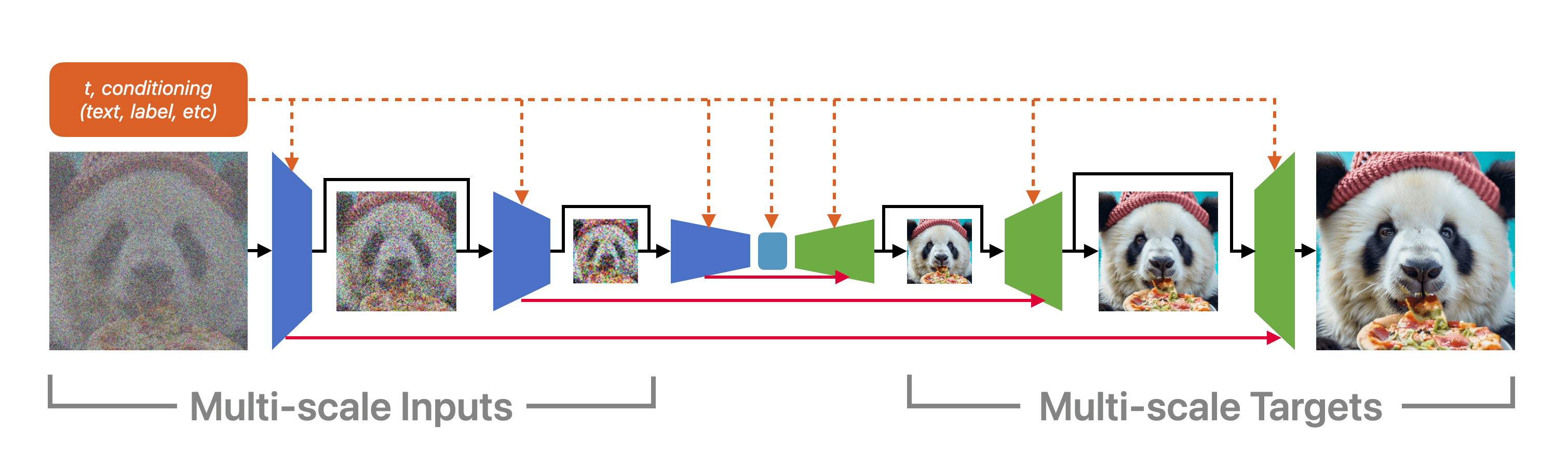
ml_mdm is an end-to-end framework for high-resolution image and video synthesis — it is named after our technique: Matryoshka Diffusion Models.
Remarkably, we can train a single pixel-space model at resolutions of up to 1024x1024 pixels, demonstrating strong zero-shot generalization using the CC12M dataset, which contains only 12 million images.
Installation
The default installation dependencies, as defined in the pyproject.toml, are selected so that you can install this library even on a CPU only machine.
Users have run this codebase with Python 3.9,3.10 and cuda_12, cuda-11.8
> pip install -e .
Developers should set up pre-commit as well with pre-commit install.
Running Test Cases
> pytest   # run test cases that can work with just cpu
> pytest  -m ''  # will run all test cases - including ones that require a gpu
> pytest -m gpu # run only gpu test cases
Pretrained Models
We've uploaded model checkpoints to:
- https://docs-assets.developer.apple.com/ml-research/models/mdm/flickr64/vis_model.pth
- https://docs-assets.developer.apple.com/ml-research/models/mdm/flickr256/vis_model.pth
- https://docs-assets.developer.apple.com/ml-research/models/mdm/flickr1024/vis_model.pth
Note: We are releasing models that were trained on 50M text-image pairs collected from Flickr. In this repo, we provide scripts for downloading CC12M and configs for training equivalent models on CC12M data.
Feel free to download the models or skip further down to train your own. Once a pretrained model is downloaded locally, you can use it in our web demo, pass it as an argument to training, sampling, and more.
export ASSET_PATH=https://docs-assets.developer.apple.com/ml-research/models/mdm

curl $ASSET_PATH/flickr64/vis_model.pth --output vis_model_64x64.pth
curl $ASSET_PATH/flickr256/vis_model.pth --output vis_model_256x256.pth
curl $ASSET_PATH/flickr1024/vis_model.pth --output vis_model_1024x1024.pth
Web Demo
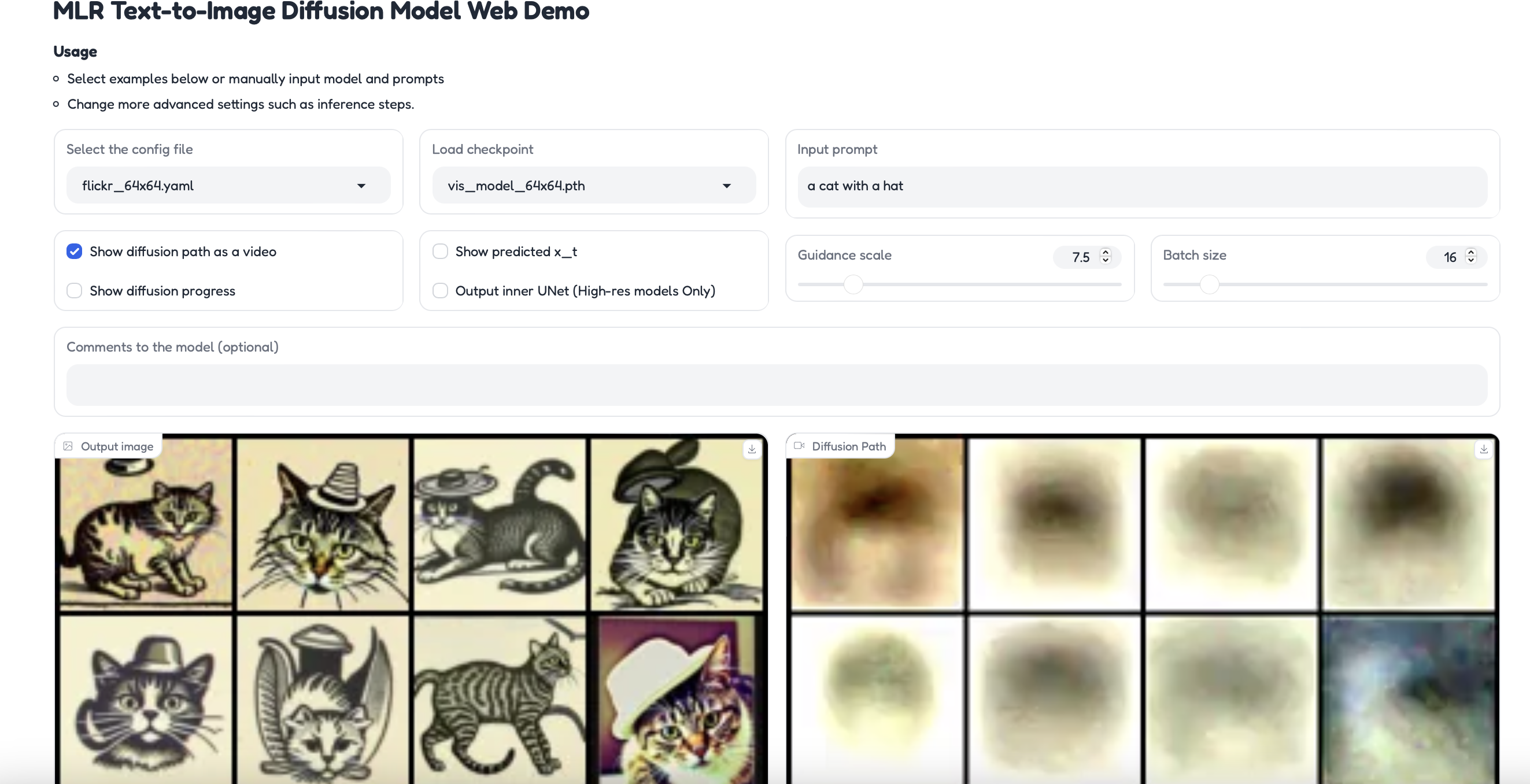
You can run your own instance of the web demo (after downloading the checkpoints) with this command:
torchrun --standalone --nproc_per_node=1 ml_mdm/clis/generate_sample.py --port $YOUR_PORT
Codebase
1. /configs
| module | description |
|---|---|
configs.dataset_creation |
Configuration file for dataset splitting into train-eval-val pipeline |
configs.datasets |
Datasets for training and evaluation phases of the model |
configs.models |
Configuration files for different resolution models |
2. /data
| module | description |
|---|---|
data |
bert.vocab: BERT-trained dictionary containing tokens and their associated vector representationsc4_wpm.vocab: C4-trained dictionary containing tokens and their associated vector representationscifar10.vocab: CIFAR10-trained dictionary containing tokens and their associated vector representationsimagenet.vocab: Prompts associated with Imagenet datasetprompts_cc12m-64x64.tsv: Prompts associated with cc12m dataset for the 64x64 res. modelprompts_cc12m-256x256.tsv: Prompts associated with cc12m dataset for the 256x256 res. modelprompts_cifar10-32x32.tsv: Prompts associated with cifar10 dataset for the 32x32 res. model prompts_cifar10-64x64.tsv: Prompts associated with cifar10 dataset for the 64x64 res. model prompts_demo.tsv: Extra demo prompts prompts_imagenet-64px.tsv: Prompts associated with imagenet dataset for the 64x64 res. model prompts_WebImage-ALIGN-64px.tsv: Prompts associated with WebImage-ALIGN dataset for the 64x64 res. model t5.vocab: t5-trained dictionary containing tokens and their associated vector representations tokenizer_spm_32000_50m.vocab: SPM-trained dictionary containing tokens and their associated vector representations |
3. /docs
| module | description |
|---|---|
docs |
web_demo.png: Screenshot of the web demo of the model |
4. /ml_mdm
| module | description |
|---|---|
ml_mdm.models |
The core model implementations |
ml_mdm.diffusion |
Model pipelines, for example DDPM |
ml_mdm.config |
Connects configuration dataclasses with associated models, pipelines, and clis using simple parsing |
ml_mdm.clis |
All command line tools in the project, the most relevant being train_parallel.py |
tests/ |
Unit tests and sample training files |
5. /tests
| module | description |
|---|---|
tests.test_files |
Sample files for testing |
Concepts
ml_mdm.models
In the ml_mdm.models submodule, we've open sourced our implementations of:
- U-Nets
- Nested U-Nets
ml_mdm.config
ml_mdm.config contains the core configuration and cli logic. Many models, clis, and functions in this codebase are configured by passing in a dataclass object. We use SimpleParsing to dynamically create clis and allow passing in yaml config representations with --config_path.
In essence,
simple_parsingwill convert all passed cli arguments and yaml files into clean configuration classes likeml_mdm.reader.ReaderConfig,ml_mdm.diffusion.DiffusionConfig.
ml_mdm.config stores a global mapping of names to classes in MODEL_REGISTRY, MODEL_CONFIG_REGISTRY, PIPELINE_REGISTRY, and PIPELINE_CONFIG_REGISTRY.
MODEL_REGISTRY and PIPELINE_REGISTRY store information as shown in the following example:
*_CONFIG_REGISTRY[architecture name]["model"] = model name
*_CONFIG_REGISTRY[architecture name]["config"] = configuration class
MODEL_CONFIG_REGISTRY and PIPELINE_CONFIG_REGISTRY store information as shown in the following example:
*_CONFIG_REGISTRY[architecture name]["model"] = model name
*_CONFIG_REGISTRY[architecture name]["config"] = configuration class
architecture name and model name are passed into ml_mdm.config through the function parameter *names. where *names points to "architecture name", "model name"
Tutorials
Generate Your Own Images With Pretrained Checkpoints
Once you've installed ml_mdm, download these checkpoints into the repo's directory.
curl https://docs-assets.developer.apple.com/ml-research/models/mdm/flickr64/vis_model.pth --output vis_model_64x64.pth
curl https://docs-assets.developer.apple.com/ml-research/models/mdm/flickr256/vis_model.pth --output vis_model_256x256.pth
The web demo will load each model with a corresponding configuration:
vis_model_64x64.pthwill be loaded with the settings fromconfigs/models/cc12m_64x64.yamlvis_model_256x256.pthwill be loaded with the settings fromconfigs/models/cc12m_256x256.yamlvis_model_1024x1024.pthwill be loaded with the settings fromconfigs/models/cc12m_1024x1024.yaml
In the demo, you can change a variety of settings and peek into the internals of the model. Set the port you'd like to use by swapping in $YOUR_PORT and then run:
torchrun --standalone --nproc_per_node=1 ml_mdm/clis/generate_sample.py --port $YOUR_PORT
Training on Dummy Data
If you just want to step through the process of training a model and running a pipeline without downloading a large dataset, we've put together a minimal example for you. It uses the dummy data from tests/test_files/
Feel free to try changing a variety of --args either directly in the cli or by editing the config yaml file
torchrun --standalone --nproc_per_node=1 ml_mdm/clis/train_parallel.py \
 --file-list=tests/test_files/sample_training_0.tsv \
 --multinode=0 \
  --output-dir=outputs    --config_path configs/models/cc12m_64x64.yaml \
  -num_diffusion_steps=10 \
	--num-training-steps=10
You should see a outputs/vis_model_000100.pth file. Now lets do something a bit more meaningful:
Lets train an MDM model on CC12m
1. Data Prep:
(OPTIONAL) Download the first 1K files of CC12m with this sample argument
The script is based on img2dataset's CC12M script.
curl https://storage.googleapis.com/conceptual_12m/cc12m.tsv | head -n 1000 > cc12m_index.tsv

# Add headers to the file
sed -i '1s/^/url\tcaption\n/'  cc12m_index.tsv
Note: if you want all of cc12m, remove
| head -n 1000from the call
Then prepare and split into train/validation
This script requires
img2dataset, either runpip install '.[data_prep]'or justpip install img2dataset
python3 -m ml_mdm.clis.scrape_cc12m \
  --cc12m_index cc12m_index.tsv \
  --cc12m_local_dir cc12m_download
After running this command you will see the following files:
training.0.tsv # train index file
validation.tsv # validation index file
cc12m_download/
   00000.parquet  00000.tar  00000.tsv  00000_stats.json  validation.tsv
   00001.parquet ....
2. Train
Now that we have our training file, we can select a model config and pass any additional training arguments:
# Modify torchrun arguments to fit your GPU setup
torchrun --standalone --nproc_per_node=8 ml_mdm/clis/train_parallel.py \
  --file-list=training_0.tsv \
  --multinode=0 --output-dir=/mnt/data/outputs \
  --config_path configs/models/cc12m_64x64.yaml \
  --num-training-steps=100   --warmup-steps 10
Note:
configs/models/cc12m_64x64.yamlcontains many more arguments, check it out for more details.
If you've downloaded a pretrained model, you can set the
--pretrained-vision-fileargument to point to its location on disk
Once training completes, you'll find the model in the folder defined by the --output-dir argument:
2024-07-22:17:58:46,649 INFO     [model_ema.py:33] Saving EMA model file: /mnt/data/outputs/vis_model_000100.pth
2024-07-22:17:58:47,448 INFO     [unet.py:794] Saving model file: /mnt/data/outputs/vis_model_noema_000100.pth
3. Sample from the model
Now that we have a trained model, we can generate samples from the diffusion model:
torchrun --standalone --nproc_per_node=1 ml_mdm/clis/generate_batch.py \
  --config_path configs/models/cc12m_64x64.yaml \
  --min-examples 3 --test-file-list validation.tsv \
  --sample-image-size 64 --model-file /mnt/data/outputs/vis_model_000100.pth
If you want to skip the training step, you can update
--model-fileto point to one of our pretrained models
Dataset Storage
For long term storage, you can optionally upload your data to s3://{your_bucket}/datasets/{datasetname}/*.[tar,tsv].
Then update configs/datasets/cc12m.yaml to point to your s3 paths.
# configs/datasets/cc12m.yaml
train:
  files:
    - s3://mlx/datasets/cc12m-64x64/images_00.*.tsv
eval:
  files:
    - s3://mlx/datasets/cc12m-64x64/validation.tsv
# configs/datasets/reader_config.yaml
reader_config:
  append_eos: true
  bucket: ${your_bucket} # add your s3 bucket
  endpoint_url: None # boto will automatically infer the endpoint
Then you can use our dataset download helper:
python -m ml_mdm.clis.download_tar_from_index \
  --dataset_config_file configs/datasets/cc12m.yaml \
  --subset train --download_tar

python -m ml_mdm.clis.download_tar_from_index \
  --dataset_config_file configs/datasets/cc12m.yaml \
  --subset eval --download_tar
S3 Dataset Selection
Take a look at configs/datasets/cc12m.yaml.
The code allows for multiple regular expressions to be provided. Keep in mind that the regular expressions are not globs -- they are regular expressions from the python re library. So if you wanted to use only 100 of the 1000 tar files in WebImage for training you can do the following:
train:
  files:
    - s3://mlx/datasets/example-dataset-100M_64px/example-dataset-100M-00[0-1]..-[0-9]*-of-01000.tsv
eval:
  files:
    - s3://mlx/datasets/example-dataset-100M_64px/validation.tsv
You can also mix and match the files. So if you wanted to merge CC12m and imagenet you could create a new yaml file with the following contents:
train:
  files:
    - s3://mlx/datasets/imagenet-64px/imagenet-train-000??-of-00100.tsv
    - s3://mlx/datasets/cc12m-64x64/images_00.*.tsv
eval:
  files:
    - s3://mlx/datasets/cc12m-64x64/validation.tsv
Dataset Structure
The S3 Bucket contains a series of files in this format, take a look at ml_mdm/clis/scrape_cc12m.py to generate your own.
2023-04-01 01:31:30   36147200 images_00000.tar
2023-05-10 11:34:49    1108424 images_00000.tsv
2023-04-01 01:31:26   36454400 images_00001.tar
2023-05-10 11:34:49    1109588 images_00001.tsv
2023-04-01 01:31:53   36116480 images_00002.tar
...
Minimal representations of these files can be found at tests/test_files/.
Citation
If you find our work useful, please consider citing us as:
@misc{gu2023matryoshkadiffusionmodels,
      title={Matryoshka Diffusion Models},
      author={Jiatao Gu and Shuangfei Zhai and Yizhe Zhang and Josh Susskind and Navdeep Jaitly},
      year={2023},
      eprint={2310.15111},
      archivePrefix={arXiv},
      primaryClass={cs.CV},
      url={https://arxiv.org/abs/2310.15111},
}