← Open Source
altryne

chatGPT-telegram-bot

This is a very early attempt at having chatGPT work within a telegram bot.

ApplicationsWrappersPython
Open on GitHub
Momentum
+0stars in 24 hours0.0%
1.64k
Stars
217
Forks
+0
This week
5
Contributors
Created 2022-12-02 · Updated 2026-10-13 · #9811 today
Top developers
altrynestjohn96thibauld

altryne/chatGPT-telegram-bot is ranked 9,811 with 1,637 stars.

Same-category comparison

altryne/chatGPT-telegram-bot is ranked 9,811 among these 8 peers; Simpleyyt/ai-manus is ranked 9,809.

Same-category comparison
NameRankMetrics
RQLuo/MixTeX-Latex-OCR9,802
Language:
Python
Stars:
1,640
Forks:
97
Description:
MixTeX multimodal LaTeX, ZhEn, and, Table OCR. It performs efficient CPU-based inference in a local offline on Windows.
ariacom/Seal-Report9,803
Language:
C#
Stars:
1,640
Forks:
508
Description:
Database Reporting Tool and Tasks (. Net).
Lucchetto/SuperImage9,807
Language:
Kotlin
Stars:
1,638
Forks:
114
Description:
Sharpen your low-resolution pictures with the power of AI upscaling.
Simpleyyt/ai-manus9,809
Language:
Python
Stars:
1,638
Forks:
409
Description:
AI Manus is a general-purpose AI Agent system that supports running various tools and operations in a sandbox environment.
mmz-001/knowledge_gpt9,827
Language:
Python
Stars:
1,627
Forks:
780
Description:
Accurate answers and instant citations for your documents.
Ildaron/Laser_control9,832
Language:
Python
Stars:
1,624
Forks:
188
Description:
Laser for control mosquito, weed, and pest.
WongSaang/chatgpt-ui9,833
Language:
Vue
Stars:
1,624
Forks:
346
Description:
A ChatGPT web client that supports multiple users, multiple languages, and multiple database connections for persistent data storage. Provides Docker images and quick deployment scripts.
869413421/ai-moive-studio9,842
Language:
Python
Stars:
1,618
Forks:
251
Key parameters and specifications
ParameterValue
LanguagePython
CategoryApplications
SubcategoryWrappers
Stars1,637
Forks217
Contributors5
Created date2022-12-02
Updated date2026-10-13
Stars in 1 day0
Stars in 7 days0
Rank9,811
Previous rank9,844
Rank change33
7-day stars rank12,421
Previous 7-day stars rank12,463
7-day stars rank change42
Total stars rank7,526
Previous total stars rank7,522
Total stars rank change-4
CountryUSA
README summary

BREAKING: ChatGPT API was just released, going to update this repo to use it! ChatGPT Telegram Bot This is a Telegram bot that lets you chat with the chatGPT language model using your local browser. The bot uses Playwright to run chatGPT in Chromium, and can parse code and text, as well as send messages. It also includes a command that allows you to generate pictures using stable diffusion. Features [ ] Chat with chatGPT from your Telegram on the go [ ] pictures

using stable diffusion (version 0. 2) [ ] give chatGPT access to Google (version 0. 3) How to Install Step 1: Install Python and Miniconda 1. Click on the appropriate installer for your operating system. Follow the prompts to complete the installation. Navigate to the directory where you want to create the environment. Activate the newly created environment Step 3: Install Playwright 1. Navigate to the directory where you installed Miniconda. Run to download the necessary Chromium software. Run to download the

necessary dependencies Step 4: Set up your Telegram bot 1. Set up your Telegram bot token and user ID in the file. See these instructions for more information on how to do this. Add telegram userinfobot to your telegram contacts 2. Edit the file, rename it to , and place your values in the appropriate fields. To use the command, you will need to obtain an API key for stable diffusion. To do this, go to Dream Studio Beta and sign

up for a free membership. If you want to use the command, you will need to obtain an API key for SERP. To do this, go to SERP API and sign up for a free account. Navigate to the directory where you installed the ChatGPT Telegram bot. Step 6: Chat with your bot in Telegram 1. Find your bot in the list of contacts (you should have already created it with @botfather). If you're using Docker inside a server (headless

mode) You can use the docker image to launch your bot in a server (using playwright headless mode) example Credits Creator @Altryne on Twitter Based on Daniel Gross's whatsapp gpt package.

Frequently asked questions

How many stars and forks are recorded?

altryne/chatGPT-telegram-bot has 1,637 stars and 217 forks.

What is the repository rank?

altryne/chatGPT-telegram-bot is ranked 9,811.

What language and category are recorded?

altryne/chatGPT-telegram-bot has 1,637 stars, uses Python and belongs to Applications.

Which repository is closest in rank?

altryne/chatGPT-telegram-bot is compared with Simpleyyt/ai-manus, ranked 9,809 with 1,638 stars.

README

BREAKING: ChatGPT API was just released, going to update this repo to use it! We're back baby!

ChatGPT Telegram Bot
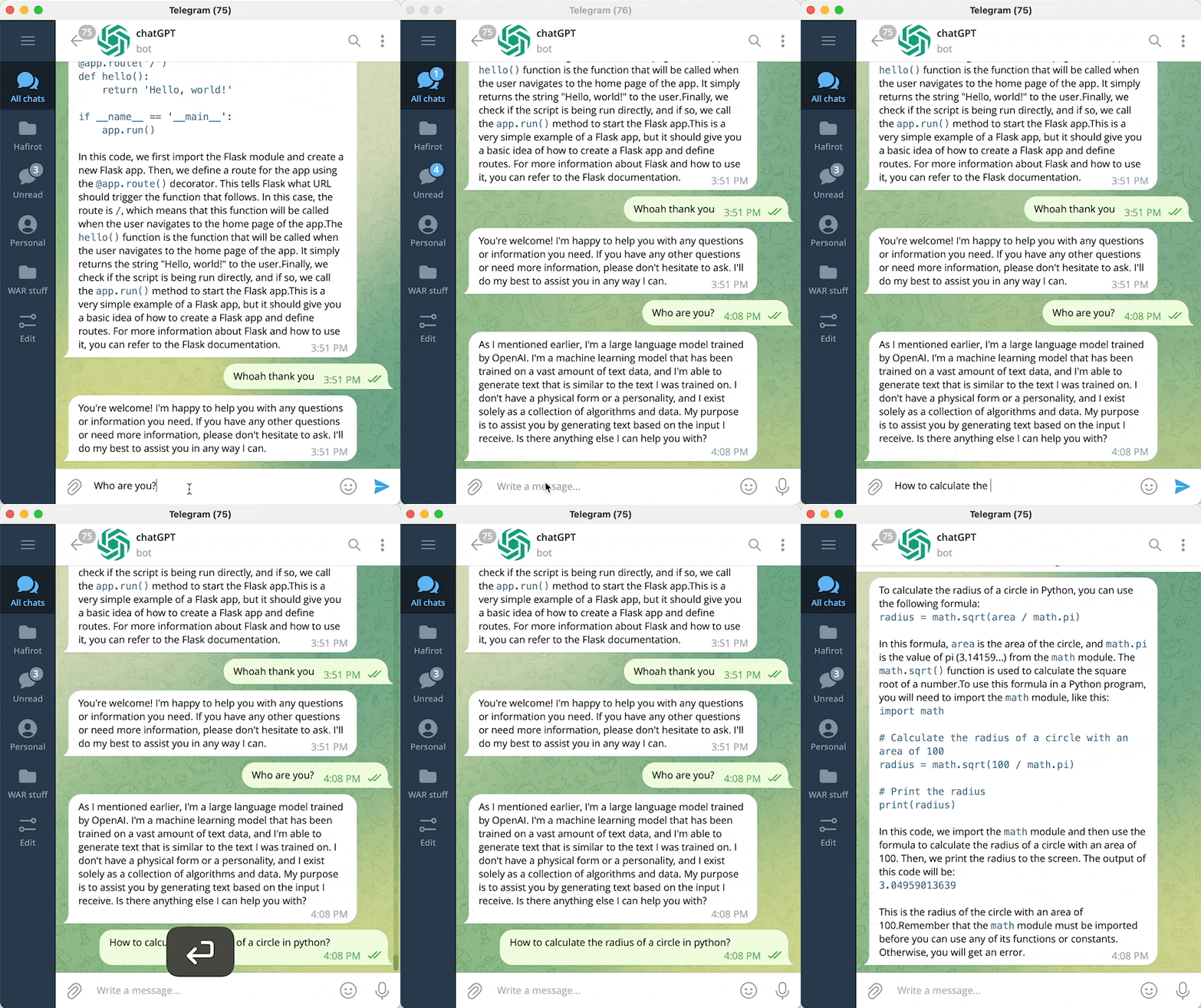
This is a Telegram bot that lets you chat with the chatGPT language model using your local browser. The bot uses Playwright to run chatGPT in Chromium, and can parse code and text, as well as send messages. It also includes a /draw command that allows you to generate pictures using stable diffusion. More features are coming soon.

Features

  • [ ] Chat with chatGPT from your Telegram on the go
  • [ ] /draw pictures using stable diffusion (version 0.0.2)
  • [ ] /browse give chatGPT access to Google (version 0.0.3)

How to Install

Step 1: Install Python and Miniconda

  1. Go to the Miniconda download page.
  2. Click on the appropriate installer for your operating system.
  3. Follow the prompts to complete the installation.

Step 2: Create a conda environment

  1. Open a terminal or command prompt.
  2. Navigate to the directory where you want to create the environment.
  3. Run conda env create -f environment.yml to create the environment.
  4. Activate the newly created environment conda activate chat

Step 3: Install Playwright

  1. Open a terminal or command prompt.
  2. Navigate to the directory where you installed Miniconda.
  3. Run playwright install to download the necessary Chromium software.
  4. Run playwright install-deps to download the necessary dependencies

Step 4: Set up your Telegram bot

  1. Set up your Telegram bot token and user ID in the .env file. See these instructions for more information on how to do this.

How to obtain telegram user id? Add telegram userinfobot to your telegram contacts

  1. Edit the .env.example file, rename it to .env, and place your values in the appropriate fields.

Step 5: Set up your API keys

  1. Copy the .env.example file and rename the copy to .env.
  2. To use the /draw command, you will need to obtain an API key for stable diffusion. To do this, go to Dream Studio Beta and sign up for a free membership.
  3. SERP_API_KEY is optional. If you want to use the /browse command, you will need to obtain an API key for SERP. To do this, go to SERP API and sign up for a free account.

Step 5: Run the server

  1. Open a terminal or command prompt.
  2. Navigate to the directory where you installed the ChatGPT Telegram bot.
  3. Run python server.py to start the server.

Step 6: Chat with your bot in Telegram

  1. Open the Telegram app on your device.
  2. Find your bot in the list of contacts (you should have already created it with @botfather).
  3. Start chatting with your bot.

If you're using Docker inside a server (headless mode)

You can use the docker image to launch your bot in a server (using playwright headless mode)

docker-compose example

services:
  chatgpt-telegram-bot:
    image: ghcr.io/altryne/chatgpt-telegram-bot
    container_name: chatgpt-telegram-bot
    environment:
      - TELEGRAM_API_KEY=
      - TELEGRAM_USER_ID= #Use this with your user ID to restrict usage only to your account
      - STABILITY_API_KEY= #use this if you want the bot to draw things with stability AI as well
      - SERP_API_KEY= #add this from serpapi if you want to enable the google search feature
      - OPEN_AI_EMAIL= #openai login email. Needed for autologin in headless mode
      - OPEN_AI_PASSWORD= #openai password. Needed for autologin in headless mode

Credits

Nearby in the ranking
Similar items