
[](https://github.com/alexandre01/deepsvg)
[](https://github.com/alexandre01/deepsvg/blob/master/LICENCE)
[](https://www.aiunfolded.co)
[](https://alexandre01.github.io/deepsvg/)
Introduction
This is the official code for the paper "DeepSVG: A Hierarchical Generative Network for Vector Graphics Animation". Please refer to section below for Citation details.
-
Paper: arXiv
-
Code: GitHub
-
Project page: link
-
Reshot AI: link
-
BricksAR: link
-
LingoSub: link
-
ClipLaunch: link
-
Featured on AI Unfolded:

-
1min video:

This repository includes:
- The training code to reproduce our Hierarchical Generative Network: DeepSVG.
- A library for deep learning with SVG data, including export functionality to differentiable PyTorch tensors.
- The SVG-Icons8 dataset.
- A Graphical user interface showing a demo of DeepSVG for vector graphics animation.
Updates
-
December 2020: Added raw SVG dataloader (see Dataloader section).
-
September 2020: Accepted to NeurIPS2020 🎉
-
July 2020: Added pretrained models and notebook for Font generation.
Installation
Start by cloning this Git repository:
git clone https://github.com/alexandre01/deepsvg.git
cd deepsvg
Create a new conda environment (Python 3.7):
conda create -n deepsvg python=3.7
conda activate deepsvg
And install the dependencies:
pip install -r requirements.txt
Please refer to cairosvg's documentation for additional requirements of CairoSVG. For example:
- on Ubuntu:
sudo apt-get install libcairo2-dev. - on macOS:
brew install cairo libffi.
Tested environments
- Ubuntu 18.04, CUDA 10.1
- macOS 10.13.6, CUDA 10.1, PyTorch installed from source
Dataset
 Download the dataset using the script provided in
 dataset/ by running:
cd dataset/
bash download.sh
If this is not working for you, download the dataset manually from Google Drive, place the files in the dataset folder, and unzip (this may take a few minutes).
icons_meta.csv(9 MB): https://drive.google.com/file/d/10Zx4TB1-BEdWv1GbwcSUl2-uRFiqgUP1/view?usp=sharingicons_tensor.zip(3 GB): https://drive.google.com/file/d/1gTuO3k98u_Y1rvpSbJFbqgCf6AJi2qIA/view?usp=sharing
By default, the dataset will be saved with the following tree structure:
deepsvg
 └─dataset/
    ├── icons_meta.csv
    └── icons_tensor/
NOTE: The
icons_tensor/folder contains the 100k icons in pre-augmented PyTorch tensor format, which enables to easily reproduce our work. For full flexbility and more research freedom, we however recommend downloading the original SVG icons from icons8, for which you will need a paid plan. Instructions to download the dataset from source are coming soon.
To download the Font-dataset, we recommend following SVG-VAE's instructions: https://github.com/magenta/magenta/tree/master/magenta/models/svg_vae. For demo purposes, we also release a mini version of the dataset. To download it, run:
cd dataset/
bash download_fonts.sh
Or use these links:
fonts_meta.csv(6 MB): https://drive.google.com/file/d/1PEukDlZ6IkEhh9XfTTMMtFOwdXOC3iKn/view?usp=sharingfonts_tensor.zip(92 MB): https://drive.google.com/file/d/15xPf2FrXaHZ0bf6htZzc9ORTMGHYz9DX/view?usp=sharing
Dataloader
To process a custom dataset of SVGs, use the SVGDataset dataloader.
To preprocess them on the fly, you can set already_preprocessed to False, but we recommend preprocessing them before training for better I/O performance.
To do so, use the dataset/preprocess.py script:
python -m dataset.preprocess --data_folder dataset/svgs/ --output_folder dataset/svgs_simplified/ --output_meta_file dataset/svg_meta.csv
This will preprocess all input svgs in a multi-threaded way and generate a meta data file, for easier training filtering.
Then modify the training configuration by providing the correct dataloader module, data folder and meta data file:
cfg.dataloader_module = "deepsvg.svg_dataset"
cfg.data_dir = "./dataset/svgs_simplified/"
cfg.meta_filepath = "./dataset/svg_meta.csv"
Deep learning SVG library
DeepSVG has been developed along with a library for deep learning with SVG data. The main features are:
- Parsing of SVG files.
- Conversion of basic shapes and commands to the subset
m/l/c/z. - Path simplification, using Ramer-Douglas-Peucker and Philip J. Schneider algorithms.
- Data augmentation: translation, scaling, rotation of SVGs.
- Conversion to PyTorch tensor format.
- Draw utilities, including visualization of control points and exporting to GIF animations.
The notebook notebooks/svglib.ipynb provides a walk-trough of the deepsvg.svglib library. Here's a little sample code showing the flexibility of our library:
from deepsvg.svglib.svg import SVG
from deepsvg.svglib.geom import Point, Angle

icon = SVG.load_svg("docs/imgs/dolphin.svg").normalize()
icon.simplify_heuristic()                                 # path simplifcation
icon.zoom(0.75).translate(Point(0, 5)).rotate(Angle(15))  # scale, translate, rotate
icon.draw()

And making a GIF of the SVG is as easy as:
icon.animate()

Differentiable SVG shape optimization
Similarly to PyTorch3D, differentiable operations can be performed on a SVGTensor, enabling to deform a circle to match an arbitrary target via gradient descent.
Interestingly, using a lower number of Bézier commands in the initial circle (n) creates somehow artistic approximations of the target shape.
See notebooks/svgtensor.ipynb.
| n | 4 | 8 | 16 | 32 |
|---|---|---|---|---|
| optimization |  |
 |
 |
 |
Graphical User Interface (experimental)
While developing DeepSVG, we have also built a Graphical User Interface (GUI) for easier visualization of our model and as a tool to easily create 2D animations.
The code, available under deepsvg/gui, is written with Kivy and the UI style is inspired from the design tool Figma.
DISCLAIMER: this GUI has been developed for demo purposes mainly and features one would expect from a vector graphics editor (like rescaling) will be added in the near future. For more flexibility, we recommend creating animations programmatically using the template code provided in
notebooks/animation.ipynb.
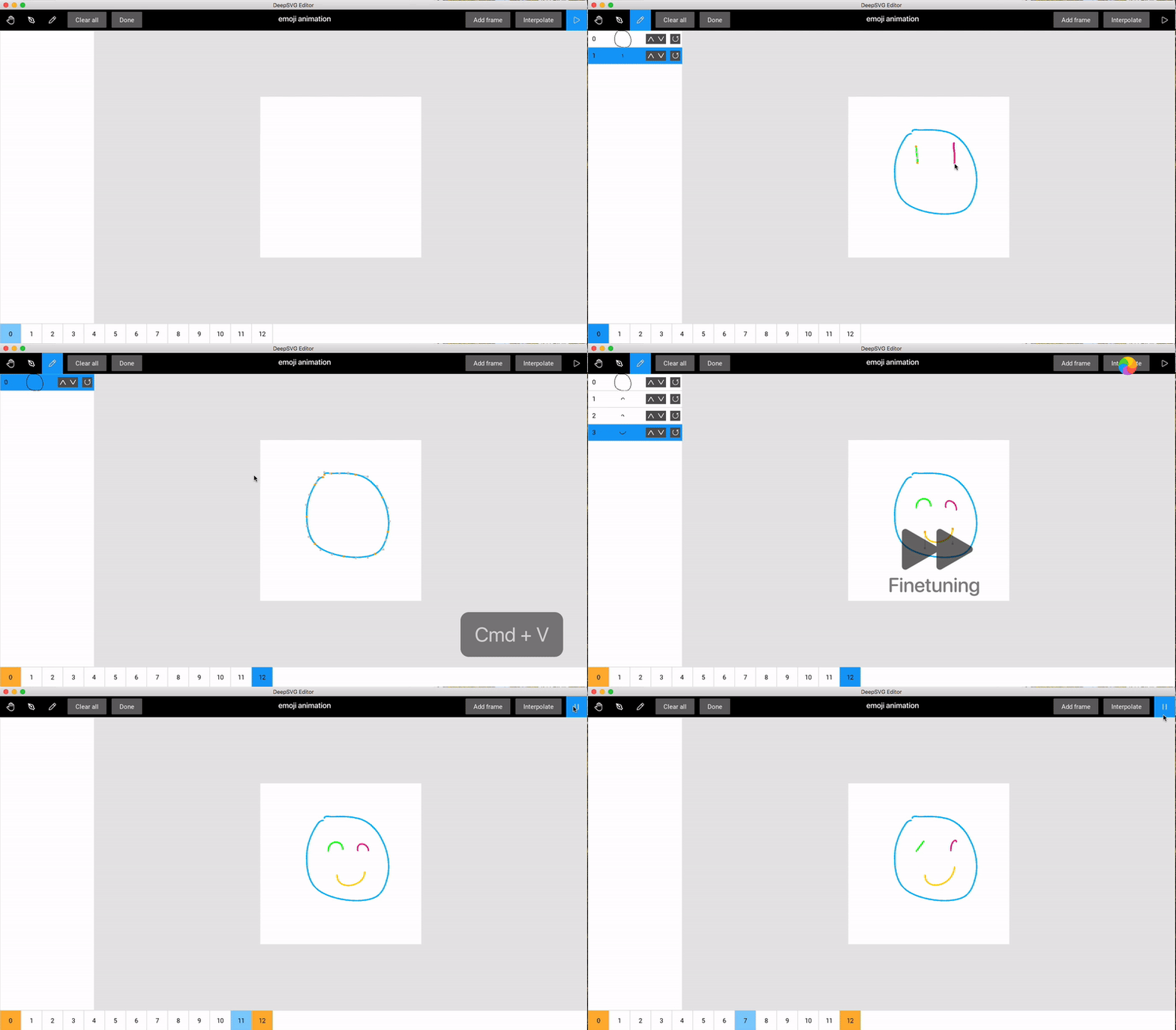
Shortcuts:
H: hand toolP: pen toolCtrl/⌘ Cmd P: pencil toolK: make keyframespacebar: play/pauseCtrl/⌘ Cmd E: export animation to GIF (file is saved by default in./gui_data)
Training
Start a training by running the following command.
python -m deepsvg.train --config-module configs.deepsvg.hierarchical_ordered
The (optional) --log-dir argument lets you choose the directory where model checkpoints and tensorboard logs will be saved.
Inference (interpolations)
Download pretrained models by running:
cd pretrained/
bash download.sh
If this doesn't work, you can download them manually from Google Drive and place them in the pretrained folder.
hierarchical_ordered.pth.tar(41 MB): https://drive.google.com/file/d/1tsVx_cnFunSf5vvPWPVTjZ84IQC2pIDm/view?usp=sharinghierarchical_ordered_fonts.pth.tar(41 MB): https://drive.google.com/file/d/11KBUWfexw3LDvSFOVxy072_VCFYKm3L-/view?usp=sharing
We provide sample code in notebooks/interpolate.ipynb to perform interpolation between pairs of SVG icons
and notebooks/latent_ops.ipynb for word2vec-like operations in the SVG latent space, as shown in the experiments of our paper.
Notebooks
| Description | Link to notebook |
|---|---|
| SVGLib walk-through | svglib.ipynb |
| Differentiable SVGTensor optimization | svgtensor.ipynb |
| DeepSVG interpolation between pairs of icons | interpolation.ipynb |
| DeepSVG latent space operations | latent_ops.ipynb |
| DeepSVG animation between user-drawn images | animation.ipynb |
| DeepSVG generation and interpolation of Fonts | fonts.ipynb |
Citation
If you find this code useful in your research, please cite:
@misc{carlier2020deepsvg,
    title={DeepSVG: A Hierarchical Generative Network for Vector Graphics Animation},
    author={Alexandre Carlier and Martin Danelljan and Alexandre Alahi and Radu Timofte},
    year={2020},
    eprint={2007.11301},
    archivePrefix={arXiv},
    primaryClass={cs.CV}
}
Contributing
Contributions are welcome! Feel free to submit a pull request if you have found a bug or developed a feature that may be useful for others. Also, don't hesitate to contact me for any further question related to this code repository.
Licence
This code is released under the MIT licence.