M²: Meshed-Memory Transformer
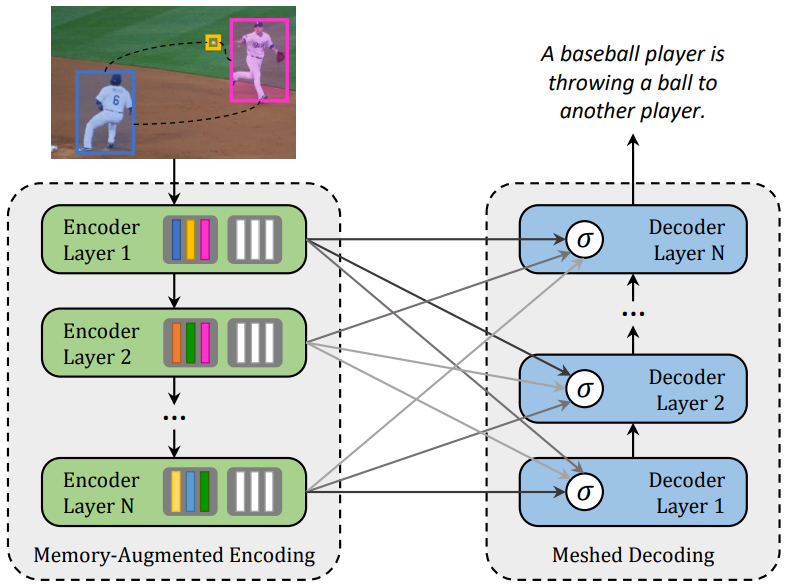
This repository contains the reference code for the paper Meshed-Memory Transformer for Image Captioning (CVPR 2020).
Please cite with the following BibTeX:
@inproceedings{cornia2020m2,
  title={{Meshed-Memory Transformer for Image Captioning}},
  author={Cornia, Marcella and Stefanini, Matteo and Baraldi, Lorenzo and Cucchiara, Rita},
  booktitle={Proceedings of the IEEE/CVF Conference on Computer Vision and Pattern Recognition},
  year={2020}
}
Environment setup
Clone the repository and create the m2release conda environment using the environment.yml file:
conda env create -f environment.yml
conda activate m2release
Then download spacy data by executing the following command:
python -m spacy download en
Note: Python 3.6 is required to run our code.
Data preparation
To run the code, annotations and detection features for the COCO dataset are needed. Please download the annotations file annotations.zip and extract it.
Detection features are computed with the code provided by [1]. To reproduce our result, please download the COCO features file coco_detections.hdf5 (~53.5 GB), in which detections of each image are stored under the _features key. is the id of each COCO image, without leading zeros (e.g. the for COCO_val2014_000000037209.jpg is 37209), and each value should be a (N, 2048) tensor, where N is the number of detections.
Evaluation
To reproduce the results reported in our paper, download the pretrained model file meshed_memory_transformer.pth and place it in the code folder.
Run python test.py using the following arguments:
| Argument | Possible values |
|---|---|
--batch_size |
Batch size (default: 10) |
--workers |
Number of workers (default: 0) |
--features_path |
Path to detection features file |
--annotation_folder |
Path to folder with COCO annotations |
Expected output
Under output_logs/, you may also find the expected output of the evaluation code.
Training procedure
Run python train.py using the following arguments:
| Argument | Possible values |
|---|---|
--exp_name |
Experiment name |
--batch_size |
Batch size (default: 10) |
--workers |
Number of workers (default: 0) |
--m |
Number of memory vectors (default: 40) |
--head |
Number of heads (default: 8) |
--warmup |
Warmup value for learning rate scheduling (default: 10000) |
--resume_last |
If used, the training will be resumed from the last checkpoint. |
--resume_best |
If used, the training will be resumed from the best checkpoint. |
--features_path |
Path to detection features file |
--annotation_folder |
Path to folder with COCO annotations |
--logs_folder |
Path folder for tensorboard logs (default: "tensorboard_logs") |
For example, to train our model with the parameters used in our experiments, use
python train.py --exp_name m2_transformer --batch_size 50 --m 40 --head 8 --warmup 10000 --features_path /path/to/features --annotation_folder /path/to/annotations
References
[1] P. Anderson, X. He, C. Buehler, D. Teney, M. Johnson, S. Gould, and L. Zhang. Bottom-up and top-down attention for image captioning and visual question answering. In Proceedings of the IEEE Conference on Computer Vision and Pattern Recognition, 2018.