WeDLM: The fastest diffusion language model with standard causal attention and native KV cache compatibility, delivering real speedups over vLLM-optimized baselines.
The first-ever vast natural language processing benchmark for Indonesian Language. We provide multiple downstream tasks, pre-trained IndoBERT models, and a starter code. (AACL-IJCNLP 2020).
LLaSA: Scaling Train-time and Inference-time Compute for LLaMA-based Speech Synthesis.
Key parameters and specifications
Key parameters and specifications
Parameter
Value
Language
Python
Category
Models
Subcategory
Vision models, Domain-specific models
Keywords
Datasets, Image production, Model architecture
Stars
659
Forks
232
Contributors
1
Created date
2017-03-23
Updated date
2026-09-30
Stars in 1 day
0
Stars in 7 days
0
Rank
15,368
Previous rank
15,181
Rank change
-187
7-day stars rank
14,959
Previous 7-day stars rank
14,964
7-day stars rank change
5
Total stars rank
15,581
Previous total stars rank
15,553
Total stars rank change
-28
README summary
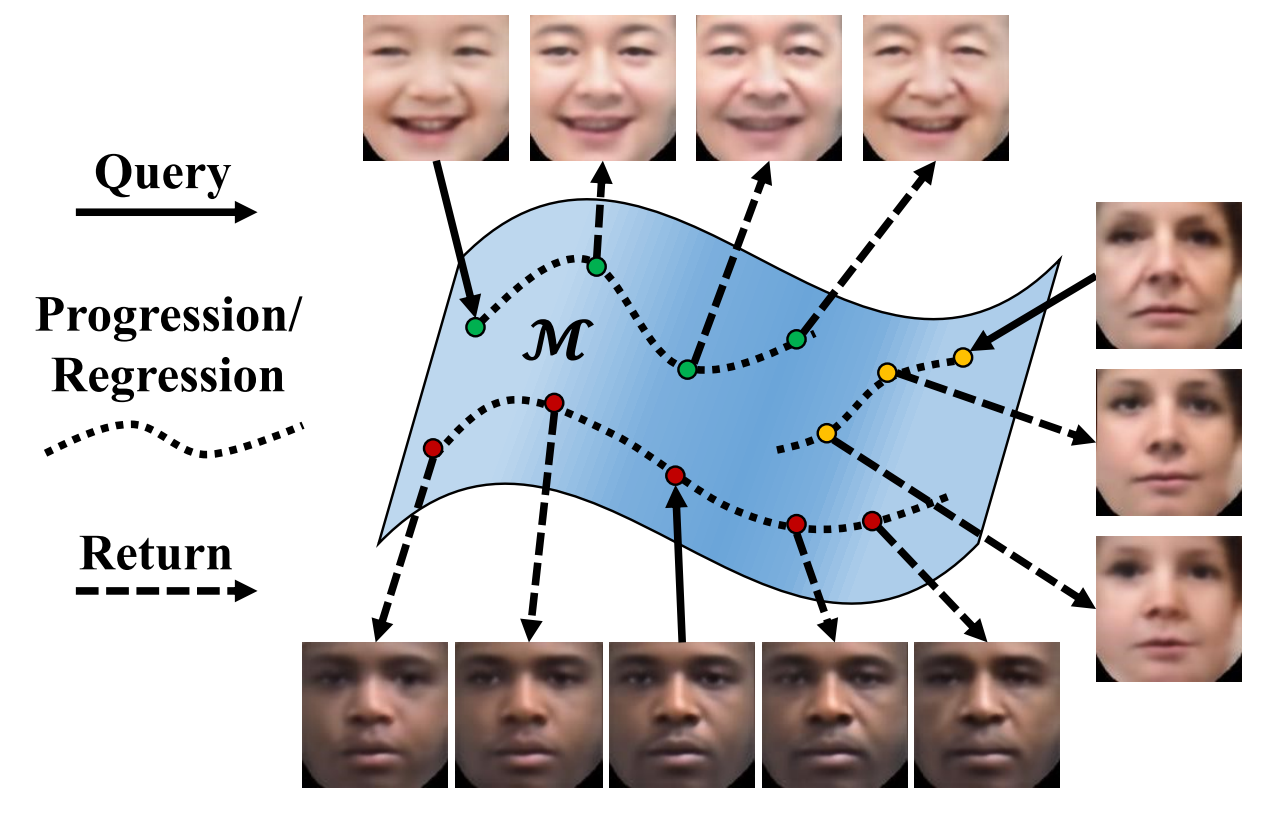
Age Progression/Regression by Conditional Adversarial Autoencoder (CAAE) TensorFlow implementation of the algorithm in the paper Age Progression/Regression by Conditional Adversarial Autoencoder. Thanks to the Pytorch implementation by Mattan Serry, Hila Balahsan, and Dor Alt. 12)~~ The code is updated to run with Tensorflow 1. 0, and an initial model is provided to better initialize the network. The old version is backed up to the folder . Datasets FGNET MORPH CACD UTKFace (Access from the Github link or the Wiki
link) Prepare the training dataset You may use any dataset with labels of age and gender. In this demo, we use the UTKFace dataset. It is better to use aligned and cropped faces. Training The training process has been tested on NVIDIA TITAN X (12GB). The training time for 50 epochs on UTKFace (23,708 images in the size of 128x128x3) is about two and a half hours. During training, a new folder named will be created, including four sub
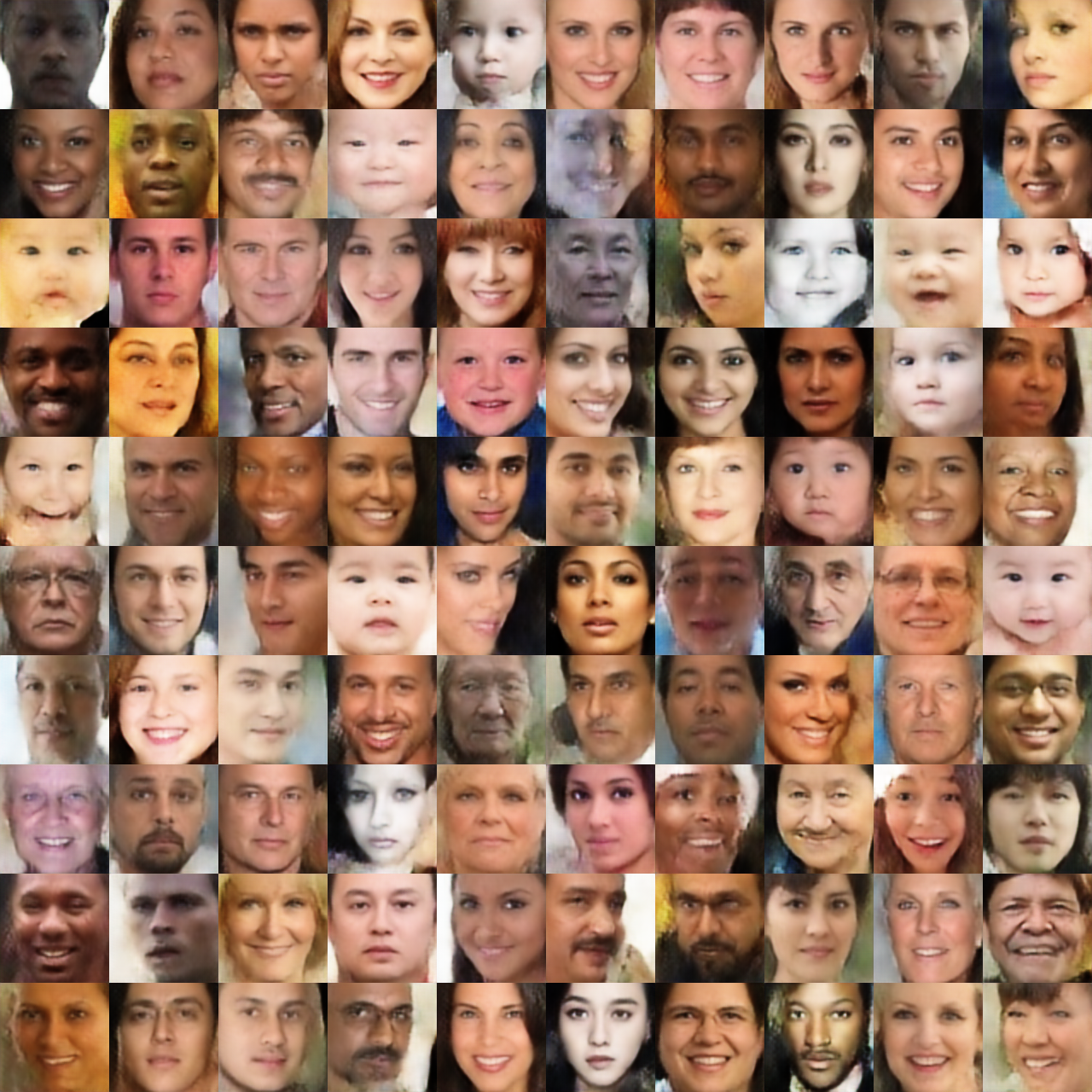
-folders: , , , and . saves the reconstructed faces at each epoch. saves the testing results at each epoch (generated faces at different ages based on input faces). saves the batch-wise losses and intermediate outputs. To visualize the summary, After training, you can check the folders and to visualize the reconstruction and testing performance, respectively. The following shows the reconstruction (left) and testing (right) results. The first row in the reconstruction results (left) are testing samples that yield the testing results (right
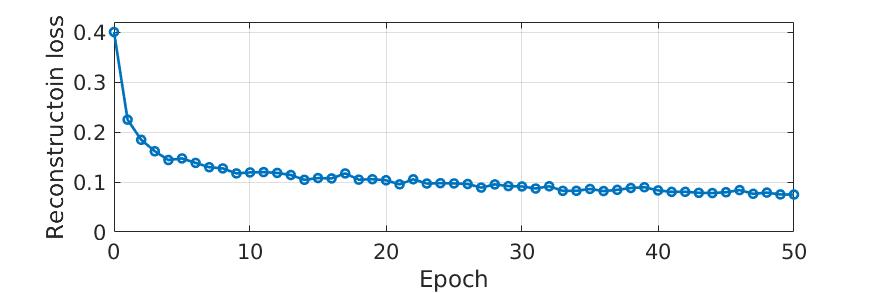
) in the age ascending order from top to bottom. epoch is shown below, which was passed through a low-pass filter for visualization purpose. The original record is saved in folder . Custom Training Testing **Note**: specifies the model name saved in the training. By default, the trained model is saved in the folder save (i. Then, it is supposed to print out the following message. Specifically, the testing faces will be processed twice, being considered as male and female, respectively
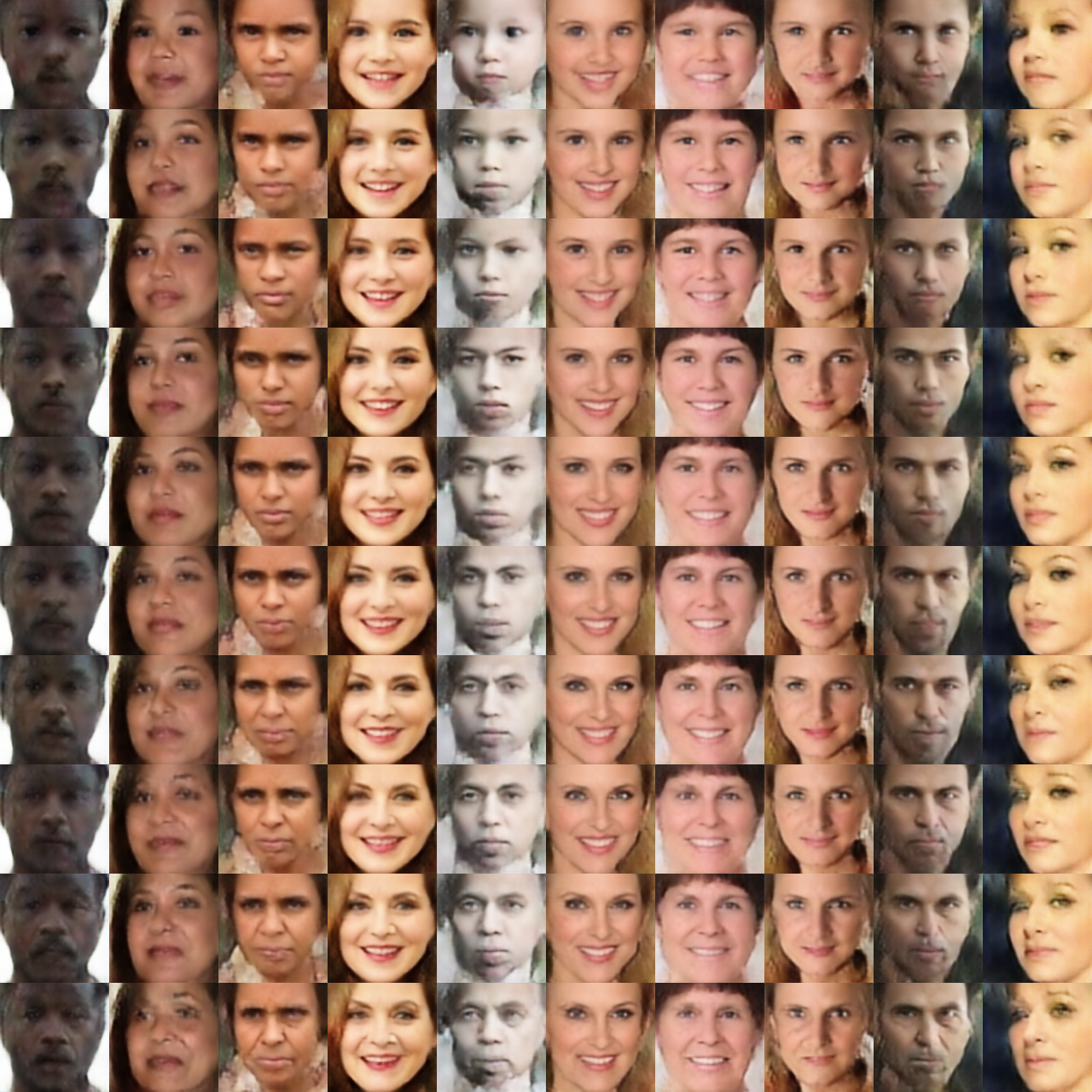
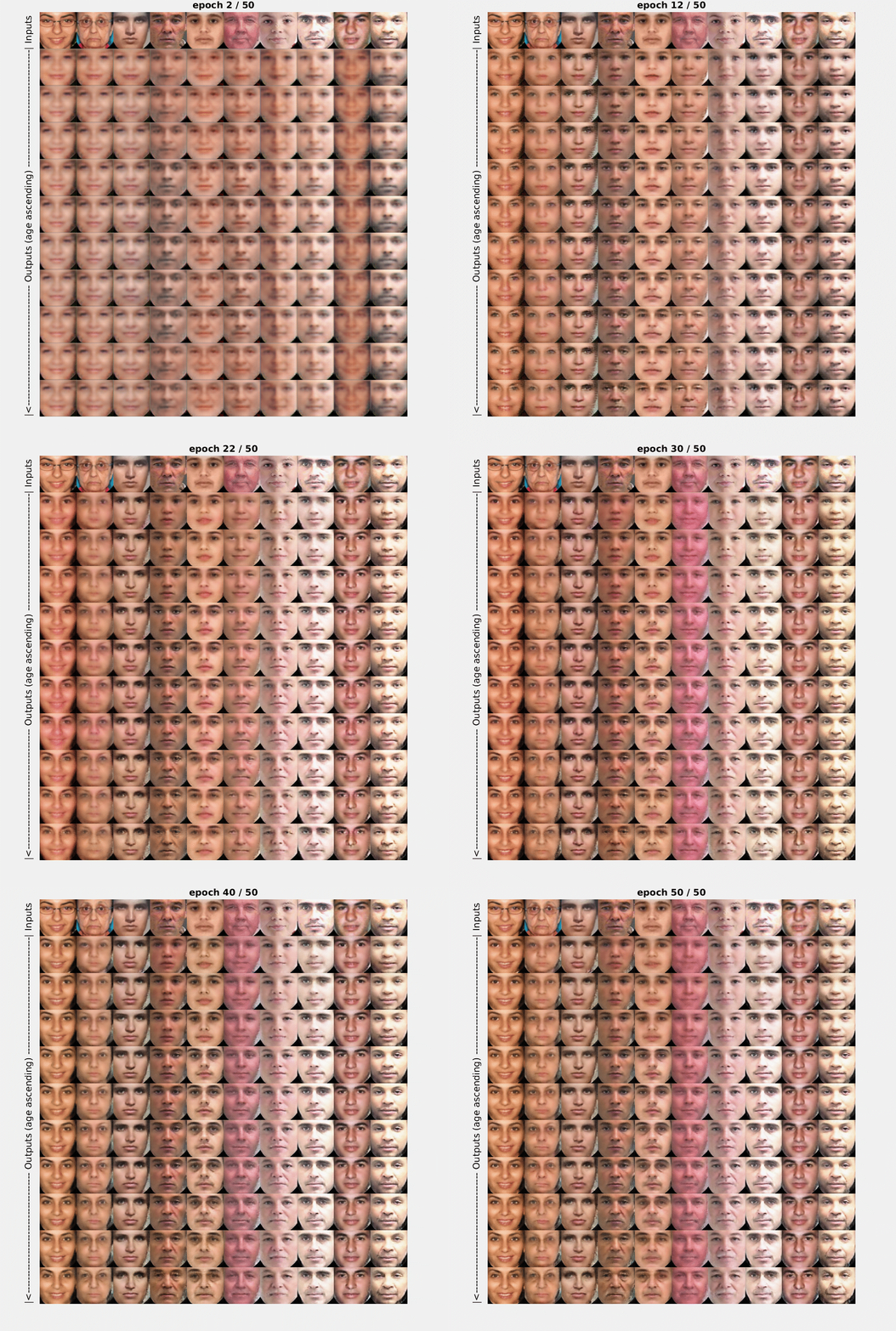
. Therefore, the saved files are named and , respectively. To achieve better results, it is necessary to train on a large and diverse dataset. A demo of training process The first row shows the input faces of different ages, and the other rows show the improvement of the output faces at every other epoch. From top to bottom, the output faces are in the age ascending order. Files is a class that builds and initializes the model, and implements training and
testing related stuff consists of functions called to implement options of convolution, deconvolution, fully connection, leaky ReLU, load and save images. Citation Zhifei Zhang, Yang Song, and Hairong Qi. "Age Progression/Regression by Conditional Adversarial Autoencoder. " *IEEE Conference on Computer Vision and Pattern Recognition (CVPR)*, 2017.
Frequently asked questions
How many stars and forks are recorded?
ZZUTK/Face-Aging-CAAE has 659 stars and 232 forks.
What is the repository rank?
ZZUTK/Face-Aging-CAAE is ranked 15,368.
What language and category are recorded?
ZZUTK/Face-Aging-CAAE has 659 stars, uses Python and belongs to Models.
Which repository is closest in rank?
ZZUTK/Face-Aging-CAAE is compared with Tencent/WeDLM, ranked 15,381 with 658 stars.
README
Age Progression/Regression by Conditional Adversarial Autoencoder (CAAE)
Please note that you will get errors if running with TensorFlow r1.0 because the definition of input arguments of some functions have changed, e.g., tf.concat and tf.nn.sigmoid_cross_entropy_with_logits.
The code is updated to run with Tensorflow 1.7.0, and an initial model is provided to better initialize the network. The old version is backed up to the folder old_version.
You may use any dataset with labels of age and gender. In this demo, we use the UTKFace dataset. It is better to use aligned and cropped faces. Please save and unzip UTKFace.tar.gz to the folder data.
Training
$ python main.py
The training process has been tested on NVIDIA TITAN X (12GB). The training time for 50 epochs on UTKFace (23,708 images in the size of 128x128x3) is about two and a half hours.
During training, a new folder named save will be created, including four sub-folders: summary, samples, test, and checkpoint.
samples saves the reconstructed faces at each epoch.
test saves the testing results at each epoch (generated faces at different ages based on input faces).
checkpoint saves the model.
summary saves the batch-wise losses and intermediate outputs. To visualize the summary,
$ cd save/summary
$ tensorboard --logdir .
After training, you can check the folders samples and test to visualize the reconstruction and testing performance, respectively. The following shows the reconstruction (left) and testing (right) results. The first row in the reconstruction results (left) are testing samples that yield the testing results (right) in the age ascending order from top to bottom.
The reconstruction loss vs. epoch is shown below, which was passed through a low-pass filter for visualization purpose. The original record is saved in folder summary.
Custom Training
$ python main.py
    --dataset		default 'UTKFace'. Please put your own dataset in ./data
    --savedir		default 'save'. Please use a meaningful name, e.g., save_init_model.
    --epoch		default 50.
    --use_trained_model	default True. If use a trained model, savedir specifies the model name.
    --use_init_model	default True. If load the trained model failed, use the init model save in ./init_model
Testing
$ python main.py --is_train False --testdir your_image_dir --savedir save
Note: savedir specifies the model name saved in the training. By default, the trained model is saved in the folder save (i.e., the model name).
Then, it is supposed to print out the following message.
  	Building graph ...

	Testing Mode

	Loading pre-trained model ...
	SUCCESS ^_^

	Done! Results are saved as save/test/test_as_xxx.png
Specifically, the testing faces will be processed twice, being considered as male and female, respectively. Therefore, the saved files are named test_as_male.png and test_as_female.png, respectively. To achieve better results, it is necessary to train on a large and diverse dataset.
A demo of training process
The first row shows the input faces of different ages, and the other rows show the improvement of the output faces at every other epoch. From top to bottom, the output faces are in the age ascending order.
Files
FaceAging.py is a class that builds and initializes the model, and implements training and testing related stuff
ops.py consists of functions called FaceAging.py to implement options of convolution, deconvolution, fully connection, leaky ReLU, load and save images.
Zhifei Zhang, Yang Song, and Hairong Qi. "Age Progression/Regression by Conditional Adversarial Autoencoder." IEEE Conference on Computer Vision and Pattern Recognition (CVPR), 2017.
@inproceedings{zhang2017age,
  title={Age Progression/Regression by Conditional Adversarial Autoencoder},
  author={Zhang, Zhifei and Song, Yang and Qi, Hairong},
  booktitle={IEEE Conference on Computer Vision and Pattern Recognition (CVPR)},
  year={2017}
}