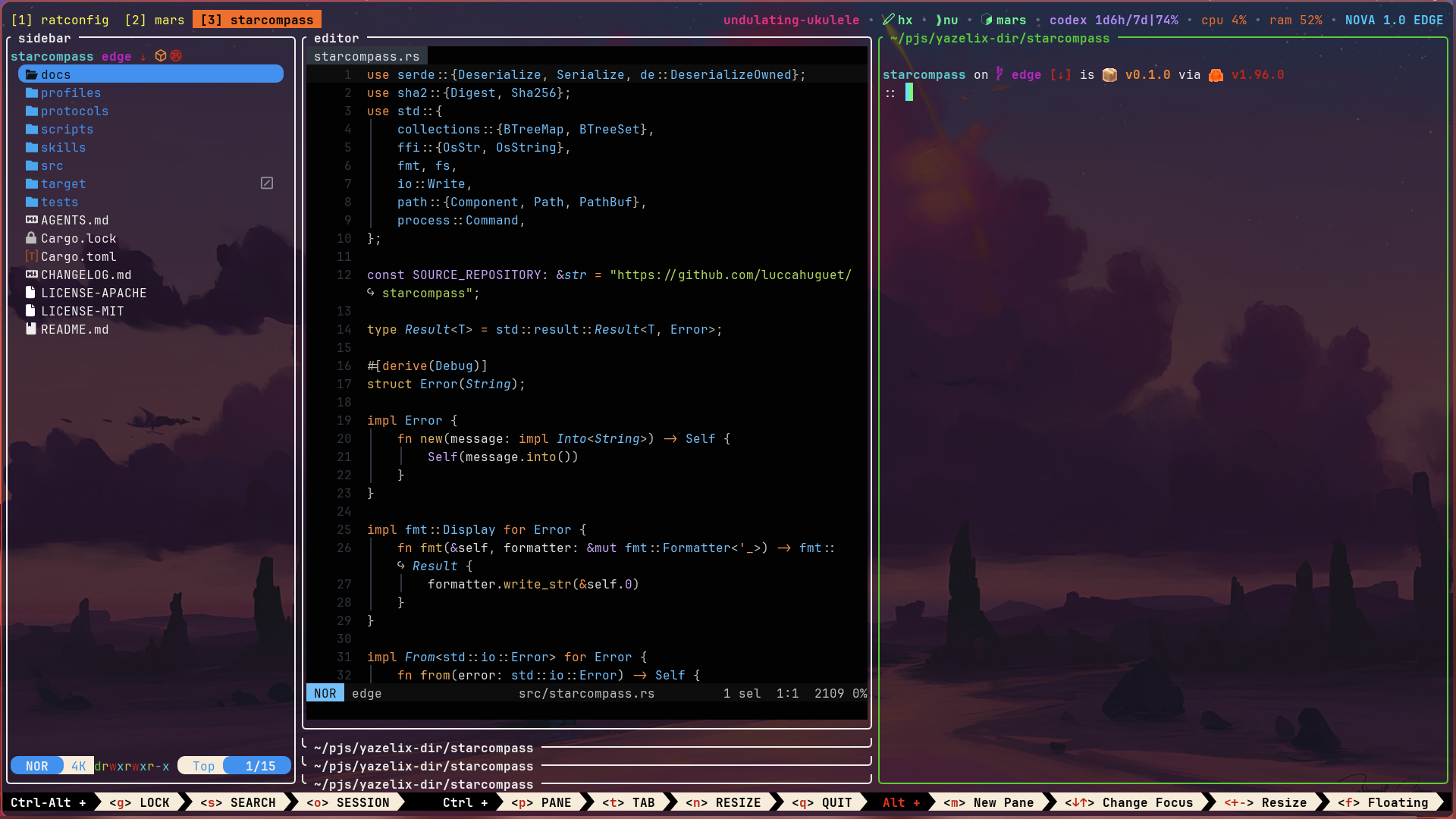
Yazelix Nova is a Nix-packaged terminal workspace built from focused first-party components, including Mars, Nova Zellij, Nova Helix, Yazi, Nushell, Ratconfig, popups, status widgets, cursors, and Anima.
Open-source product analytics for startups: track visitors, events, funnels, and goals without cookies, and ask Databunny, the built-in AI analyst. Uptime, feature flags, and short links in the same dashboard.
OpenScholarXIV is an open-source, aesthetic, minimal and AI powered app that allows users to search, read, bookmark, share, download and view summaries of academic papers from the arXiv repository.
A minimal LLM chat app that runs entirely in your browser.
Key parameters and specifications
Key parameters and specifications
Parameter
Value
Language
Rust
Category
Applications
Subcategory
Productivity
Keywords
Automation, Coding, DevOps, Tool use
Stars
1,202
Forks
52
Contributors
1
Created date
2024-01-20
Updated date
2026-10-15
Stars in 1 day
1
Stars in 7 days
4
Rank
5,752
Previous rank
11,119
Rank change
5,367
7-day stars rank
6,208
Previous 7-day stars rank
7,047
7-day stars rank change
839
Total stars rank
9,688
Previous total stars rank
9,685
Total stars rank change
-3
README summary
Yazelix Nova Delight is the only option. **The Nova docs are the canonical user guide for the current Stable release. ** Start there for installation, configuration, keybindings, updates, and recovery. Yazelix Nova is a Nix-packaged terminal workspace built around Nova Rio, a minimal upstream Zellij distribution, Yazi, Nushell, Bash, Zsh, and Fish with Atuin history. It includes a lazygit popup with support for other Git clients and an optional coding-agent popup. Yazelix Forest provides the default managed Helix file
tree, and the narrow Yazelix Radar fork provides the collapsible Zellij rail. Nova uses the Nova Helix fork by default; can select another terminal editor. opens the desktop workspace through Rio, while opens Yazelix in any capable terminal emulator or over SSH. If Yazelix is useful to you, support its development on GitHub Sponsors. Install and start Yazelix requires Nix with flakes enabled. Install the checked Stable release: Open Nova through its packaged Rio terminal: Enter the same workspace in
the current capable terminal or over SSH: Learn the core workspace keys inside Nova: To try the split work area, open a second work pane with , then press or to switch between the stacked and split arrangements. The Radar sidebar stays open or collapsed as you left it. The command palette's entry remains available with . Full tab labels use in both focus states, keeping text and positions steady when focus changes. Active tabs use bold orange on the terminal background
; inactive tabs use muted gray. Floating panes and popups add no tab indicator. Initial picker tabs use their directory basename, including for , without a special home icon or label. or **Toggle bottom hints** in the command palette hides or restores bottom hint rows throughout the current session. Hiding them frees one row for work panes; sidebar and layout switches retain the choice. New tabs inherit it, and fresh sessions start with hints visible unless is . Attaching preserves the session's current
choice. Toggling preserves pane order and work-pane focus, including manually rearranged stacks and splits. Open managed popups resize with the hint row, preserving their running process and keyboard focus. Set to remap the shortcut, or to disable it. The hint row uses compact , , and modifier headers. Core workspace and Nova shortcuts take priority as the terminal narrows; managed hints follow shortcut remapping and disabling. groups tab movement with and vertical pane movement with . Alt-Shift hints keep menu first
, followed by fullscreen, hints and the HJKL shortcuts. If startup fails, inspect Nova's owned runtime without opening Rio or Zellij: Linux is the dogfooded platform. Native builds cover the Rio packages and Home Manager closure; interactive macOS behavior and the Rio GUI do not yet have complete release evidence. Use the website install guide for Stable setup. The repository installation reference covers Main and Edge channels, all eight package variants, platform evidence, Home Manager, updates, and the binary cache. The
product name is Yazelix Nova; packages do not install a command. Documentation The website holds the user guides: Install and
Frequently asked questions
How many stars and forks are recorded?
Yazelix/nova has 1,202 stars and 52 forks.
What is the repository rank?
Yazelix/nova is ranked 5,752.
What language and category are recorded?
Yazelix/nova has 1,202 stars, uses Rust and belongs to Applications.
Which repository is closest in rank?
Yazelix/nova is compared with databuddy-analytics/Databuddy, ranked 5,751 with 1,203 stars.
README
Yazelix Nova
Delight is the only option.
The Nova docs are the canonical user guide
for the current Stable release. Start there for installation, configuration,
keybindings, updates, and recovery.
Yazelix Nova is a Nix-packaged terminal workspace built around
Nova Rio, a minimal
upstream Zellij distribution, Yazi, Nushell,
Bash, Zsh, and Fish with Atuin history. It includes a lazygit popup with support
for other Git clients and an optional coding-agent popup.
Yazelix Forest provides the default managed Helix file tree, and the narrow
Yazelix Radar fork provides the
collapsible Zellij rail. Nova uses the
Nova Helix fork by default;
editor.command can select another terminal editor. yzx launch opens the
desktop workspace through Rio, while yzx enter opens Yazelix in any capable
terminal emulator or over SSH. Great defaults out of the box!
Enter the same workspace in the current capable terminal or over SSH:
yzx enter
Learn the core workspace keys inside Nova:
yzx tutor begin
To try the split work area, open a second work pane with Alt m, then press
Alt ] or Alt [ to switch between the stacked and split arrangements. The
Radar sidebar stays open or collapsed as you left it. The command palette's
layout entry remains available with Alt Shift M.
Full tab labels use [index name] in both focus states, keeping text and positions
steady when focus changes. Active tabs use bold orange on the terminal background;
inactive tabs use muted gray. Floating panes and popups add no tab indicator.
Initial picker tabs use their directory basename,
including lucca for /home/lucca/, without a special home icon or label.
Alt Shift B or Toggle bottom hints in the command palette hides or restores
bottom hint rows throughout the current session. Hiding them frees one row for
work panes; sidebar and layout switches retain the choice. New tabs inherit it,
and fresh sessions start with hints visible unless bottom_hints.start_hidden
is true. Attaching preserves the session's current choice. Toggling preserves pane order
and work-pane focus, including manually rearranged stacks and splits.
Open managed popups resize with the hint row, preserving their running process
and keyboard focus.
Set keybindings.bottom_hints to remap the shortcut, or false to disable it.
The hint row uses compact C, C-A, A and A-S modifier headers. Core
workspace and Nova shortcuts take priority as the terminal narrows; managed
hints follow shortcut remapping and disabling. C-A hl/jk move groups tab
movement with h/l and vertical pane movement with j/k.
Alt-Shift hints keep menu first, followed by fullscreen, hints and the HJKL shortcuts.
If startup fails, inspect Nova's owned runtime without opening Rio or Zellij:
yzx doctor
Linux is the dogfooded platform. Native aarch64-darwin builds cover the Rio
packages and Home Manager closure; interactive macOS behavior and the Rio GUI
do not yet have complete release evidence. Use the
website install guide for Stable setup.
The repository installation reference covers Main and
Edge channels, all eight package variants, platform evidence, Home Manager,
updates, and the binary cache.
yzx is the sole public CLI: yzx launch, yzx enter, and yzx help.
The product name is Yazelix Nova; packages do not install a nova command.