Auto-Slides: Automatic Academic Presentation Generation with Multi-Agent Collaboration
Yuheng Yang1
Wenjia Jiang1
Yang Wang1
Yiwei Wang2
Chi Zhang1†
1AGI Lab, Westlake University
2University of California at Merced
†Corresponding author
[yangyuheng@westlake.edu.cn](mailto:yangyuheng@westlake.edu.cn)
[](https://arxiv.org/abs/2509.11062)
[](https://2026.ieeeicme.org/)
[](https://auto-slides.github.io/)
[](https://github.com/wzsyyh/Auto-Slides)

Auto-Slides is an intelligent system that automatically converts academic research papers into well-structured, pedagogically optimized presentation slides. Built on large language models and cognitive science principles, it creates multimodal presentations with interactive customization capabilities.
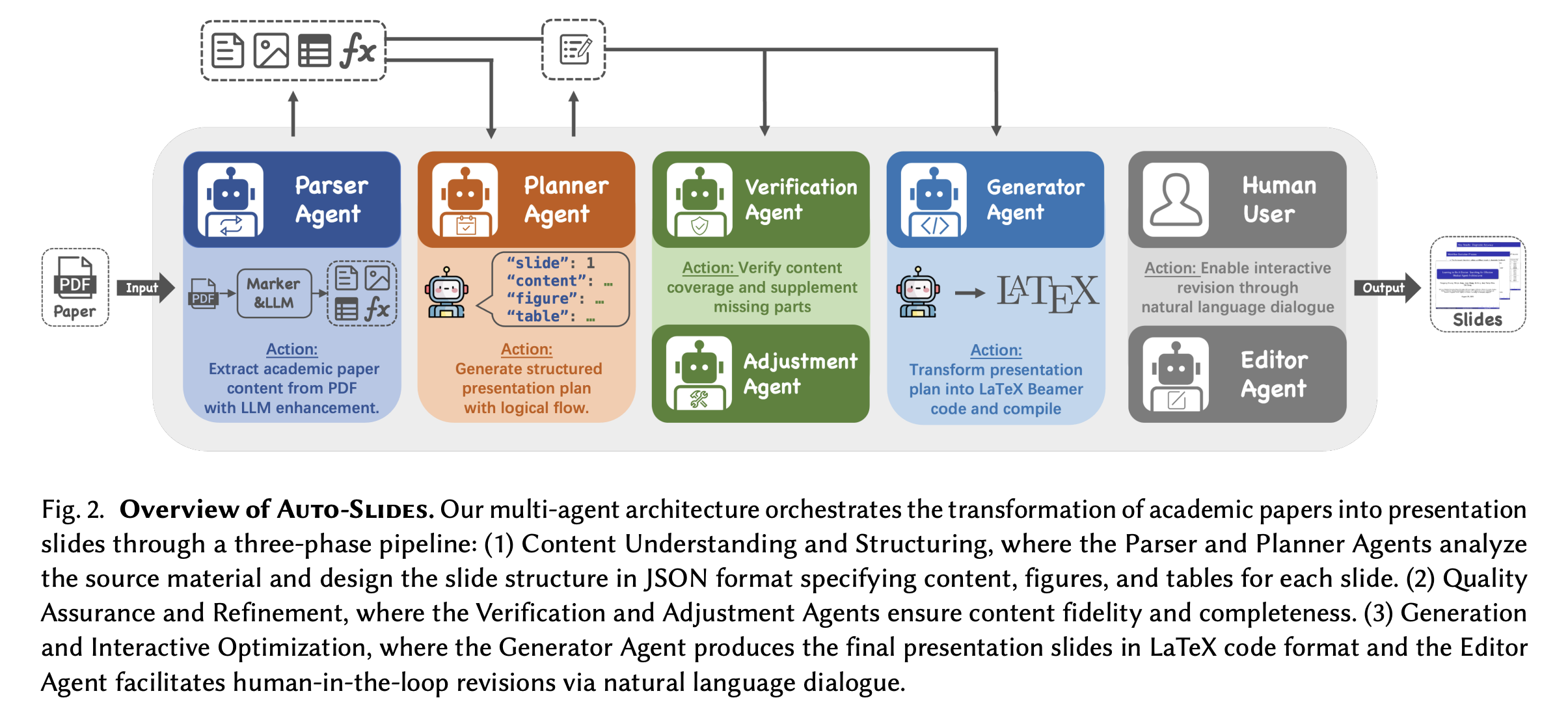
🏗️ System Architecture
🚀 Features
- Intelligent PDF Processing: Automatically extracts text, figures, tables, and structure from research papers using advanced OCR and layout analysis
- Multi-Agent Framework: Employs specialized agents for content extraction, presentation planning, verification, and repair
- Interactive Customization: Supports real-time refinement through natural language dialogue
- Pedagogical Optimization: Creates presentation-oriented narratives that enhance learning and comprehension
- Multimodal Output: Generates slides with proper figure placement, table formatting, and code syntax highlighting
- Multiple Themes: Supports various Beamer themes (Madrid, Berlin, Singapore, etc.)
- Bilingual Support: Works with both English and Chinese papers
- Speech Generation: Optional accompanying speech script generation
📋 Requirements
- Python 3.8+
- LaTeX environment (TeX Live or MiKTeX)
- OpenAI API key
- 8GB+ RAM (for marker-pdf model)
🛠️ Installation
1. Clone the Repository
git clone https://github.com/your-username/auto-slides.git
cd auto-slides
2. Create Virtual Environment (Recommended)
python -m venv venv
source venv/bin/activate  # Linux/Mac
# or
venv\Scripts\activate  # Windows
3. Install Dependencies
pip install -r requirements.txt
4. Download Required Models
Important: Download the marker-pdf model for PDF processing:
python down_model.py
This will download the marker-pdf model to the models/ directory (~2GB).
5. Configure API Keys
Option 1: Use the provided template (Recommended)
Rename the provided template file and add your API key:
# Rename the template file
mv ".env copy" .env

# Edit the .env file and add your OpenAI API key
nano .env  # or use your preferred editor
Option 2: Create from scratch
Create a .env file in the project root:
# OpenAI API Configuration (Required)
OPENAI_API_KEY=your_openai_api_key_here

# Optional: LangSmith for monitoring (uncomment if needed)
# LANGCHAIN_TRACING_V2="true"
# LANGCHAIN_ENDPOINT="https://api.smith.langchain.com"
# LANGCHAIN_API_KEY="your_langsmith_api_key_here"
# LANGCHAIN_PROJECT="auto-slides"
Note: The
.env copyfile contains a template with all available configuration options. Simply rename it to.envand update theOPENAI_API_KEYvalue with your actual API key.
🎯 Quick Start
Basic Usage
Convert a research paper to presentation slides:
python main.py path/to/your/paper.pdf
Advanced Options
python main.py path/to/your/paper.pdf \
    --language en \
    --model gpt-4o \
    --theme Madrid \
    --output-dir output \
    --verbose
Disable Interactive Revision
By default, Auto-Slides enables interactive revision after generating slides. To disable this feature:
python main.py path/to/your/paper.pdf --no-interactive-revise
Revision Mode
Modify existing presentations with feedback:
python main.py --revise \
    --original-plan=path/to/plan.json \
    --previous-tex=path/to/output.tex \
    --feedback="Please make the title more prominent"
📖 Command Line Options
Required Arguments
pdf_path: Path to the input PDF file
Optional Arguments
Basic Options
--output-dir, -o: Output directory (default:output)--language, -l: Output language (zhoren, default:en)--model, -m: Language model to use (default:gpt-4o)--theme: Beamer theme (default:Madrid)--verbose, -v: Show verbose logs
Processing Options
--disable-llm-enhancement: Use basic PDF parsing only--skip-compilation, -s: Generate TEX only, skip PDF compilation--max-retries, -r: Maximum retries for compilation (default: 5)
Interactive Features
--interactive, -i: Enable interactive mode for presentation plan optimization--no-interactive-revise: Disable interactive revision after slide generation (enabled by default)
Verification & Repair
--enable-verification: Enable content verification (default: enabled)--enable-auto-repair: Enable automatic content repair (default: enabled)--disable-verification: Disable verification and repair (fast mode)
Speech Generation
--enable-speech: Generate accompanying speech script--speech-duration: Target speech duration in minutes (default: 15)--speech-style: Speech style (academic_conference,classroom,industry_presentation,public_talk)
Revision Mode
--revise, -R: Enable revision mode--original-plan: Path to original presentation plan JSON--previous-tex: Path to previous TEX file--feedback: User feedback for modifications
📁 Output Structure
The system generates organized output in the specified directory:
output/
├── raw//          # Extracted PDF content
├── plan//         # Presentation plans (JSON)
├── tex//          # Generated LaTeX files and PDFs
├── images//       # Extracted figures and tables
├── verification// # Verification reports
├── repair//       # Auto-repair results
└── speech//       # Generated speech scripts
🔧 System Architecture
Auto-Slides employs a sophisticated multi-agent framework with the following components:
- PDF Parser: Extracts content using marker-pdf and OCR technologies
- Presentation Planner: Generates structured presentation plans based on cognitive science principles
- Verification Agent: Ensures content coverage and accuracy through automated validation
- Repair Agent: Automatically fixes identified issues and improves content completeness
- TEX Generator: Creates high-quality LaTeX Beamer code with proper formatting
- Interactive Editor: Enables real-time customization through natural language dialogue
The system processes research papers through multiple stages, from initial content extraction to final presentation generation, with built-in quality assurance and user interaction capabilities.
🎨 Supported Themes
- Madrid (default)
- Berlin
- Singapore
- Warsaw
- Copenhagen
- And more Beamer themes
🌍 Language Support
- English: Full support with optimized prompts
- Chinese: Full support with Chinese-specific processing
⚠️ Troubleshooting
Common Issues
Q: Images not extracted or missing?
- Ensure the marker-pdf model is downloaded:
python down_model.py - Check that images exist in
output/images//
Q: API key not working?
- Verify
OPENAI_API_KEYis set in your.envfile - Check your OpenAI account has sufficient credits
Q: LaTeX compilation fails?
- Ensure LaTeX is installed and
pdflatexis in your PATH - The system automatically uses
-shell-escapefor code highlighting
Q: Memory issues with large PDFs?
- The marker-pdf model requires ~8GB RAM
- Consider using
--disable-llm-enhancementfor basic processing
Performance Tips
- Use
--disable-verificationfor faster processing - Enable
--skip-compilationto generate TEX only - Use
--no-interactive-reviseto skip interactive features
📚 Citation
If you use Auto-Slides in your research, please cite our paper:
@article{yang2025autoslides,
  title={Auto-Slides: Automatic Academic Presentation Generation with Multi-Agent Collaboration},
  author={Yang, Yuheng and Jiang, Wenjia and Wang, Yang and Wang, Yiwei and Zhang, Chi},
  journal={arXiv preprint arXiv:2509.11062},
  year={2025},
  note={AGI Lab, Westlake University; University of California at Merced; Corresponding author: Chi Zhang},
  url={https://auto-slides.github.io/},
  eprint={2509.11062},
  archivePrefix={arXiv},
  primaryClass={cs.AI}
}
📄 License
This project is licensed under the MIT License - see the LICENSE file for details.
🤝 Contributing
Contributions are welcome! Please feel free to submit a Pull Request.
📞 Contact
- Project Page: auto-slides.github.io
- Paper: arXiv:2509.11062
- Issues: GitHub Issues
- Email: yangyuheng@westlake.edu.cn
🙏 Acknowledgments
- marker-pdf for PDF processing
- OpenAI for language models
- LangChain for LLM orchestration
- Beamer for presentation framework