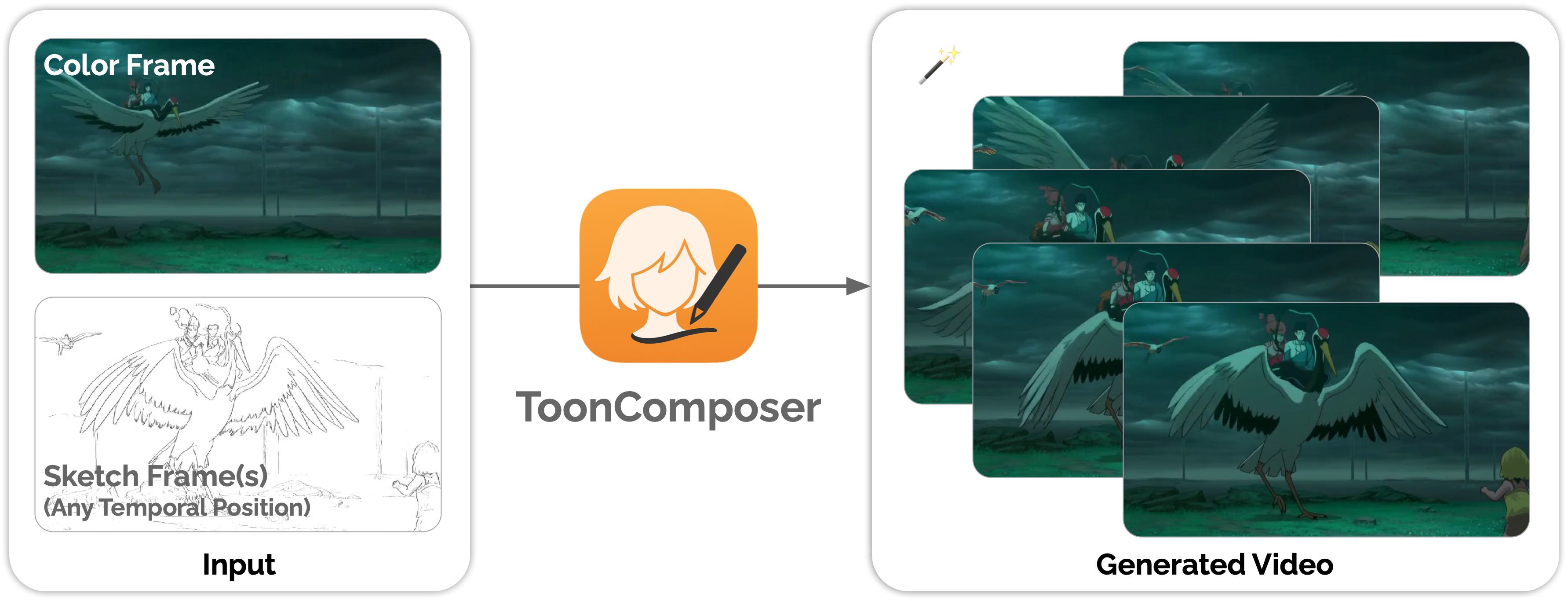
ToonComposer ToonComposer: Streamlining Cartoon Production with Generative Post-Keyframing Lingen Li, Guangzhi Wang, Zhaoyang Zhang, Yaowei Li, Xiaoyu Li, Qi Dou, Jinwei Gu, Tianfan Xue, Ying Shan 👀 TL;DR Traditional cartoon/anime production is time-consuming, requiring skilled artists for keyframing, inbetweening, and colorization. ToonComposer streamlines this with generative AI, turning hours of manual work of inbetweening and colorization into a single, seamless process. Visit our project page and read our paper for more details. ✏️ Updates [08/18/2025] Online
gradio demo is now available on Hugging Face Space. [08/15/2025] ToonComposer model weights are available here. ⚠️ Unauthorized Site Notice The website is NOT hosted, authorized, or endorsed by the ToonComposer team. This site has replicated content from our open-source project without our permission or notification, and we are unaware of the operators’ identity or intentions. ⚙️ Configuration 1) Clone the repository 2) Set up the Python environment Create a conda environment and install dependencies from requirements. **Note: ToonComposer
requires specific versions for gradio==5. ** For Linux users, we recommend installing . 3) Run the app The app will check your local cache and download required weights if missing (see Weights section below). By default, the Gradio interface launches on port 7860. If you run on a remote server, replace with your server IP or hostname. Generating a 480p video with 61 frames requires ~57GB of VRAM. If you don't have sufficient GPU resources, we recommend trying our 🤗 Hugging Face
Spaces demo instead. 💾 Weights and Checkpoints ToonComposer relies on two sets of weights: **Wan2. 1 I2V 14B 480P (foundation model)**: **ToonComposer weights**: The app resolves weights in this order: If you provide local directories via CLI flags or environment variables (see below), they are used first. Otherwise, it checks your local Hugging Face cache (no network). If still not found, it downloads from the Hugging Face Hub. 1 is very large, the app avoids re-downloading if it exists in
your cache. Provide local directories (optional) Environment variables: : path to local Wan2. 1 model directory : path to local ToonComposer directory that contains and/or subdirectories. : HF access token if required for gated downloads (optional) CLI flags (override env vars): Notes: The ToonComposer HF repo organizes weights by resolution: and . The app automatically loads the correct and from the selected resolution directory. The app checks the HF cache first ( ) and only downloads if missing. Set the text prompt, number of output
frames, and resolution. Provide at least one keyframe color image (usually placed at frame index 0). Add one or more keyframe sketches at selected frames. You can optionally draw black brush regions as motion masks to allow free motion in those areas. Adjust CFG scale and position-aware residual scale as needed. The bottom right panel shows status and the generated video. A set of sample inputs is also provided in the gallery. Limitations As a generative model, outputs may
vary. Try changing seed, steps, CFG scale, pos-aware residual scale, or sketch/mask inputs for different results. 📑 Citation If
Frequently asked questions
How many stars and forks are recorded?
TencentARC/ToonComposer has 591 stars and 63 forks.
What is the repository rank?
TencentARC/ToonComposer is ranked 16,434.
What language and category are recorded?
TencentARC/ToonComposer has 591 stars, uses Python and belongs to Models.
Which repository is closest in rank?
TencentARC/ToonComposer is compared with IDKiro/DehazeFormer, ranked 16,431 with 591 stars.
README
ToonComposer
ToonComposer: Streamlining Cartoon Production with Generative Post-Keyframing
Traditional cartoon/anime production is time-consuming, requiring skilled artists for keyframing, inbetweening, and colorization.
ToonComposer streamlines this with generative AI, turning hours of manual work of inbetweening and colorization into a single, seamless process. Visit our project page and read our paper for more details.
[08/15/2025] ToonComposer model weights are available here.
⚠️ Unauthorized Site Notice
The website https://tooncomposer.com is NOT hosted, authorized, or endorsed by the ToonComposer team. This site has replicated content from our open-source project without our permission or notification, and we are unaware of the operators’ identity or intentions.
⚙️ Configuration
1) Clone the repository
git clone https://github.com/TencentARC/ToonComposer
cd ToonComposer
2) Set up the Python environment
Create a conda environment and install dependencies from requirements.txt.
The app will check your local cache and download required weights if missing (see Weights section below). By default, the Gradio interface launches on port 7860.
python app.py
Open your browser at http://localhost:7860.
If you run on a remote server, replace localhost with your server IP or hostname.
Generating a 480p video with 61 frames requires ~57GB of VRAM. If you don't have sufficient GPU resources, we recommend trying our 🤗 Hugging Face Spaces demo instead.
If you provide local directories via CLI flags or environment variables (see below), they are used first.
Otherwise, it checks your local Hugging Face cache (no network).
If still not found, it downloads from the Hugging Face Hub.
Because Wan2.1 is very large, the app avoids re-downloading if it exists in your cache.
Provide local directories (optional)
Environment variables:
WAN21_I2V_DIR: path to local Wan2.1 model directory
TOONCOMPOSER_DIR: path to local ToonComposer directory that contains 480p/ and/or 608p/ subdirectories. Each subdir should include tooncomposer.ckpt and config.json.
HF_TOKEN: HF access token if required for gated downloads (optional)
The ToonComposer HF repo organizes weights by resolution: 480p/ and 608p/. The app automatically loads the correct config.json and tooncomposer.ckpt from the selected resolution directory.
The app checks the HF cache first (local_files_only=True) and only downloads if missing.
📖 Usage Guide
Launch options
python app.py --help
--resolution: 480p or 608p (default: 480p)
--device: e.g., cuda:0, cpu (default: cuda:0)
--wan_model_dir: local Wan2.1 directory (optional)
--tooncomposer_dir: local ToonComposer directory with 480p/608p (optional)
In Gradio UI
Set the text prompt, number of output frames, and resolution.
Provide at least one keyframe color image (usually placed at frame index 0).
Add one or more keyframe sketches at selected frames. You can optionally draw black brush regions as motion masks to allow free motion in those areas.
Adjust CFG scale and position-aware residual scale as needed.
Click Generate to create the video.
The bottom right panel shows status and the generated video. A set of sample inputs is also provided in the gallery.
Limitations
As a generative model, outputs may vary. Try changing seed, steps, CFG scale, pos-aware residual scale, or sketch/mask inputs for different results.
📑 Citation
If you find ToonComposer useful, please consider citing:
@article{li2025tooncomposer,
  title={ToonComposer: Streamlining Cartoon Production with Generative Post-Keyframing},
  author={Li, Lingen and Wang, Guangzhi and Zhang, Zhaoyang and Li, Yaowei and Li, Xiaoyu and Dou, Qi and Gu, Jinwei and Xue, Tianfan and Shan, Ying},
  journal={arXiv preprint arXiv:2508.10881},
  year={2025}
}