YOLOv7 Object Tracking 🚀


💥 Ultralytics YOLOv8 support added python detect.py --weights yolov8n.pt
🚀 YOLOv9, YOLOv10, YOLO11, YOLO12, YOLO13 support coming soon :)
How to Run the Code
-
Clone the repository:
git clone https://github.com/RizwanMunawar/yolov7-object-tracking.git -
Navigate to the cloned folder:
cd yolov7-object-tracking -
Create a virtual environment (Recommended to avoid conflicts):
For Anaconda:
conda create -n yolov7objtracking python=3.12
conda activate yolov7objtracking
For Linux:
python3 -m venv yolov7objtracking
source yolov7objtracking/bin/activate
For Windows:
python3 -m venv yolov7objtracking
cd yolov7objtracking/Scripts
activate
For MacOS:
python3 -m venv yolov7objtracking source yolov7objtracking/bin/activate -
Update pip and install dependencies:
pip install --upgrade pip pip install -r requirements.txt -
Run the script:
Select the appropriate command based on your requirements. Pretrained yolov7 weights will be downloaded automatically if needed.
-
Detection only:
python detect.py --weights yolov7.pt # If you want to use your own videos. python detect.py --weights yolov7.pt --source "your video.mp4" # For Inference with YOLOv8 python detect.py --weights yolov8n.pt -
Object tracking:
python detect_and_track.py --weights yolov7.pt # If you want to use your own videos. python detect_and_track.py --weights yolov7.pt --source "your video.mp4" -
Webcam:
python detect_and_track.py --weights yolov7.pt --source 0 -
External Camera:
python detect_and_track.py --weights yolov7.pt --source 1 -
IP Camera Stream:
python detect_and_track.py --source "your IP Camera Stream URL" --device 0 -
Specific class tracking (e.g., person):
python detect_and_track.py --weights yolov7.pt --source "your video.mp4" --classes 0 -
Colored tracks:
python detect_and_track.py --weights yolov7.pt --source "your video.mp4" --colored-trk -
Save track centroids, IDs, and bounding box coordinates:
python detect_and_track.py --weights yolov7.pt --source "your video.mp4" --save-txt --save-bbox-dim
-
-
Output files will be saved in
runs/detect/obj-trackingwith the original filename.
Arguments details 🚀
| Argument | Type | Default | Description |
|---|---|---|---|
--weights |
str |
yolov7.pt |
Path(s) to model weights (.pt file). |
--download |
flag |
False |
Download model weights automatically. |
--source |
str |
None |
Source for inference (file, folder, or 0 for webcam). |
--img-size |
int |
640 |
Inference image size in pixels. |
--conf-thres |
float |
0.25 |
Object confidence threshold. |
--iou-thres |
float |
0.45 |
Intersection over Union (IoU) threshold for NMS. |
--device |
str |
'' |
CUDA device (e.g., 0 or 0,1,2,3) or cpu. |
--view-img |
flag |
False |
Display results during inference. |
--save-txt |
flag |
False |
Save results to .txt files. |
--save-conf |
flag |
False |
Save confidence scores in .txt labels. |
--nosave |
flag |
False |
Do not save images or videos. |
--classes |
list[int] |
None |
Filter results by class (e.g., --classes 0 or --classes 0 2 3). |
--agnostic-nms |
flag |
False |
Use class-agnostic Non-Maximum Suppression (NMS). |
--augment |
flag |
False |
Enable augmented inference. |
--update |
flag |
False |
Update all models. |
--project |
str |
runs/detect |
Directory to save results (project/name). |
--name |
str |
runs/detect/object_tracking |
Name of the results folder inside the project directory. |
--exist-ok |
flag |
False |
Allow existing project/name without incrementing. |
--no-trace |
flag |
False |
Do not trace the model during export. |
--colored-trk |
flag |
False |
Assign a unique color to each track for visualization. |
--save-bbox-dim |
flag |
False |
Save bounding box dimensions in .txt tracks. |
--save-with-object-id |
flag |
False |
Save results with object ID in .txt files. |
Results 📊
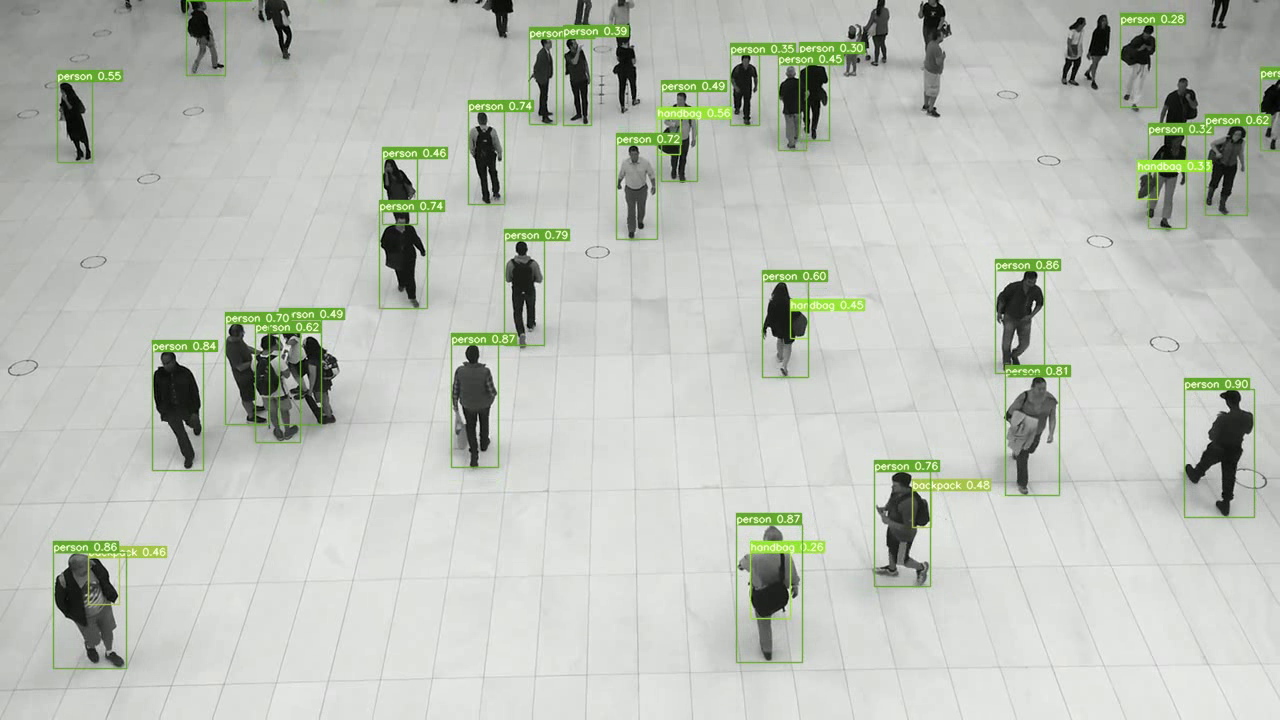
YOLOv7 Detection Only
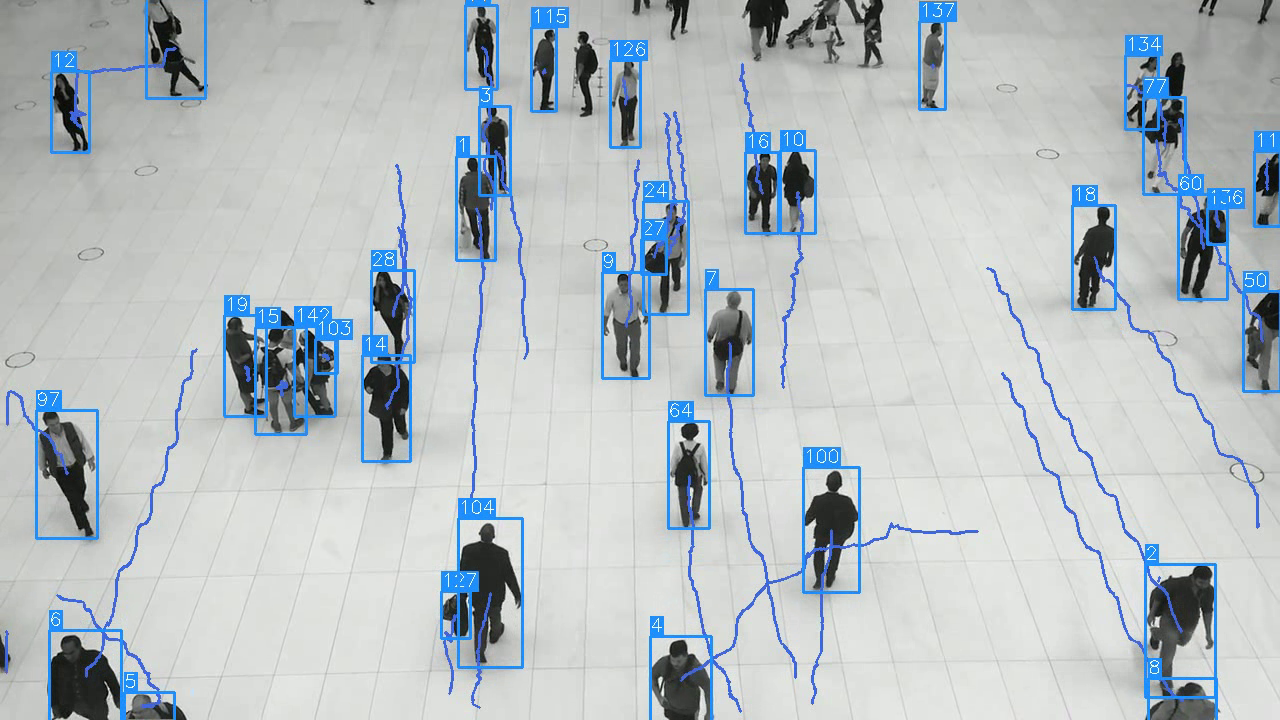
YOLOv7 Object Tracking with ID
YOLOv7 Object Tracking with ID and Label

Star History
References
Some of my articles/research papers | computer vision awesome resources for learning | How do I appear to the world? 🚀
Ultralytics YOLO11: Object Detection and Instance Segmentation🤯
Parking Management using Ultralytics YOLO11
My 🖐️Computer Vision Hobby Projects that Yielded Earnings
Best Resources to Learn Computer Vision
Roadmap for Computer Vision Engineer
How did I spend 2022 in the Computer Vision Field
Domain Feature Mapping with YOLOv7 for Automated Edge-Based Pallet Racking Inspections
Exudate Regeneration for Automated Exudate Detection in Retinal Fundus Images
Feature Mapping for Rice Leaf Defect Detection Based on a Custom Convolutional Architecture
Yolov5, Yolo-x, Yolo-r, Yolov7 Performance Comparison: A Survey
Explainable AI in Drug Sensitivity Prediction on Cancer Cell Lines
Session with Ultralytics Team about Computer Vision Journey