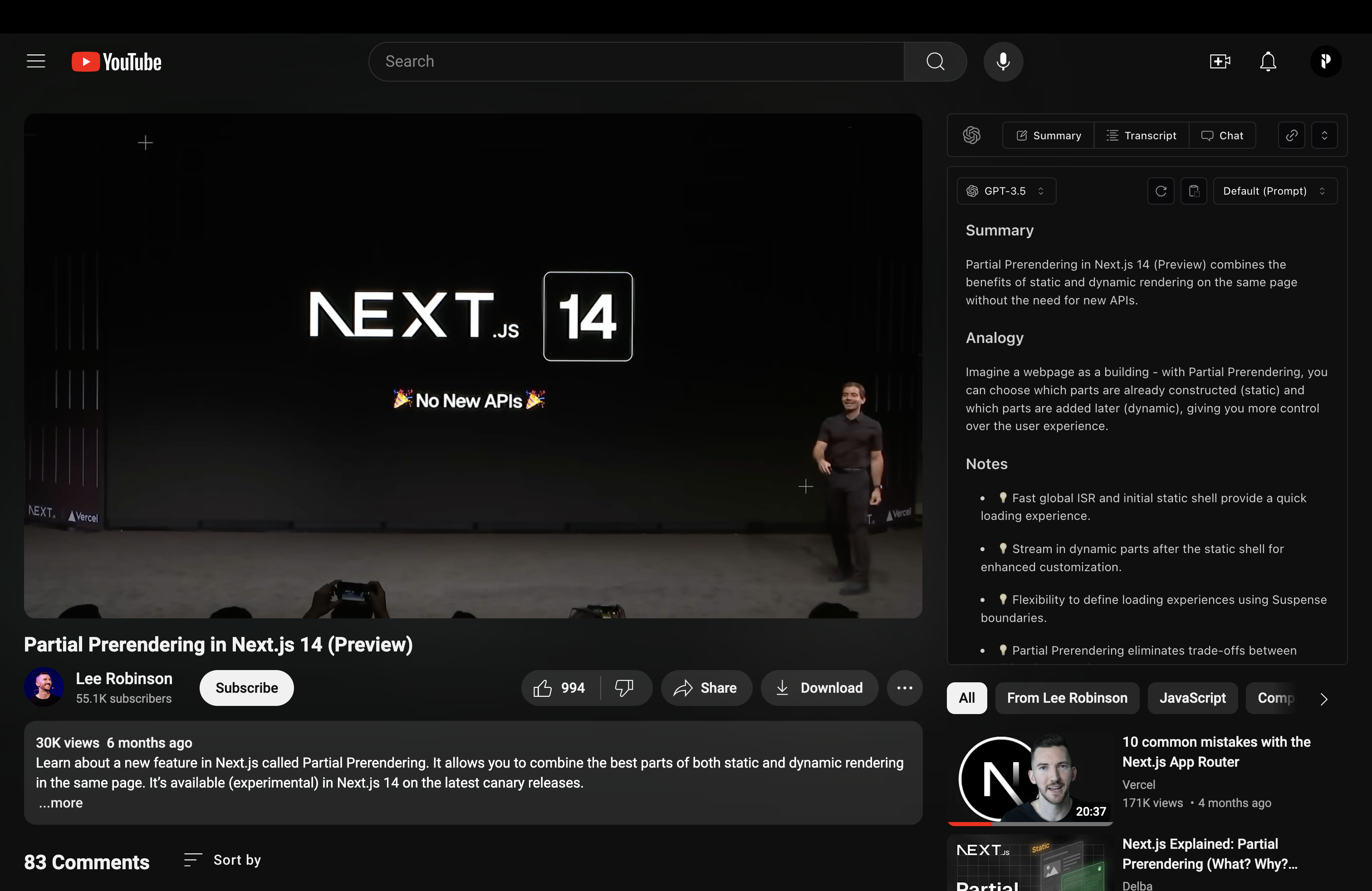
Interactive YouTube extension built with React, Tailwind CSS, and Plasmo. It integrates with the OpenAI API to enable real-time video chat, providing summaries, Q&A, and context-aware responses directly on YouTube.
ScienceClaw is a personal research assistant built with LangChain DeepAgents and AIO Sandbox infrastructure, adopting a completely new architecture beyond OpenClaw. It offers stronger security, better transparency, and a more user-friendly experience.
OpenChatBI is an intelligent chat-based BI tool powered by large language models, designed to help users query, analyze, and visualize data through natural language conversations. It uses LangGraph and LangChain to build chat agent and workflows that support natural language to SQL conversion and data analysis.
D1 Manager is a web UI and API for Cloudflare D1, a serverless SQL database. It provides a web interface for managing databases, tables, and records, as well as an AI assistant to help you write query in natural language.
Transform your Claude Code experience with a beautiful, informative statusline.
Key parameters and specifications
Key parameters and specifications
Parameter
Value
Language
TypeScript
Category
Applications
Subcategory
Research & knowledge
Keywords
Summarization, Video production
Stars
665
Forks
71
Contributors
2
Created date
2024-06-02
Updated date
2026-10-15
Stars in 1 day
1
Stars in 7 days
0
Rank
6,492
Previous rank
15,116
Rank change
8,624
7-day stars rank
14,909
Previous 7-day stars rank
17,711
7-day stars rank change
2,802
Total stars rank
15,466
Previous total stars rank
15,465
Total stars rank change
-1
Country
USA
README summary
YouTube AI Extension 🚀 Big update coming June 10, 2025! 🚀 A new version is on the way with powerful new features, a streamlined install process, and an official release on the Chrome Web Store. YouTube Chat Extension allows you to chat directly with YouTube videos, providing a unique interactive experience. Demo Video · Features · Roadmap · Installation · Acknowledgments Features Seamlessly chat with YouTube videos in real-time. Get video summaries, ask questions, and receive detailed explanations. User-friendly interface integrated directly into YouTube
. Support for multiple languages and context-aware responses. Roadmap **June 10, 2025**: Major update with new features and official Chrome Web Store release. Installation To install and run the YouTube Chat Extension locally, follow these steps: 1. Replace with your actual key in the files and 3. Install the dependencies and build the project: 4. Enable "Developer mode" by toggling the switch in the top right corner. Click "Load unpacked" and select the directory from the project you just built
. Open YouTube and start chatting with videos! :) The extension does not support the new YouTube layout. To revert to the old layout, use the uBlock Origin extension. The extension should then work correctly. License This project is licensed under the **AGPL-3. Commercial Use For commercial use or deployments requiring a setup fee, please contact us for a commercial license at paolo. By using this software, you agree to the terms of the license. Acknowledgments This project wouldn't be possible
without the following resources: OpenAI API React Tailwind CSS Plasmo Extension Chrome Extension Documentation
Frequently asked questions
How many stars and forks are recorded?
PaoloJN/youtube-ai-extension has 665 stars and 71 forks.
What is the repository rank?
PaoloJN/youtube-ai-extension is ranked 6,492.
What language and category are recorded?
PaoloJN/youtube-ai-extension has 665 stars, uses TypeScript and belongs to Applications.
Which repository is closest in rank?
PaoloJN/youtube-ai-extension is compared with zhongyu09/openchatbi, ranked 6,491 with 666 stars.
README
YouTube AI Extension
🚀 Big update coming June 10, 2025! 🚀
A new version is on the way with powerful new features, a streamlined install process, and an official release on the Chrome Web Store.
YouTube Chat Extension allows you to chat directly with YouTube videos, providing a unique interactive experience.
Get video summaries, ask questions, and receive detailed explanations.
User-friendly interface integrated directly into YouTube.
Support for multiple languages and context-aware responses.
Roadmap
June 10, 2025: Major update with new features and official Chrome Web Store release.
Installation
To install and run the YouTube Chat Extension locally, follow these steps:
Clone the repository:
git clone https://github.com/PaoloJN/youtube-ai-extension.git

cd youtube-chat-extension
Add your OpenAI API key. Replace YOUR_API_KEY with your actual key in the files chat.ts and completion.ts
const openai = new OpenAI({
  apiKey: "YOUR_API_KEY"
})
Install the dependencies and build the project:
pnpm install
pnpm run build
Load the extension into Chrome:
Open Chrome and navigate to chrome://extensions/.
Enable "Developer mode" by toggling the switch in the top right corner.
Click "Load unpacked" and select the build/chrome-mv3-dev directory from the project you just built.
Open YouTube and start chatting with videos! :)
The extension does not support the new YouTube layout. To revert to the old layout, use the uBlock Origin extension. The extension should then work correctly.
License
This project is licensed under the AGPL-3.0 for non-commercial use.
Commercial Use
For commercial use or deployments requiring a setup fee, please contact us
for a commercial license at paolo.j.nessim@gmail.com.
By using this software, you agree to the terms of the license.
Acknowledgments
This project wouldn't be possible without the following resources: