Technical Paper | Documentation | X
OpenMind's OM1 is a modular AI runtime that empowers developers to create and deploy multimodal AI agents across digital environments and physical robots, including Humanoids, Phone Apps, Quadrupeds, educational robots such as TurtleBot 4, and simulators like Gazebo and Isaac Sim. OM1 agents can process diverse inputs like web data, social media, camera feeds, and LIDAR, while enabling physical actions including motion, autonomous navigation, and natural conversations. The goal of OM1 is to make it easy to create highly capable human-focused robots, that are easy to upgrade and (re)configure to accommodate different physical form factors.
Pick Your Runtime
OM1 was originally built in Python, and the Go runtime is a newer, performance-focused implementation. We migrated to Go for lower latency, better performance, efficient concurrency, a smaller memory footprint for edge devices, and simpler deployment as a single Go binary (with the Zenoh C library bundled alongside it).
The Go runtime covers the core agent pipeline, but several capabilities available in the Python runtime are still under active development. For most new development we recommend the Go runtime.
[!NOTE] However, Python version is available at
pythonfor use, if preferred. It is now deprecated and will not be maintained.
Capabilities of OM1
- Modular Architecture: Written in Go for performance and seamless integration.
- Data Input: Easily handles new data and sensors.
- Hardware Support via Plugins: Supports new hardware through plugins for API endpoints and specific robot hardware connections to
ROS2,Zenoh, andCycloneDDS. (We recommendZenohfor all new development). - Pre-configured Endpoints: Supports Text-to-Speech, multiple LLMs from OpenAI, xAI, DeepSeek, Anthropic, Meta, Gemini, NearAI, Ollama (local), and multiple Visual Language Models (VLMs) with pre-configured endpoints for each service.
- Metrics & Observability: Includes a pre-configured Prometheus and Grafana stack to monitor real-time AI pipeline metrics like LLM and ASR latencies.
Architecture Overview
Getting Started
If you are new to OM1, this is the fastest path to a successful first run using the conversation agent.
The conversation agent uses your webcam and microphone to enable natural voice interactions with an AI. The model processes visual and audio inputs and responds through speech.
This quick start uses the default starter configuration to help you understand the OM1 pipeline. It visualizes state updates in the terminal and demonstrates the input-LLM-action flow.
Quick Start (5 Minutes)
- Install system dependencies.
- Download the binary or clone the repository.
- Add your OpenMind API key.
- Launch OM1 and verify it is running.
1. Install System Dependencies
For macOS:
brew install portaudio ffmpeg
For Linux:
sudo apt-get update
sudo apt-get install -y portaudio19-dev ffmpeg pkg-config
[!TIP] Webcam access is recommended if configuring VLM.
2. Download or Build
Option A: Download Pre-built Binary (Recommended)
No Go installation required. Download the latest release for your platform from the Releases page.
Current pre-built binaries are available for:
linux-amd64linux-arm64darwin-arm64darwin-amd64
After downloading and extracting the archive, open a terminal in the extracted folder and run:
chmod +x om1
./om1 -config
On macOS, if the binary is blocked by Gatekeeper, run:
xattr -d com.apple.quarantine om1 2>/dev/null || true
[!NOTE] The release archive already includes
config/,knowledge_base/, andlibzenohcfiles, so you do not need to clone the repository for runtime assets.
Option B: Build from Source
Requires Go 1.25.0+ (installation guide) and make.
git clone https://github.com/OpenMind/OM1.git
cd OM1
make deps
make build
3. Configure API Key
Get your API key from OpenMind Portal.
Set via shell profile (recommended):
export OM_API_KEY=""
If you built from source from this repository, you can also use a project-local .env file:
cp .env.example .env
# Then set OM_API_KEY= in .env
4. Launch the Agent
If using pre-built binary:
On macOS:
export DYLD_LIBRARY_PATH="$PWD:$DYLD_LIBRARY_PATH"
./om1 -config ./config/conversation.json5
On Linux:
export LD_LIBRARY_PATH="$PWD:$LD_LIBRARY_PATH"
./om1 -config ./config/conversation.json5
If you run into permission issues on macOS, go to System Settings -> Privacy & Security and allow om1 (and libzenohc.dylib if prompted).
If built from source:
CONFIG=conversation make run
Or for development with debug logging:
CONFIG=conversation make dev
Verify It Is Working
Your setup is successful if:
- The terminal shows the agent has started successfully.
- You see input processing and LLM responses logged in the terminal.
- The agent responds to voice and camera input with speech output.
5. Monitor with Grafana (Optional)
If you have Docker installed, you can launch the included Prometheus and Grafana stack to monitor real-time AI pipeline metrics such as LLM and ASR latencies:
docker-compose up -d grafana prometheus
Navigate to in your browser (default login: admin/admin). The OM1 Latency Monitoring dashboard is automatically provisioned and ready to use.
Troubleshooting
Authenticationerrors: confirmOM_API_KEYis set and not expired.Builderrors: ensure Go 1.25.0+ is installed and runmake depsfirst.Cameraaccess issues: grant terminal/IDE camera permissions in OS settings.Address already in useon the metrics port9090: stop the conflicting process (e.g. another Prometheus) or free the port.
OMCU
OMCU is the computational unit for billing on OpenMind's platform. The free plan provides 50 OMCU renewed monthly.
Upgrade your plan here for additional credits.
For more help connecting OM1 to your robot hardware, see getting started.
[!NOTE] For voice interactions, ensure ASR and TTS are configured in
config/conversation.json5.
What's Next?
- Try out some examples
- Add new
inputsandactions. - Design custom agents and robots by creating your own
json5config files with custom combinations of inputs and actions. - Change the system prompts in the configuration files (located in
/config/) to create new behaviors.
Interfacing with New Robot Hardware
OM1 assumes that robot hardware provides a high-level SDK that accepts elemental movement and action commands such as backflip, run, gently pick up the red apple, move(0.37, 0, 0), and smile. Action connectors live under plugins/actions/. For example, the Unitree Go2 movement connector plugins/actions/unitree/go2/autonomy/move.go (registered as unitree_go2_autonomy/move) translates high-level goals into cmd_vel velocity commands published over Zenoh. See the Actions guide for how connectors are registered and resolved.
If your robot hardware does not yet provide a suitable HAL (hardware abstraction layer), traditional robotics approaches such as RL (reinforcement learning) in concert with suitable simulation environments (Unity, Gazebo), sensors (such as hand mounted ZED depth cameras), and custom VLAs will be needed for you to create one. It is further assumed that your HAL accepts motion trajectories, provides battery and thermal management/monitoring, and calibrates and tunes sensors such as IMUs, LIDARs, and magnetometers.
OM1 can interface with your HAL via USB, serial, ROS2, CycloneDDS, Zenoh, or websockets. For an example of an advanced humanoid HAL, see Unitree's C++ SDK. Frequently, a HAL, especially ROS2 code, is dockerized and interfaces with OM1 through DDS middleware or websockets.
Recommended Development Platforms
OM1 is developed on:
- Nvidia Thor (running JetPack 7.0) - full support
- Jetson AGX Orin 64GB (running Ubuntu 22.04 and JetPack 6.1) - limited support
- Mac Studio with Apple M2 Ultra with 48 GB unified memory (running MacOS Sequoia)
- Mac Mini with Apple M4 Pro with 48 GB unified memory (running MacOS Sequoia)
- Generic Linux machines (running Ubuntu 22.04)
OM1 should run on other platforms (such as Windows) and microcontrollers such as the Raspberry Pi 5 16GB.
Introduction to BrainPack
From research to real-world autonomy, a platform that learns, moves, and builds with you.
The BrainPack is designed to be mounted directly onto a robot to bring together mapping, object recognition, remote control, and self charging, giving humanoids and quadrupeds what they need to navigate, remember, and act with purpose.
Full Autonomy Guidance
OM1 supports full autonomy for the Unitree Go2, Deep Robotics M20 Pro, Unitree G1, and LimX Tron with BrainPack. The following features are supported with BrainPack:
- Navigation - Autonomous path planning and movement.
- SLAM - Simultaneous Localization and Mapping for persistent map-based operation.
- Auto Charging - Automated docking and battery charging workflows.
- Face Detection and Anonymization - Real-time perception and privacy-aware processing.
See it in action
Full autonomy running in the Cloud Simulator — 3D mapping and autonomous patrol, no hardware required:
| 3D Color Mapping | 3D Full Mapping | Autonomous Patrol |
|---|---|---|
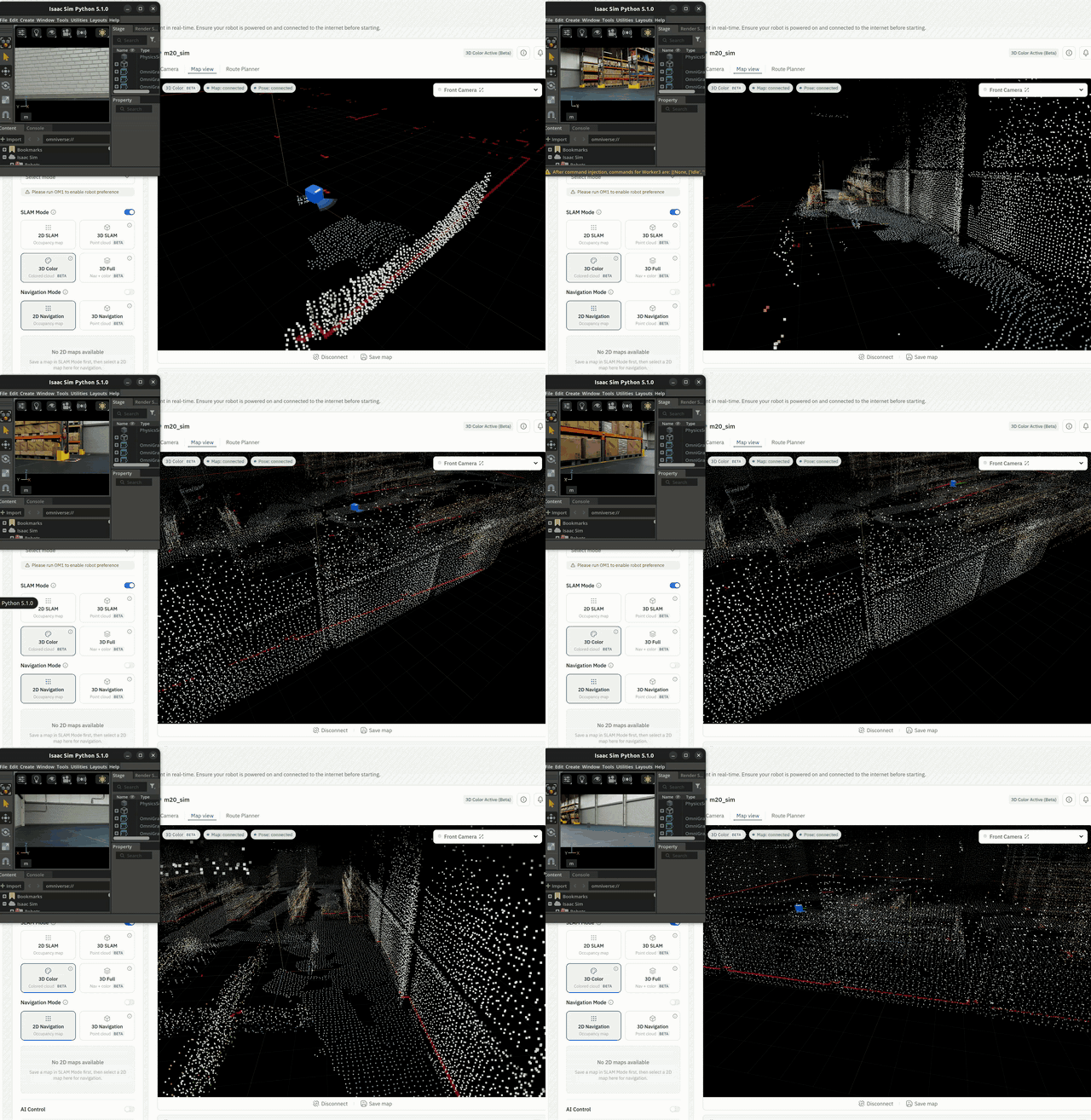 |
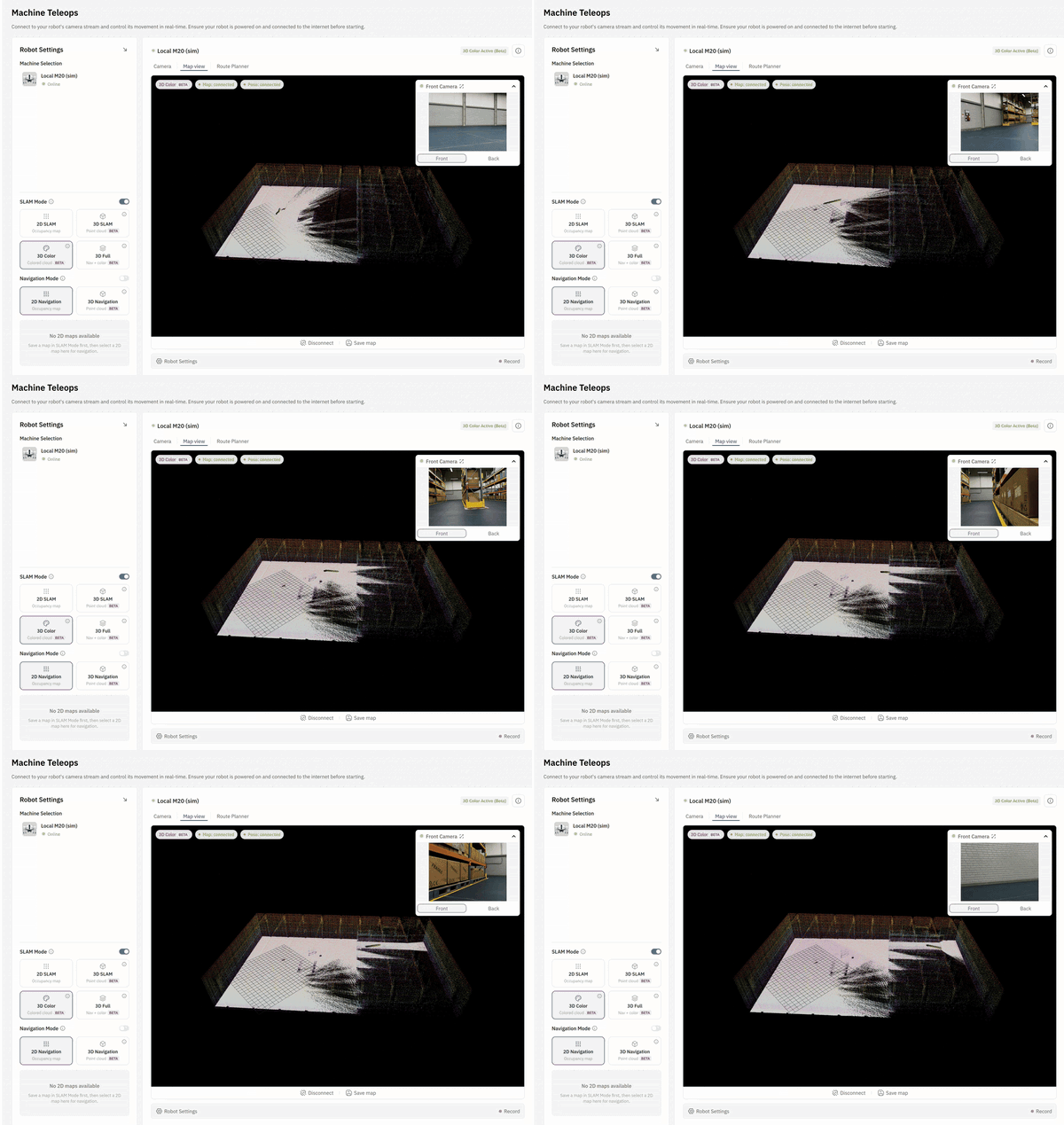 |
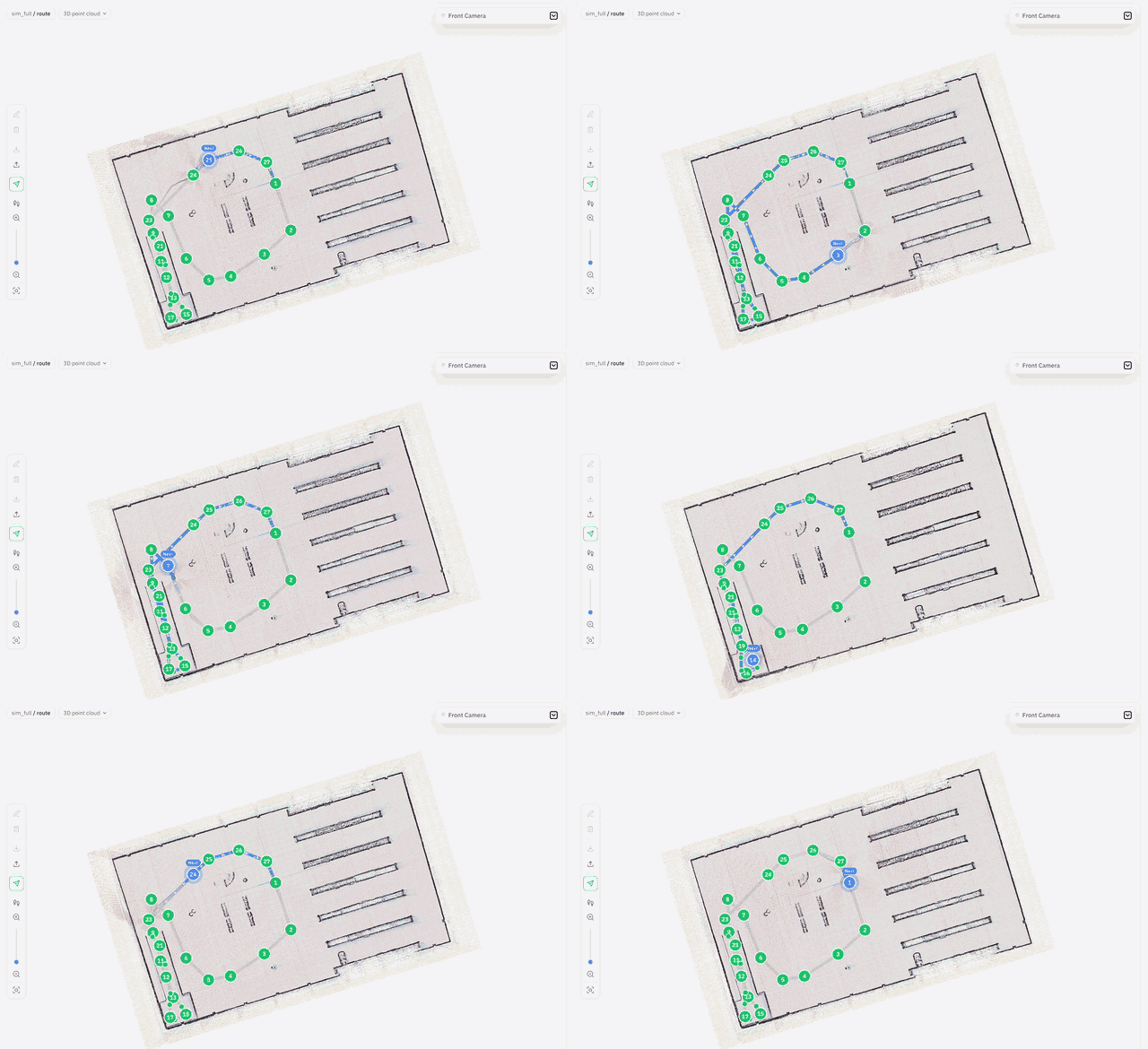 |
For more details, see Full Autonomy.
The BrainPack is open-source and you can refer to the guidelines to build your own here.
Simulator Support
OM1 integrates with popular robotics simulators to enable rapid prototyping and testing without physical hardware.
Gazebo
Open source Gazebo support is designed for rapid prototyping, conversational interaction, and behavior testing. Gazebo integration with OM1 is supported for Unitree Go2.
See Gazebo to get started.
Isaac Sim
NVIDIA Isaac Sim support enables physics-accurate simulation with GPU acceleration. Isaac Sim integration with OM1 is supported for Unitree Go2 and G1.
Requires NVIDIA GPU and CUDA support. See Isaac Sim Setup to get started.
Detailed Documentation
More detailed documentation can be accessed at docs.openmind.com.
Contributing
Please make sure to read the Contributing Guide before making a pull request.
License
This project is licensed under the terms of the MIT License.