Text Generator is a versatile plugin for Obsidian that allows you to generate text content using various AI providers, including OpenAI, Anthropic, Google and local models.
Key parameters and specifications
Key parameters and specifications
Parameter
Value
Language
Svelte
Category
Applications
Subcategory
Wrappers
Stars
2,003
Forks
460
Contributors
23
Created date
2023-03-02
Updated date
2026-10-09
Stars in 1 day
0
Stars in 7 days
0
Rank
9,113
Previous rank
9,156
Rank change
43
7-day stars rank
12,181
Previous 7-day stars rank
9,567
7-day stars rank change
-2,614
Total stars rank
6,337
Previous total stars rank
6,331
Total stars rank change
-6
Country
Netherlands
README summary
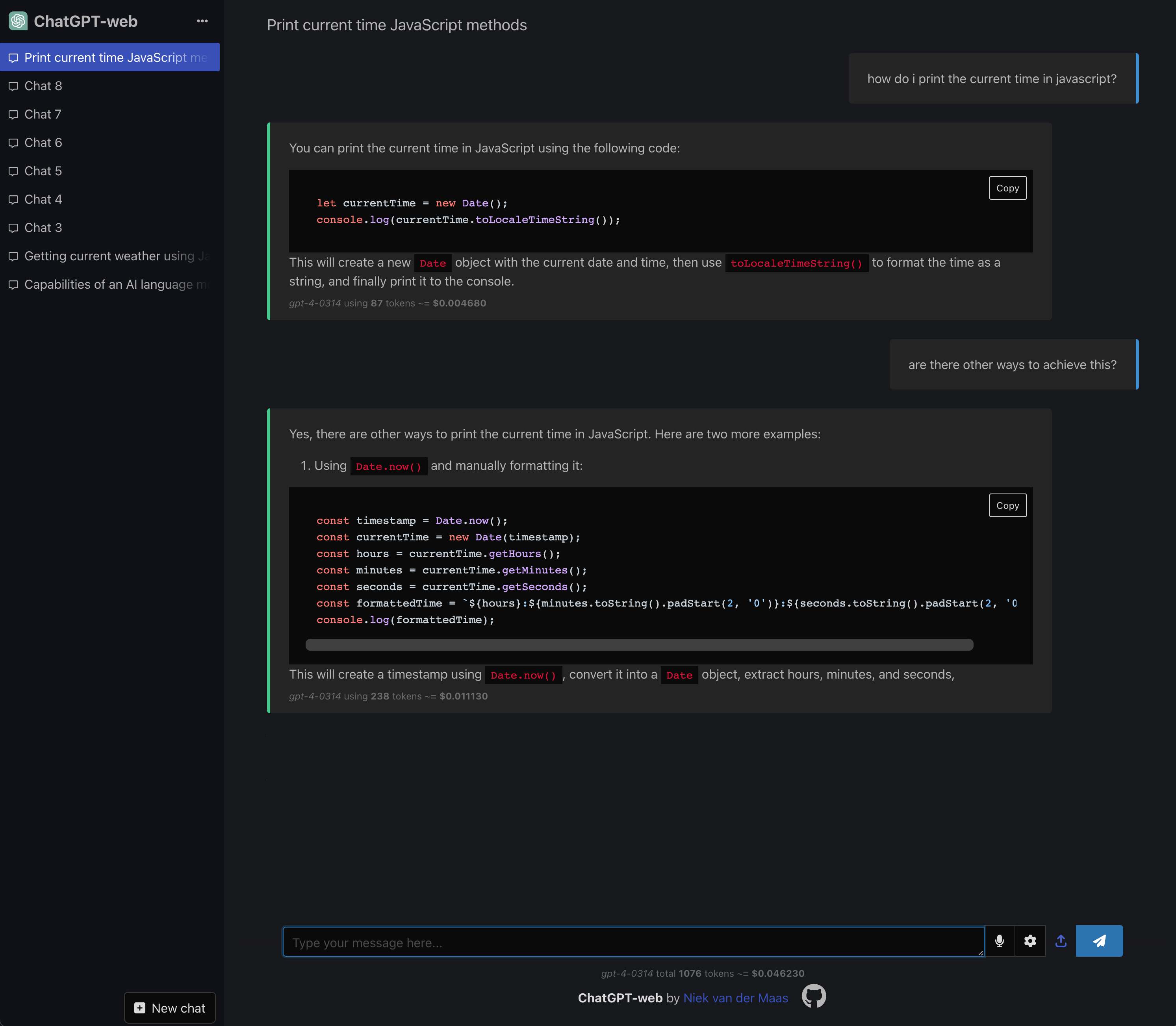
ChatGPT-web **URL**: ChatGPT-web is a simple one-page web interface for OpenAI-compatible chat APIs. Select a provider, enter its API key, and the app discovers its available models. Chats are stored in your browser's local storage; prompts are sent directly to the selected provider. Features **Open source**: ChatGPT-web is open source (GPL-3. 0), so you can host it yourself and make changes as you want. **Private**: All chats and messages are stored in your browser's
local storage, so everything is private. **Customizable**: You can customize the prompt, the temperature, and other model settings. Multiple models (including GPT-4) are supported. **Bring your own provider**: Use a supported API directly and pay only for that provider's usage. **Fast**: ChatGPT-web is a single-page web app, so it's fast and responsive. **Mobile-friendly**: ChatGPT-web is mobile-friendly, so you can use it on your phone. **Voice input**: ChatGPT-web supports voice input, so you can
talk to ChatGPT. **Pre-selected prompts**: ChatGPT-web comes with a list of pre-selected prompts, so you can get started quickly. **Export**: ChatGPT-web can export chats as a Markdown file, so you can share them with others. **Code**: ChatGPT-web recognizes and highlights code blocks and allows you to copy them with one click. **Desktop app**: ChatGPT-web can be bundled as a desktop app, so you can use it outside of the browser. **Image generation**: Generate images
through OpenAI, xAI, Google Gemini, OpenRouter, or a compatible custom endpoint by prompting "show me an image of . **Streaming**: ChatGPT-web can stream the response from the API, so you can see the response as it's being generated. Supported providers The setup screen has presets for: OpenAI Anthropic xAI Google Gemini Mistral AI APIpie OpenRouter OrcaRouter Any custom OpenAI-compatible API Anthropic's compatibility layer is intended primarily for testing and comparison. Some OpenAI request fields are ignored or translated; see
Anthropic's compatibility documentation for the current limitations. Image generation is available for providers with a compatible image endpoint. ChatGPT-web automatically uses the provider default, such as for OpenAI, for xAI, or for Google Gemini. The chat setting can override that default; providers without a known default require an explicit model ID. Development and Building Here’s how to participate in development and prepare your build for production: Setting Up and Running the Development Server To install dependencies and start
the development server: Preparing the Production Build To compile the project for production, ensuring optimal performance: This command generates a folder containing the production build of your project, ready for deployment. Updating pre-selected prompts The *prompts. chat* data provides the pre-selected prompts shown in the chat interface. The bundled list contains the 100 most-upvoted text prompts from the public prompts. To refresh the bundled snapshot, run: The updater validates the response before atomically replacing , so an API
or network failure leaves the existing snapshot intact. Using Docker Compose for Local Deployment Deploying the application and its mocked
Frequently asked questions
How many stars and forks are recorded?
Niek/chatgpt-web has 2,003 stars and 460 forks.
What is the repository rank?
Niek/chatgpt-web is ranked 9,113.
What language and category are recorded?
Niek/chatgpt-web has 2,003 stars, uses Svelte and belongs to Applications.
Which repository is closest in rank?
Niek/chatgpt-web is compared with bigemon/ChatGPT-ToolBox, ranked 9,118 with 2,000 stars.
README
ChatGPT-web
URL:
ChatGPT-web is a simple one-page web interface for OpenAI-compatible chat APIs. Select a provider, enter its API key, and the app discovers its available models. Chats are stored in your browser's local storage; prompts are sent directly to the selected provider.
Features
Open source: ChatGPT-web is open source (GPL-3.0), so you can host it yourself and make changes as you want.
Private: All chats and messages are stored in your browser's local storage, so everything is private.
Customizable: You can customize the prompt, the temperature, and other model settings. Multiple models (including GPT-4) are supported.
Bring your own provider: Use a supported API directly and pay only for that provider's usage.
Mobile-friendly: ChatGPT-web is mobile-friendly, so you can use it on your phone.
Voice input: ChatGPT-web supports voice input, so you can talk to ChatGPT. It will also talk back to you.
Pre-selected prompts: ChatGPT-web comes with a list of pre-selected prompts, so you can get started quickly.
Export: ChatGPT-web can export chats as a Markdown file, so you can share them with others.
Code: ChatGPT-web recognizes and highlights code blocks and allows you to copy them with one click.
Desktop app: ChatGPT-web can be bundled as a desktop app, so you can use it outside of the browser.
Image generation: Generate images through OpenAI, xAI, Google Gemini, OpenRouter, or a compatible custom endpoint by prompting "show me an image of ...".
Streaming: ChatGPT-web can stream the response from the API, so you can see the response as it's being generated.
Anthropic's compatibility layer is intended primarily for testing and comparison. Some OpenAI request fields are ignored or translated; see Anthropic's compatibility documentation for the current limitations.
Image generation is available for providers with a compatible image endpoint. ChatGPT-web automatically uses the provider default, such as gpt-image-2 for OpenAI, grok-imagine-image-quality for xAI, or gemini-2.5-flash-image for Google Gemini. The chat setting can override that default; providers without a known default require an explicit model ID.
Development and Building
Here’s how to participate in development and prepare your build for production:
Setting Up and Running the Development Server
To install dependencies and start the development server:
npm ci
npm run dev
Preparing the Production Build
To compile the project for production, ensuring optimal performance:
npm run build
This command generates a dist folder containing the production build of your project, ready for deployment.
Updating pre-selected prompts
The prompts.chat data provides the pre-selected prompts shown in the chat interface. The bundled list contains the 100 most-upvoted text prompts from the public prompts.chat API.
To refresh the bundled snapshot, run:
npm run update-prompts
The updater validates the response before atomically replacing src/awesome-chatgpt-prompts/prompts.csv, so an API or network failure leaves the existing snapshot intact.
Using Docker Compose for Local Deployment
Deploying the application and its mocked API locally is streamlined using Docker Compose. By executing the following command, you initialize both services effortlessly:
docker compose up -d
Accessing the Local Web Service
Upon successfully running the Docker Compose command, the local version of the web service becomes accessible. You can interact with it by visiting:
Mocked API Usage
For instances where immediate API responses are preferred, consider utilizing the mocked API. Follow the steps below to configure and customize your mocked API responses:
Configuration:
Open the .env file located at the project's root.
Assign the key VITE_PROVIDER=custom.
Assign the key VITE_API_BASE=http://localhost:5174 to redirect requests to the mocked API.
Assign any non-empty value to VITE_API_KEY.
Execute docker compose up -d mocked_api to start the mocked API service.
To test image generation, set the chat's Image Generation Model to mock-image and prompt "show me an image of ...".
To test safe inline SVG rendering, prompt mock svg without enabling image generation.
Customizing Responses:
To introduce a delay in the API response, use d followed by the desired number of seconds (e.g., d2 for a 2-second delay).
To specify the length of the response, use l followed by the desired number of sentences (e.g., l10 for a response of 10 sentences).
For instance, sending d2 l10 configures the mocked API to delay the response by 2 seconds and to include 10 sentences.