⚠️ Alternate System Prompt Format for Roo Code ⚠️
RooFlow provides an experimental set of modes and system prompts designed as an alternative way to interact with the Roo Code VS Code extension. It uses YAML-based system prompts aiming for improved efficiency and token usage compared to the standard Markdown prompts. RooFlow is NOT officially endorsed or supported by the Roo Code project. Use with caution.
✨Now with optional installation for use with the new Context Portal MCP!!✨
RooFlow

Persistent Project Context and Streamlined AI-Assisted Development


🎯 Overview
RooFlow offers an experimental alternative approach to AI-assisted development within the Roo Code VS Code extension. It utilizes YAML-based system prompts for its specialized "Flow" modes, potentially offering improved efficiency and reduced token consumption compared to standard modes. RooFlow provides persistent project context through its Memory Bank system (adapted from the concepts in roo-code-memory-bank), ensuring the AI assistant maintains project understanding across sessions.
Key Improvements over Roo Code Memory Bank:
- Reduced Token Consumption: Optimized prompts and instructions minimize token usage.
- Five Integrated Modes: Flow-Architect, Flow-Code, Flow-Debug, Flow-Ask, and Flow-Orchestrator modes work together seamlessly.
- Simplified Setup: Easier installation and configuration.
- Streamlined Real-time Updates: More efficient and targeted Memory Bank updates.
- Clearer Instructions: Improved YAML-based rule files for better readability and maintainability.
Key Components
%%{init: {'themeVariables': { 'fontSize': '14px'}}}%%
graph LR
    subgraph Workspace
        U[User]
        MB[(Memory Bank)]
    end

    subgraph VSCode
        RC[Roo Code Extension]
    end

    subgraph RooFlow ["RooFlow (Experimental Alternative)"]
        subgraph FlowModes ["Flow Modes (YAML Prompts)"]
            direction TB
            FO[Flow-Orchestrator]
            subgraph ExecutionModes ["Direct/Delegated Modes"]
               direction LR
               FA[Flow-Architect]
               FC[Flow-Code]
               FD[Flow-Debug]
               FK[Flow-Ask]
            end
             %% Link Orchestrator to the group it delegates to
             FO -- Delegates --> ExecutionModes
        end
    end

    %% Core Flow
    U -- Interacts with --> RC
    RC -- Uses --> RooFlow

    %% User Task Paths
    U -- Complex Task --> FO
    U -- Direct Task --> ExecutionModes


    %% Memory Bank Interactions
    FA <--> MB
    FC <--> MB
    FD <--> MB
    FK --> MB

    %% Styling
    style MB fill:#f9f,stroke:#333,stroke-width:2px,color:#000
    style FO fill:#ccf,stroke:#333,stroke-width:2px,color:#000
Memory Bank Access Legend:
<-->(Read/Write): Flow-Architect, Flow-Code, Flow-Debug-->(Read-Only): Flow-Ask
- 🧠 Memory Bank: Persistent storage for project knowledge (automatically managed).
- 💻 System Prompts: YAML-based core instructions for each mode (
.roo/system-prompt-[mode]). - 🔧 VS Code Integration: Seamless development experience within VS Code.
- ⚡ Real-time Updates: Automatic Memory Bank updates triggered by significant events.
🚀 Quick Start
Installation
-
Install Roo Code Extension: Ensure you have the Roo Code extension installed in VS Code.
-
Prerequisites:
- Git: The installation script requires
gitto be installed and accessible in your system's PATH. Download Git from https://git-scm.com/downloads. - Python 3: The script now uses Python directly. Ensure Python 3 is installed and accessible as
python3(Linux/macOS) orpython(Windows) in your PATH. Download Python from https://www.python.org/downloads/. - PyYAML: The Python script requires the PyYAML library. Install it using pip:
pip install pyyaml
# or potentially pip3 install pyyaml
- Git: The installation script requires
-
Open your terminal and navigate (
cd) to your project's root directory. -
Run the appropriate command for your operating system directly:
- Windows (Command Prompt or PowerShell):
-
Download the script
For Use With File Based Memory Bank:
curl -O https://raw.githubusercontent.com/GreatScottyMac/RooFlow/main/config/install_rooflow.cmdFor Use With Context Portal MCP:
curl -O https://raw.githubusercontent.com/GreatScottyMac/RooFlow/main/config/install_rooflow_conport.cmd -
Execute the downloaded script (⚠️If you have MCP servers connected, see Importing Connected MCP Server Tools prior to installation):
./install_rooflow.cmdor
./install_rooflow_conport.cmd
-
- Linux / macOS (bash/zsh):
-
Download the script
For Use With File Based Memory Bank:
curl -O https://raw.githubusercontent.com/GreatScottyMac/RooFlow/main/config/install_rooflow.shFor Use With Context Portal MCP:
curl -O https://raw.githubusercontent.com/GreatScottyMac/RooFlow/main/config/install_rooflow_conport.sh -
Make the script executable:
chmod +x install_rooflow.shor
chmod +x install_rooflow_conport.sh -
Execute the downloaded script (⚠️If you have MCP servers connected, see Importing Connected MCP Server Tools prior to installation):
./install_rooflow.shor
./install_rooflow_conport.sh
-
- Windows (Command Prompt or PowerShell):
-
The command downloads and executes the script, which will check for prerequisites (
git,python3/python,pyyaml), clone the repository, copy necessary files (includinggenerate_mcp_yaml.py), clean up the clone, and run the Python script to process templates. Follow any on-screen prompts or error messages. -
Note: The installer script (
install_rooflow.*) is designed to remain after execution for potential re-runs (e.g., for updates). -
Verify Installation: After the script runs successfully:
- Check that the
.roo/directory, along with the.roomodesfile exist in your project root. - Optionally, inspect the
.roo/system-prompt-*files to ensure placeholders likeWORKSPACE_PLACEHOLDERhave been replaced with your actual system paths.
- Check that the
-
Coexistence with Standard Modes: The RooFlow installation adds the
Flow-*modes alongside the standard Roo Code modes (Architect, Code, Debug, Ask). You can switch between Flow modes and standard modes at any time using the Roo Code interface. If you encounter issues with a Flow mode, you can easily switch back to its standard counterpart.
Importing Connected MCP Server Tools (Optional)
If you use MCP (Model Context Protocol) servers with Roo Code, RooFlow can automatically inject the details of your connected servers (their tools, resources, etc.) into the custom Flow mode prompts during installation. This ensures the Flow modes are aware of the same tools as the standard Roo Code modes.
To enable this during initial installation:
-
Get Full System Prompt: Before running the RooFlow installer, you need the complete system prompt text that Roo Code generates dynamically after it connects to your MCP servers.
- Navigate to Extensions -> Roo Code -> Prompts (as shown in illustration below).
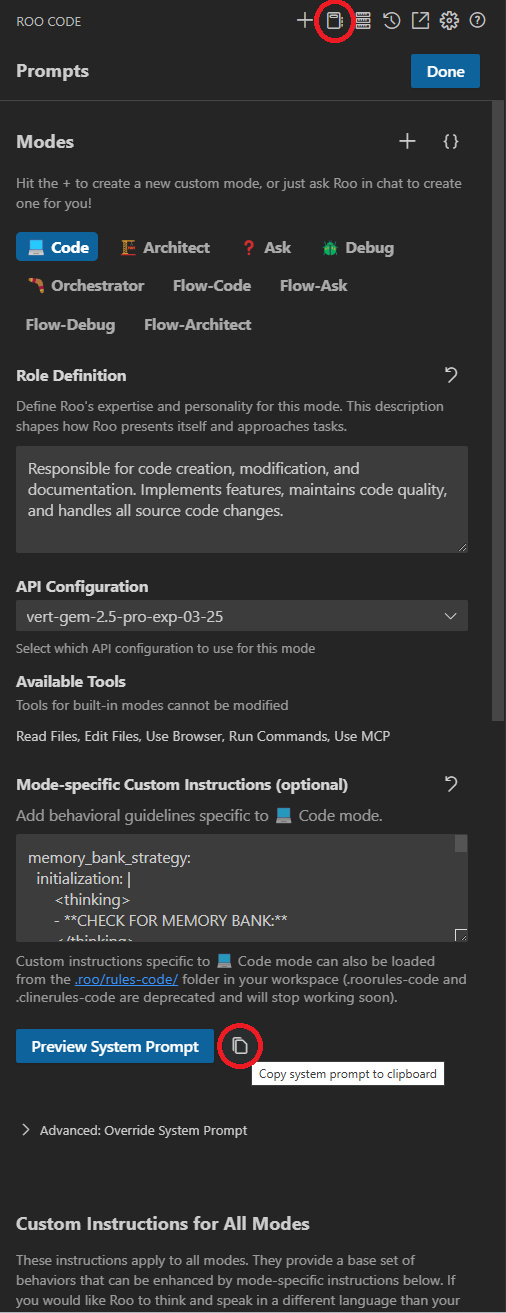
- Select any standard Roo Code mode (e.g., "Architect", "Code", "Ask", "Debug").
- Click the "Copy system prompt to clipboard" button (as shown in illustration above).
- This text includes the dynamically discovered information about your currently connected MCP servers.
-
Save as
system_prompt.md: Save this copied text into a new file named exactlysystem_prompt.mddirectly in your project's root directory. -
Run Installer: Now, run the
install_rooflow.shorinstall_rooflow.cmdscript as described in the main Installation section above.- The installer copies the Python script
generate_mcp_yaml.py. - It then runs this Python script (using
python3orpython). The script automatically looks forsystem_prompt.mdin the root directory. - If found, the Python script parses the MCP server details from it, converts them to YAML, and injects them into the appropriate placeholder (
# [CONNECTED_MCP_SERVERS]) within the.roo/system-prompt-flow-*files while also performing other variable substitutions. - If
system_prompt.mdis not found, this injection step is simply skipped.
- The installer copies the Python script
Updating MCP Server Information Later:
If you add, remove, or modify your MCP server configurations after the initial RooFlow installation, you'll need to update the Flow mode prompts:
- Get Updated Prompt: Ensure your desired MCP servers are connected in Roo Code. Go back to Roo Code settings and copy the latest full system prompt text (which includes the updated MCP details) from a standard mode, just like in the initial setup.
- Save Updated
system_prompt.md: Save this new text intosystem_prompt.mdin your project root, overwriting the previous version. - Re-run Installer: Execute the
install_rooflow.shorinstall_rooflow.cmdscript again from your project root.- This script will copy the latest base configuration (
.roo/files,.roomodes,generate_mcp_yaml.py) from the repository and run thegenerate_mcp_yaml.pyPython script again. - The Python script will read your updated
system_prompt.mdand inject the new MCP server details into the freshly copied.roo/system-prompt-flow-*files (along with performing basic variable substitutions).
- This script will copy the latest base configuration (
⚠️ Important Warning about Updates: Re-running the installer script is the simplest way to update MCP info, but be aware that it overwrites the .roo/ directory and the .roomodes file with fresh copies from the repository. Any manual customizations you might have made directly to the system-prompt-flow-* files after the initial installation will be lost. The Python script (generate_mcp_yaml.py) remains in the root if you wish to build a more granular update process manually.
3. Using RooFlow
- Start a Chat: Open a new Roo Code chat in your project.
- Select a Mode: Choose the appropriate mode for your task:
- 🌊Flow Code💻: For writing, modifying, and documenting code.
- 🌊Flow Architect🏗️: For system design, project structure, and Memory Bank initialization.
- 🌊Flow Ask❓: For questions, code analysis, and explanations.
- 🌊Flow Debug🪲: For troubleshooting errors and debugging code.
- 🌊Flow Orchestrator🪃: For complex tasks requiring breakdown and delegation to other modes (see Boomerang Tasks).
- Interact with Roo: Give Roo instructions and ask questions. Roo will use the Memory Bank (if initialized) and mode capabilities to assist.
- Memory Bank Initialization: If you start a chat in a project without a
memory-bank/directory, Roo will suggest switching to Flow-Architect mode and guide you through the initialization process. - "Update Memory Bank" Command: At any time, you can type "Update Memory Bank" or "UMB" to force a synchronization of the chat session's information into the Memory Bank. This is useful for ensuring continuity across sessions or before switching modes.
4. Updating RooFlow
Simply run the install script and it will overwrite your existing .roo/ directory and .roomodes file. If you have your own additional custom modes in .roomodes, rename that file before running the update and then replace the contents of the newly installed .roomodes with the content from your custom file.
📚 Memory Bank Structure
The Memory Bank is a directory named memory-bank located in your project's root. It contains several Markdown files that store different aspects of your project's knowledge:
| File | Purpose |
|---|---|
activeContext.md |
Tracks the current session's context: recent changes, current goals, and open questions/issues. |
decisionLog.md |
Records architectural and implementation decisions, including the context, decision, rationale, and implementation details. |
productContext.md |
Provides a high-level overview of the project, including its goals, features, and overall architecture. |
progress.md |
Tracks the progress of the project, including completed work, current tasks, and next steps. Uses a task list format. |
systemPatterns.md |
(Optional) Documents recurring patterns and standards used in the project (coding patterns, architectural patterns, testing patterns). |
RooFlow automatically manages these files. You generally don't need to edit them directly, although you can review them to understand the AI's knowledge.
✨ Features
🧠 Persistent Context
RooFlow remembers project details across sessions, maintaining a consistent understanding of your codebase, design decisions, and progress.
⚡ Real-time Updates
The Memory Bank is updated automatically based on significant events within each mode, ensuring that the context is always up-to-date.
🤝 Mode Collaboration
The five modes (Flow-Architect, Flow-Code, Flow-Debug, Flow-Ask, and Flow-Orchestrator) are designed to work together seamlessly. Flow-Orchestrator can delegate tasks to the other modes, and they can switch between each other as needed, sharing information through the Memory Bank.
⬇️ Reduced Token Consumption
RooFlow is designed to use fewer tokens than previous systems, making it more efficient and cost-effective.
📝 UMB Command
The command "Update Memory Bank" or "UMB" can be given at any time to update the memory bank with information from the current chat session.
Contributing
Contributions to RooFlow are welcome! Please see the CONTRIBUTING.md file (you'll need to create this) for guidelines.