
Antigravity Manager
🚀 Professional multi-account manager for Google Gemini & Claude AI
English | 简体中文


📖 Table of Contents
- Why Antigravity Manager?
- Features
- Screenshots
- Quick Start
- Tech Stack
- Development
- Debugging Docs
- FAQ
- Contributing
- License
✨ Why Antigravity Manager?
When using Antigravity IDE, have you ever encountered these problems?
- 😫 Single account quota runs out quickly, requiring frequent manual switching
- 🔄 Managing multiple Google/Claude accounts is cumbersome
- 📊 Don't know how much quota is left on the current account
- ⏰ Worried about missing quota reset times
- 🔌 Need a reliable local API proxy for development tools
Antigravity Manager is here to solve these problems! It's a professional Electron desktop app that helps you:
- ✅ Unlimited Account Pool - Add any number of Google Gemini / Claude accounts
- ✅ Smart Auto-Switching - Automatically switch to the next available account when quota is low or rate-limited
- ✅ Real-time Monitoring - Visualize quota usage for all accounts
- ✅ Local API Proxy - Built-in OpenAI/Anthropic compatible proxy server
- ✅ Secure Encryption - AES-256-GCM encryption for sensitive data
[!WARNING] Account risks when using the reverse proxy
Since February, Google has intensified enforcement. Simply switching accounts with this software will not affect your Google account. However, using it as a reverse proxy or for similar purposes violates Google's Terms of Service and may result in account suspension.
Only use accounts you can afford to lose.
The first time you click Start Service on the API Proxy page, you must acknowledge this warning before the service starts. Cancelling or closing the dialog does not start the proxy.
🎯 Features
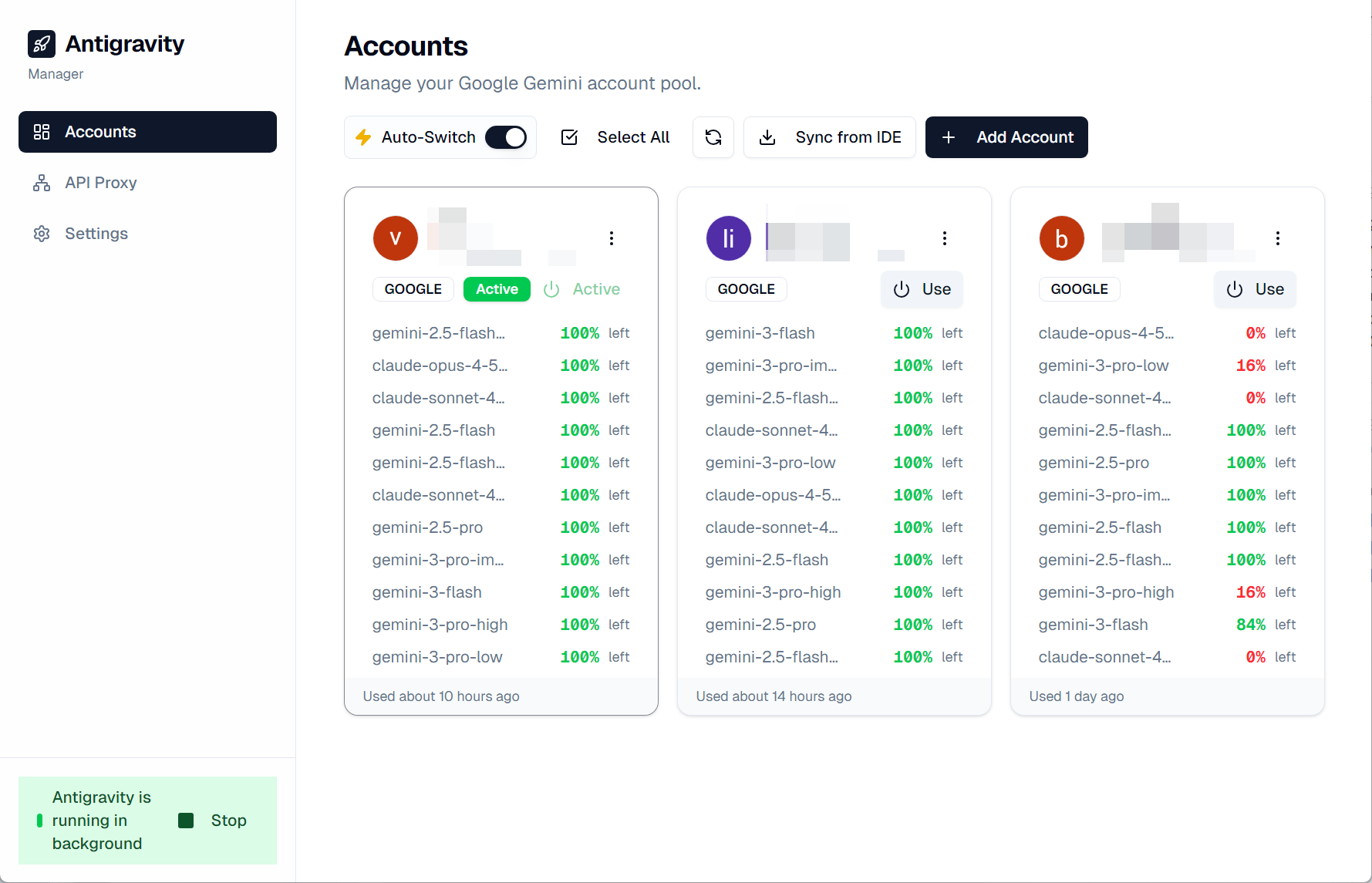
☁️ Cloud Account Pool
    Add unlimited Google Gemini / Claude accounts via OAuth
    Display avatar, email, status, and last used time
    Real-time status monitoring (Active, Rate Limited, Expired)
📊 Real-time Quota Monitoring
    Multi-model support: gemini-pro, claude-3-5-sonnet, etc.
    Visual progress bars with color indicators
    Auto & manual refresh capabilities
🔄 Intelligent Auto-Switching
    Unlimited pool mode with smart backup selection
    Auto-switch when quota < 5% or rate-limited
    Background monitoring every 5 minutes
🔐 Security First
    AES-256-GCM encryption for sensitive data
    OS native credential manager integration
    Auto migration of legacy plaintext data
💾 Account Backup
    Capture snapshots of account state
    Fast switching between saved accounts
    View, organize, and delete snapshots
⚙️ Process Control
    Auto-detect if Antigravity is running
    Launch via URI protocol or executable
    Graceful close or force kill
🔌 Local API Proxy
    OpenAI & Anthropic API compatible
    Configurable port and request timeout
    Model mapping (e.g. Claude → Gemini)
🛠️ Developer Tools
    Built-in cURL & Python code generation
    Visual service status monitoring
    One-click API Key regeneration
Additional Features
- 🖥️ System Tray - Background mode with tray icon and right-click menu
- 🔗 IDE Sync - Automatically scan and import accounts from IDE's
state.vscdb - 📦 Batch Operations - Batch refresh and delete multiple accounts
- 📤 JSON Export/Import - Export and import account pools with schema validation and deduplication
- 🔔 Desktop Notifications - Configurable alerts when model quota drops below your threshold
- 🌐 Per-Account Proxy - Route individual accounts through their own HTTP/SOCKS5 proxy
- 📊 Smart Sorting - Sort accounts by recently used, overall quota, or specific model groups
- 📋 Compact Layout - Dense horizontal view to maximize visible accounts
- 🌏 Internationalization - Multi-language support (English / 中文 / Русский)
- 🎨 Modern UI - Built with React, TailwindCSS, and Shadcn UI
📸 Screenshots


� Quick Start
Download
Download the latest release for your platform from the Releases page.
| Platform | Download |
|---|---|
| Windows (x64/ARM64) | .exe installer |
| macOS | .dmg installer |
| Linux | .deb / .rpm |
| Arch Linux (AUR) | yay -S antigravity-manager-bin |
| NixOS / Nix | nix run github:Draculabo/AntigravityManager |
❄️ Nix Integration
You can integrate Antigravity Manager into your Nix configuration using the provided flake.
🛠️ NixOS / Home Manager
Add the flake to your flake.nix inputs:
inputs = {
  nixpkgs.url = "github:nixos/nixpkgs/nixos-unstable";
  antigravity-manager.url = "github:Draculabo/AntigravityManager";
};
To integrate with your system, add antigravity-manager.overlays.default to your nixpkgs.overlays. This ensures the package is correctly built against your own nixpkgs instance and respects your global configuration.
# Add to your NixOS/Home Manager configuration
{
  nixpkgs.overlays = [ inputs.antigravity-manager.overlays.default ];

  # Antigravity Manager has an unfree license (cc-by-nc-sa-40)
  nixpkgs.config.allowUnfree = true;

  environment.systemPackages = [
    pkgs.antigravity-manager
  ];
}
💻 Development Shell
If you're using the overlay above, you can simply add it to your devShell:
devShells.default = pkgs.mkShell {
  packages = [
    pkgs.antigravity-manager
  ];
};
[!NOTE] Since the package is unfree, you must have
allowUnfree = true;enabled in yournixpkgsconfiguration for it to evaluate correctly.
Build from Source
Prerequisites
- Node.js v18 or higher
- npm or yarn
Steps
# Clone the repository
git clone https://github.com/Draculabo/AntigravityManager.git
cd AntigravityManager

# Install dependencies
npm install

# Start development
npm start

# Build for production
npm run make
�🛠️ Tech Stack
| Category | Technologies |
|---|---|
| Core | Electron, React, TypeScript |
| Build Tool | Vite |
| Styling | TailwindCSS, Shadcn UI |
| State | TanStack Query, TanStack Router |
| Database | Better-SQLite3 |
| Testing | Vitest, Playwright |
� Development
Available Scripts
| Command | Description |
|---|---|
npm start |
Start the app in development mode |
npm run lint |
Run ESLint to check for code issues |
npm run format:write |
Format code with Prettier |
npm run test:unit |
Run unit tests with Vitest |
npm run test:e2e |
Run E2E tests with Playwright |
npm run test:all |
Run all tests |
npm run type-check |
Run TypeScript type checking |
npm run make |
Build production packages |
Project Structure
AntigravityManager/
├── src/
│   ├── main.ts          # Electron main process
│   ├── preload.ts       # Preload script
│   ├── renderer/        # React renderer process
│   ├── ipc/             # IPC communication handlers
│   └── server/          # Built-in server
├── docs/                # Documentation and assets
└── .github/             # GitHub configuration
🔍 Debugging Docs
If you want to inspect Antigravity or Antigravity Manager traffic with Proxyman, start here:
- Proxyman Installation and Basic Setup on Windows
- Proxyman Debugging Guide for Antigravity and Antigravity Manager
❓ FAQ
Q: The app won't start?
Please check:
- Make sure all dependencies are installed:
npm install - Check if Node.js version is >= 18
- Try deleting
node_modulesand reinstalling
Q: Account login failed?
- Ensure network connection is working
- Try clearing app data and logging in again
- Check if the account is restricted by Google/Claude
Q: macOS shows Keychain/Credential error and OAuth cannot be saved?
This is a common macOS security behavior, usually when the app is unsigned or run directly from Downloads. This is a temporary workaround for personal use:
- Move the app to
/Applications - Run the following commands in Terminal (repeat after every update)
sudo xattr -dr com.apple.quarantine "/Applications/Antigravity Manager.app"
codesign --force --deep --sign - "/Applications/Antigravity Manager.app"
Reopen the app and allow Keychain access if prompted.
Q: How to report issues or suggestions?
Please submit issues or suggestions via GitHub Issues.
🌟 Star History
🤝 Contributing
Contributions are welcome! Please read CONTRIBUTING.md for details.
We follow the Contributor Covenant Code of Conduct.
📄 License
⚠️ Disclaimer
[!WARNING] For Educational Purposes Only
This project is intended solely for educational and research purposes. It is provided "as-is" without any warranty. Commercial use is strictly prohibited.
By using this software, you agree that you will not use it for any commercial purposes, and you are solely responsible for ensuring your use complies with all applicable laws and regulations. The authors and contributors are not responsible for any misuse or damages arising from the use of this software.
If this project helps you, please give it a ⭐ Star!