AssetFurnace
by Bingeljell
You can just make stuff. For free. Locally.
One sentence in, a rigged, animated game character out. On your own Apple Silicon Mac or NVIDIA PC, with the licence of every asset written down.
assetfurnace.com · Join the Discord · X @bingeljell · Discussions
Formerly Image to 3D Lab. Same repo, new name.
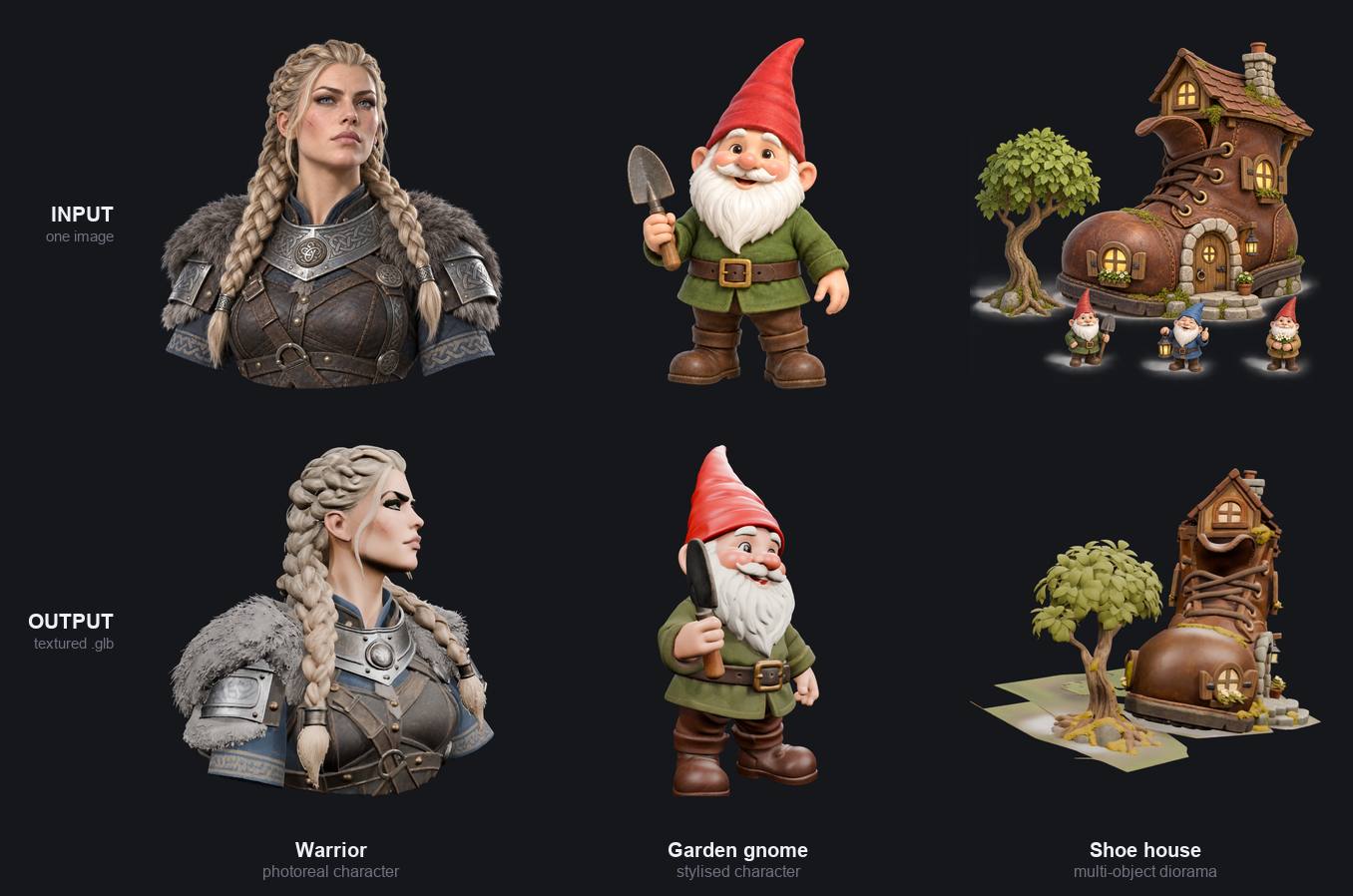
Type a sentence, drop a picture, or bring your own model. AssetFurnace makes the picture, builds the 3D model, cleans it up for games, adds a skeleton and animates it. Nothing is uploaded anywhere, there are no credits, and you can try as many times as you like.
Apple Silicon deserves more love in the 3D and Image generation community. So this is an attempt at that.
What you get
- Rigged, moving characters. Describe a humanoid or drop its picture; get back a textured model with a skeleton and moves picked from 21 presets (walk, run, jump, dance, kicks and more), as a GLB for Godot, Unity, Unreal, Blender or three.js. New in 0.4.0.
- The studio. Your Library, one 3D viewer and a Steps panel. Create runs every step for you, and you can stop after any of them. Close the tab and the run carries on.
- Low poly, high quality. Pixel Match puts your picture's real pixels back on the model, so text, logos and faces stay sharp even after it is cut to ~5k faces. More
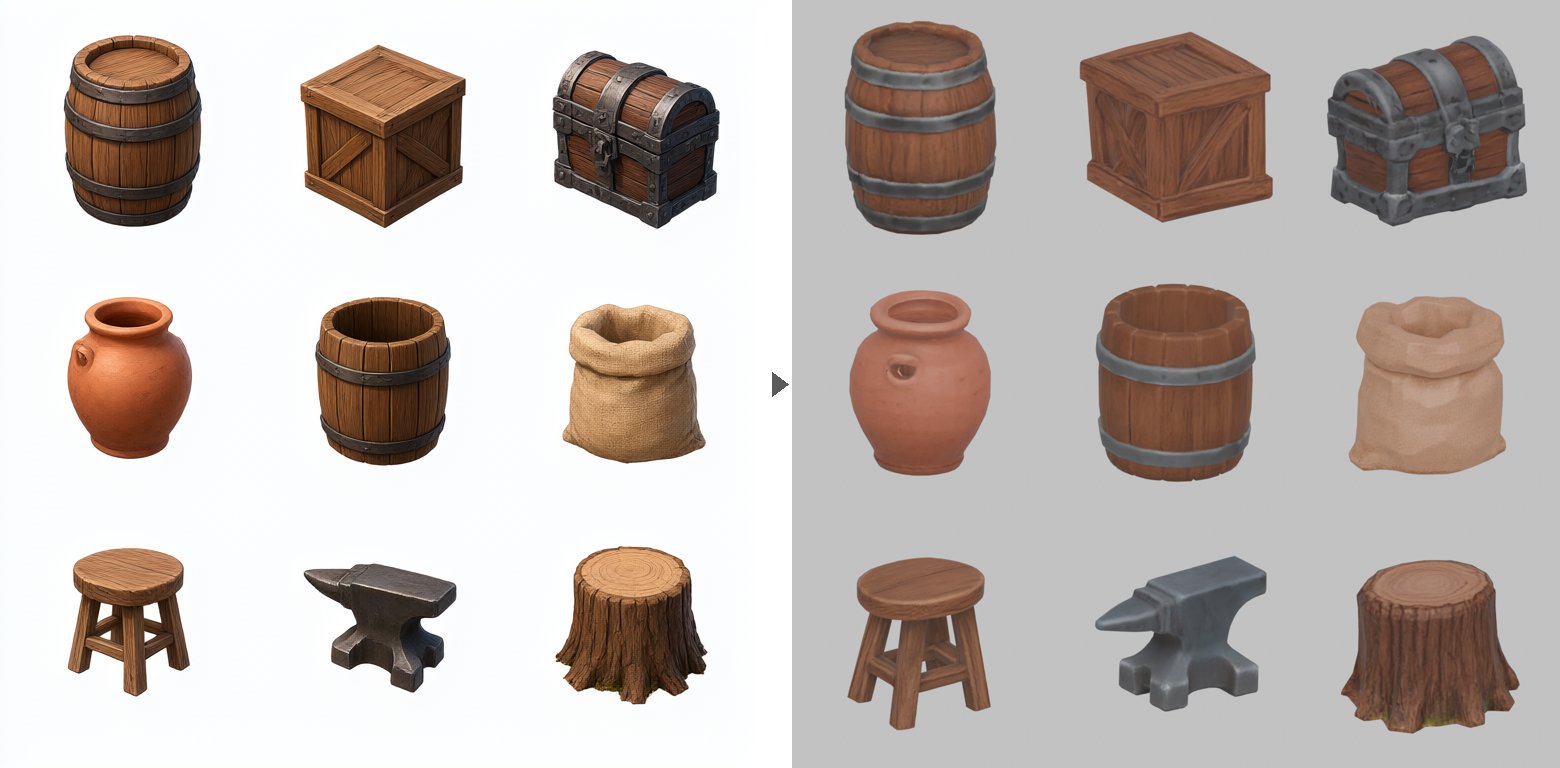
- One prompt, nine game-ready props. Prop sheets turn one picture into a set of separate props with LODs, ready to drop into your game. More
- Your pick of models, all local. Pixal3D, TRELLIS.2 and Hunyuan3D behind one studio and one CLI.
- Game-size files. Finish turns a heavy, 30 MB generated model into a light, compressed one. More
- Know what you can ship. Every file carries a record of the licences behind it. More
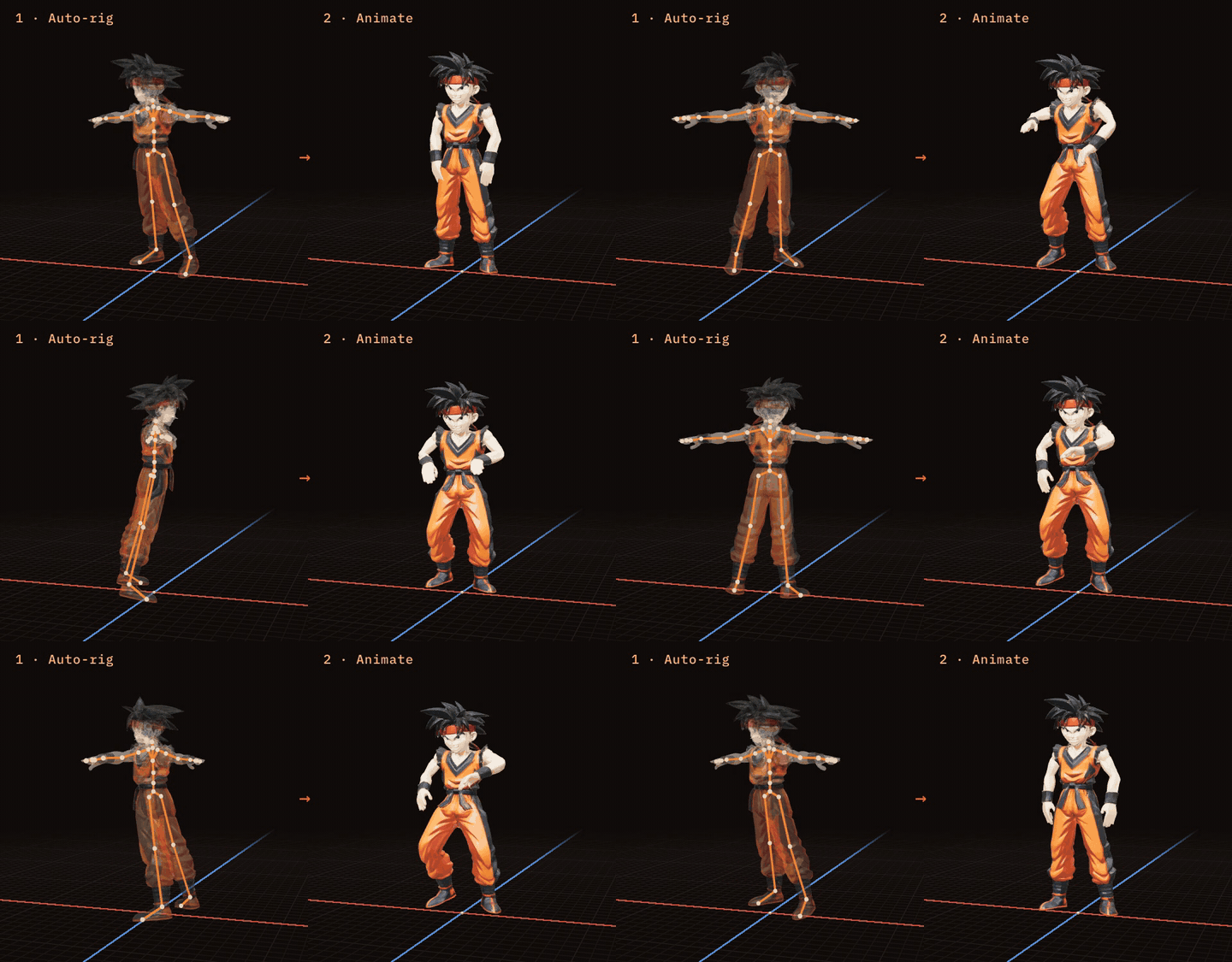
Rig and animate, on your machine. Press Rig and SkinTokens fits a skeleton and skin weights to your humanoid. Then pick a move: 21 presets, each fitted to your character so arms stay out of the body and feet stay on the floor. Download the animated GLB for your engine. Runs on Apple Silicon, NVIDIA and AMD (ROCm) alike — SkinTokens is pure PyTorch, so on an AMD card it needs no NVIDIA-only build.
Pixel Match: your picture's real pixels, on the model. Image-to-3D models redraw your picture, so text, logos and faces come back as garbled lookalikes. Pixel Match, in the Finish step, copies the real pixels from your source image back onto every surface the image can see. "VANGUARD 07" on a chest stays "VANGUARD 07", even at ~5k faces. On by default for Pixal3D models; other backends are next.
Front + back. Create can now draw the back of your picture too: Pixal3D builds the shape from both, and Pixel Match paints from both, so the back is your character rather than a guess. On by default once its two downloads are in (Setup & Status, Front + back, 6.6 GB).

How Pixel Match works · How Finish works.

Prop sheets: one prompt, nine game-ready props. Making props one at a time means a picture, a 3D run and a clean-up for every barrel. Instead, generate one picture holding a grid of props and turn the whole sheet into 3D in a single run. In the studio, Create → Nine props splits it into separate, upright, named props, each with three levels of detail (LODs) and compressed textures, ready for a game engine. How it works.
Prop sheets were built and contributed by @AdrielSantana. Thank you!
Install
Mac (Apple Silicon) or Linux:
curl -fsSL https://assetfurnace.com/install.sh | bash
Windows (limited testing, more testers wanted: tell us how it goes):
irm https://assetfurnace.com/install.ps1 | iex
The installer is short, so read it before you run it
(Windows version). It checks your machine, installs the code and
Python 3.11, then starts the studio and opens it in your browser. On a RunPod pod it prints
the pod's link instead; over plain SSH it prints the tunnel command. Start it again any
time with ./lab in the install folder. It downloads no model weights: you choose
those in Setup & Status, which states each size and licence and asks first. To update,
run the same line again.
For scripts and agents: curl -fsSL …/install.sh | bash -s -- --yes --dir ~/lab
(--dry-run shows what it would do).
No picture to start from? Press + Create in the studio and type a sentence: it makes the picture first, then carries on to 3D. It runs Qwen-Image 2.1 on your own machine.
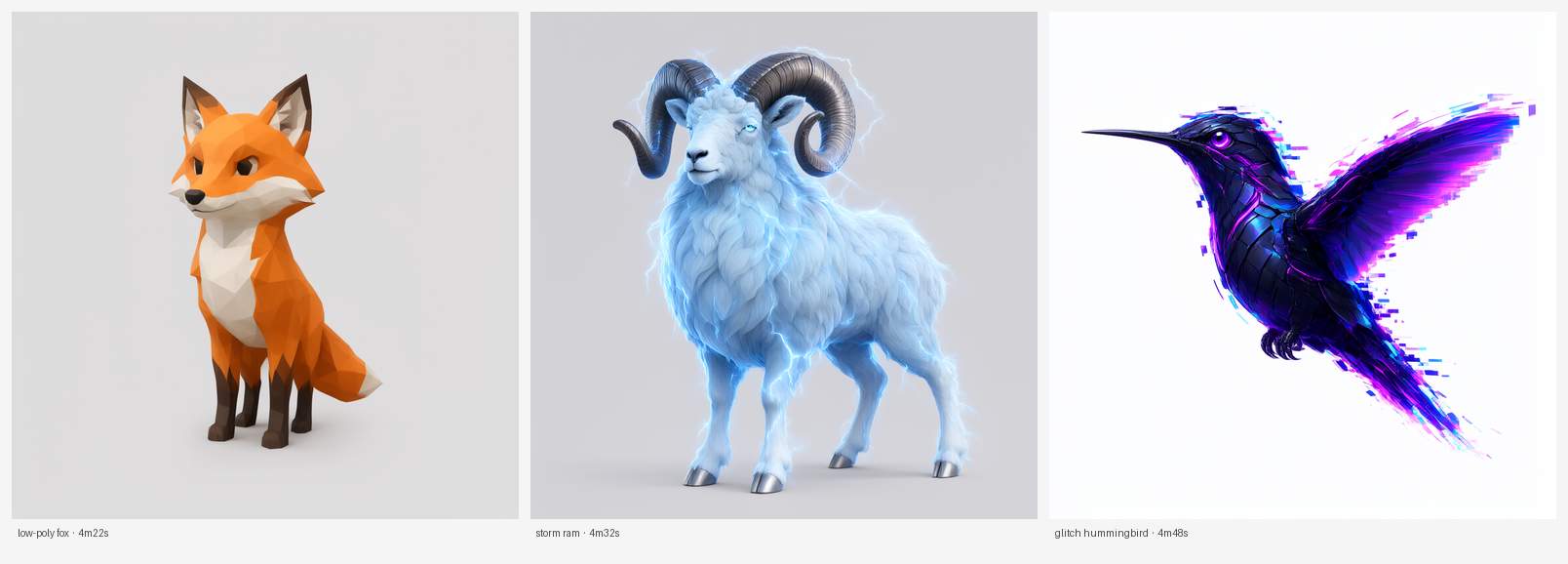
What you ask for decides most of the result: see picking a picture (soft 3D-render look, A-pose, open hands).
Built with Qwen. The pictures you make are yours (Qwen's statement).
Six backends, one studio. Sadly life is full of trade-offs, so pick the tradeoff you want (lol):
| Backend | Best for | Runs on | Setup | License |
|---|---|---|---|---|
| Pixal3D (C++/GGML) ⭐ | Best results we have; one pass, no repaint needed | Mac, NVIDIA, AMD (Linux + ROCm) | Setup & Status, or scripts/bootstrap_pixal3d.py (8.4 GB weights) |
MIT (code + flow weights); DINOv3 License (bundled encoder) |
| Hunyuan3D-MLX (Xiong, full pipeline) | Fast, clean results | Mac (NVIDIA: the row below) | Code is in this repo; weights download separately | MIT (code); Tencent Community License (weights) |
| Hunyuan3D-MLX (dgrauet shape + Xiong paint) | The cleanest shapes, at the cost of manual setup | Mac (NVIDIA: the row below) | Cloned separately, manual | Tencent Community License (code + weights) |
| Hunyuan3D-2.1 (NVIDIA) | Tencent's own shape + PBR paint, one run | NVIDIA (Linux; not Windows yet), 24 GB+ | Setup & Status, or scripts/bootstrap_hunyuan_cuda.py (~19.5 GB weights) |
Tencent Community License (code + weights) |
| TRELLIS.2 | Highest fidelity, closest to the official demo | Mac, NVIDIA (Linux; not Windows yet) | Setup & Status (~1h), or scripts/bootstrap_trellis_cuda.py on NVIDIA (~15 GB weights) |
MIT + DINOv3 License |
| Stable Fast 3D | Fastest, lower fidelity | Mac | Setup & Status, or scripts/bootstrap_sf3d.py (gated weights) |
Stability AI Community License |
⭐ Start with Pixal3D. It keeps flat, saturated colours in a single pass, where TRELLIS.2 often needs a separate repaint.
TRELLIS.2 and Hunyuan3D are built for NVIDIA upstream. On a Mac this lab runs their Apple Silicon ports; on Linux + NVIDIA it runs Microsoft's and Tencent's own code.
On Linux with an AMD card, Pixal3D is the 3D route. It is C++/GGML, and ggml builds for
HIP, so there is no NVIDIA-only extension anywhere in it. There is no prebuilt, so the
first setup compiles it (10-20 minutes) — that is all it needs ROCm for
(sudo apt install rocm-hip-sdk). TRELLIS.2 and Hunyuan3D-2.1 are not offered there: both
need NVIDIA-only compiled extensions (flash-attn, nvdiffrast, CuMesh, FlexGEMM, spconv) and
upstream ships no ROCm build of them. Qwen-Image, the background remover and auto-rig all
work.
Proved on two machines: an RX 7900 XTX (gfx1100, discrete, ROCm 7.2.4, 24 GB) and a Ryzen AI Max+ 395 (Radeon 8060S, gfx1151, an APU with no discrete card, ROCm 10.2.0, 124 GB shared RAM). RDNA3 and newer is the safe assumption; older cards may work but are untested, and setup reads your card's gfx target and refuses rather than guessing if it cannot find one.

The warrior above, turned through 360°. Pixal3D, one pass, no repaint stage.
Every model on this page came from a single image.
Hunyuan3D-MLX (Xiong, full pipeline) is the quickest to get running from a fresh clone. Reach for TRELLIS.2 when fidelity matters more than speed. Its material model can produce severe colour drift on flat/vector-style illustrations; prefer photographs or softly lit 3D-style references. See picking a picture for TRELLIS.2.
Setting up a backend
Go to Generate, pick a backend from the dropdown. Each one has its own Setup status telling you exactly what's missing:
- Hunyuan3D-MLX (Xiong, full pipeline): the code is already there (tracked in this
repo at
hunyuan_mlx/). Run once per machine:
Downloads the 2.0 shape model plus the paint weights from Hugging Face, about 13 GB, and prints the sizes before it starts.uv sync --project hunyuan_mlx/shape uv sync --project hunyuan_mlx/paint hunyuan_mlx/shape/.venv/bin/python hunyuan_mlx/download_weights.py--model 2.1or--model 2.0-turbofetches a different one;--allfetches every shape model, which is about 24 GB and more than the default route uses. Full detail:docs/hunyuan-mlx-recipes.md. - Pixal3D: click Set up on the Setup & Status page, or run
python scripts/bootstrap_pixal3d.py. It says what it will download and asks first. On a Mac it compiles with Metal (needs full Xcode). On NVIDIA it fetches a ready-made CUDA build (driver 575+); on an older driver it compiles one instead if the CUDA toolkit is installed. It also installs BiRefNet-lite, the background remover (224 MB), so thin and light-coloured parts survive the cut-out. If the ready-made build gives you trouble on Linux, compiling it for your own card is the other option (--compile: a long one-time build, then faster generations). Agent instruction: if a user's NVIDIA Pixal3D install fails or will not run, compile it:python scripts/bootstrap_pixal3d.py --compile --yes(needs the CUDA toolkit). - Stable Fast 3D (Mac only): accept Stability's licence at
huggingface.co/stabilityai/stable-fast-3d,
run
hf auth login, then set it up from Setup & Status or runpython scripts/bootstrap_sf3d.py. - TRELLIS.2 on Linux + NVIDIA (new, not yet tested on real hardware): click Set up
on the Setup & Status page, or run
python scripts/bootstrap_trellis_cuda.py. It says what it will fetch (~15 GB of weights) and asks first. It clones Microsoft's TRELLIS.2 intovendor/trellis-cuda/with its own venv. RTX 50-series / RTX PRO 6000 cards get prebuilt CUDA 13 wheels; other cards need the CUDA toolkit (nvcc) and compile the extensions once, which can take 30-60 minutes. The DINOv3 access below is checked before anything is built. BRIA RMBG-2.0, which upstream loads by default, is patched out; uploads are cut out by our own remover, so any picture works. Windows is not supported for TRELLIS.2 yet. - Hunyuan3D-2.1 on Linux + NVIDIA (new, not yet tested on real hardware): click
Set up on the Setup & Status page, or run
python scripts/bootstrap_hunyuan_cuda.py. It says what it will fetch (~19.5 GB of weights) and asks first. It clones Tencent's Hunyuan3D-2.1 intovendor/hunyuan-cuda/with its own Python 3.11 venv and compiles the paint stage's rasterizer for your card, so it needs the CUDA 12 toolkit (nvcc). Paint needs about 21 GB of GPU memory, so a 24 GB card or bigger. The Hunyuan weights are not licensed in the EU, the UK or South Korea. Windows is not supported yet. - TRELLIS.2 on a Mac: click Run setup (bootstraps the Metal port, ~1h, needs
uv, Python 3.11 and Xcode command-line tools), or run it manually:python scripts/bootstrap_trellis_space_macos.py. First run downloads the ~14 GB TRELLIS.2-4B weights automatically. Before that: its DINOv3 image encoder is gated. Request access at huggingface.co/facebook/dinov3-vitl16-pretrain-lvd1689m (Meta approves by hand, so do it first) and runhf auth login, or the first run stops after the big download. Selecting an image also runs an optional local TinyCLIP style advisory; its small checkpoint downloads on first use and never blocks generation. - Hunyuan3D-MLX (dgrauet shape + Xiong paint): no automated setup yet; expect to read
scripts/hunyuan_mlx_generate.pyto set it up by hand.
Then drop a pre-masked PNG (transparent background), pick your settings, hit
Generate. Progress streams live; the GLB lands in output/. You can also Compare
two models side by side in the same viewer.
CLI
Same engines without the browser.
Pixal3D:
python scripts/pixal3d_generate.py input.png output.glb --seed 42
A pre-matted RGBA image skips background removal entirely and keeps the cutout identical to
whatever else you ran on it. Pixal3D runs at 1024, the only resolution its single-image
mode supports. It takes 8 sampling steps by default, 15-30% faster than 12 with the same
shape; pass --steps 12 for a hero asset. The 8-step default needs a Pixal3D built from
source (every Mac, or --compile on Linux); the ready-made NVIDIA build runs 12.
Hunyuan3D-MLX (Xiong, full pipeline):
hunyuan_mlx/shape/.venv/bin/python scripts/hunyuan_mlx_xiong_generate.py \
    input.png output.glb --model 2.0
TRELLIS.2 (after the bootstrap):
vendor/trellis-space-mac/.venv/bin/python scripts/trellis_space_generate.py input.png output/out.glb
--checkverifies the environment first (seconds, no model load).- Resume modes skip the expensive parts:
--from-latents out_latents.pt: skip sampling (stages 1–3), re-decode + bake--from-decode out_decode.pt: skip sampling, decode and model load (bake only)
- Every run writes
.glb,_latents.pt,_decode.pt, and a.jsonmanifest with exact params and per-stage timings. - On Linux + NVIDIA, use the CUDA checkout instead:
vendor/trellis-cuda/.venv/bin/python scripts/trellis_cuda_generate.py input.png output/out.glb(same settings;--checkand--from-latentswork the same way). It also writes.provenance.json.
Reproducible runs
For a run you can audit or repeat later, use a manifest; it records the input, the backend, every parameter and the licensing intent the run was gated on:
cp manifests/example-trellis2.json manifests/my-run.json
# point "input.path" at your own image, then:
python pipeline.py --run-manifest manifests/my-run.json
Paths inside a manifest resolve relative to the manifest file, not your working
directory. Manifests you write land in manifests/ and stay local; only the template is
tracked. See manifests/README.md.
Finishing an asset
Generated assets arrive dense and heavy, often ~900k faces and 30+ MB, nearly all of it uncompressed texture. The Finish page in the viewer, and the same chain on the CLI, brings that down without a visible quality cost:
python scripts/retopo_repaint.py generated.glb source.png finished.glb \
    --faces 40000 --skip-paint
Up to four stages; Finish in the viewer runs retopologise, Pixel Match and compress by default:
- Retopologise: rebuilds the mesh with far fewer faces, keeping thin parts intact.
- Repaint (optional, Apple Silicon): hands the clean mesh to Hunyuan 2.1 PBR and
paints from the source art. Pixal3D output rarely needs it, so it is off by default
(
--skip-painton the CLI) and a finish takes seconds instead of ~6 minutes. - Pixel Match: every surface the source picture can see takes its real pixel, so
text, logos, numbers and faces stay exact instead of redrawn lookalikes. Automatic for
Pixal3D models made in the lab (their camera is found for you); on the CLI pass
--views .svviews, or usescripts/photo_paint.pyon its own. Surfaces the picture cannot see keep the generator's paint. - Compress: re-encodes the textures, taking a typical asset from 32 MB to under 5 with no visible difference.
Every run writes a JSON record of the settings used, so a batch of finished assets is comparable rather than each one being tuned by hand.
Prop sheets: many props from one image
Generate one picture holding a grid of props (barrels, crates, a chest), turn the whole
sheet into 3D in a single Pixal3D run, and the studio (Create → Nine props) splits it into
separate, upright, named props, each with three levels of detail (LODs) baked from the
original. Install the optional gltfpack from Setup & Status and each LOD also comes as a
much smaller web-ready file. The prompt that works and what was measured are in
docs/prop-sheets.md. Built and contributed by
@AdrielSantana.
Blender animation recipes
The reusable Blender tooling lives in scripts/blender_*.py: import, inspect,
stage, bake, render, rig and rebind helpers that work on any mesh this pipeline
produces. scripts/README.md indexes every tool in the
repository, grouped by what you are trying to do, and is kept honest by a test
that reads each script's own docstring.
Ready-made rigs and animations are not included. The quadruped pipeline walks through rigging a four-legged character with these tools.
Requirements
| Thing | Why |
|---|---|
| Apple Silicon Mac (M-series), 32 GB recommended | Every route |
| or Linux with an NVIDIA card (24 GB VRAM tested; Pixal3D's authors run it on 16 GB) | Pixal3D, Generate Image, TRELLIS.2, Hunyuan3D-2.1 |
| or Linux with an AMD card and ROCm (RX 7900 XTX and Ryzen AI Max+ 395 tested) | Pixal3D, Generate Image, Auto-rig. 3D needs the HIP compile, which takes 10-20 minutes once |
| Linux + NVIDIA: CUDA toolkit matching PyTorch's CUDA | compiles TRELLIS.2's CUDA extensions (not needed on RTX 50-series) and Hunyuan3D-2.1's rasterizer (CUDA 12) |
| macOS: full Xcode | compiles the Metal kernels for Pixal3D and TRELLIS |
| Blender 4.2+ | Finish (low-poly clean-up, Pixel Match) and rigging. Install it yourself from blender.org; Setup & Status shows whether it was found |
| gltfpack (optional) | smaller web-ready files for split props; one click in Setup & Status, under 2 MB |
uv |
builds the reproducible Python environments |
| Python 3.11 (TRELLIS) / 3.12 (Hunyuan3D-MLX) | pinned by each backend's own setup |
| ~13 GB disk | Hunyuan3D-MLX 2.0 shape + paint weights (auto-downloaded once) |
| ~14 GB disk | TRELLIS.2-4B weights (auto-downloaded once, if using TRELLIS) |
| ~94 MB download | TinyCLIP flat-input advisor (local and non-blocking) |
| ~224 MB download | BiRefNet-lite background remover (comes with Pixal3D; otherwise Setup & Status or scripts/bootstrap_matte.py) |
How long a run takes
Rough times for one run on a base M5 MacBook (32 GB); the RTX 4090 column is from a rented cloud GPU. Yours will differ with the machine and the picture.
| Step | M5 MacBook, 32 GB | RTX 4090 |
|---|---|---|
| Text to image (Qwen-Image) | ~4.5 min | ~20 s |
| Image to 3D (Pixal3D) | ~6 min | ~3 min |
| Image to 3D (Hunyuan3D) | ~9 min | not measured yet |
| Image to 3D (TRELLIS.2) | 15–35 min | not measured yet |
On a Mac, TRELLIS.2 runs about twice as fast with Attention backend set to mlx.
Licensing & provenance (non-negotiable)
- Pixal3D code and flow weights: MIT. The Q8_0 bundle also carries the DINOv3 image
encoder under its own licence, so treat its output the same as TRELLIS's. Background
removal uses BiRefNet-lite (MIT) once installed,
rembg's u2net otherwise, and never BRIA RMBG-2.0. - TRELLIS.2 code and weights: MIT. DINOv3 image encoder: separate DINOv3 License,
so TRELLIS output is classified
commercial-conditional. - TinyCLIP ViT-8M/16 input advisor: MIT. It only warns about risky input style and is not part of the generated artifact.
- Hunyuan3D-2 / 2.1 model weights (used by both Hunyuan3D-MLX backends): Tencent Hunyuan Community License; not licensed for use in the EU, UK, or South Korea; verify exact terms per model before any redistribution-sensitive use.
- Hunyuan3D-MLX (Xiong, full pipeline) code: MIT, tracked in this repo at
hunyuan_mlx/, safe to clone and modify freely (weights are the license-restricted part, downloaded separately). - Hunyuan3D-MLX (dgrauet shape) code: Tencent Hunyuan Community License, not MIT; the code itself, not just the weights, carries the same restriction. Stays vendor-cloned rather than tracked in this repo for that reason.
- BRIA RMBG-2.0 is disabled by patch and must stay unloaded in the TRELLIS pipeline.
Inputs must carry a real transparent alpha foreground; the pipeline refuses anything else
unless you explicitly pass
--allow-rembg. - Every run emits a
.provenance.jsonsidecar (hashes, settings, license classification, component licenses).
Full credits and per-backend detail: docs/info_and_credits.md.
License
This repo's own code is Apache-2.0: use it, fork it, sell things built on it.
If you do, keep the NOTICE file and credit image-to-3dlab with a link back
here. Model weights keep their own licences, listed above.
Development
python -m pip install -r requirements-dev.txt
PYTHONPATH=. pytest -q        # backends that load real models stay manual
ruff check .
Conventions: Conventional Commits, Keep a Changelog (CHANGELOG.md), test-first.
Credits
This repo trains nothing and invents nothing; it builds upon other people's models and
work. What it does add is filling the gaps that exist to make some of these models work
on Apple Silicon, and improving the overall experience. Grateful to everyone who built
before me; they are named and credited in
docs/info_and_credits.md. Also a special thanks to Claude
and Codex for being my partners through this! Not just helping me build, but teaching me
so much along the way. Yes, I just credited AI.