gym-mtsim: OpenAI Gym - MetaTrader 5 Simulator
MtSim is a simulator for the MetaTrader 5 trading platform alongside an OpenAI Gym environment for reinforcement learning-based trading algorithms. MetaTrader 5 is a multi-asset platform that allows trading Forex, Stocks, Crypto, and Futures. It is one of the most popular trading platforms and supports numerous useful features, such as opening demo accounts on various brokers.
The simulator is separated from the Gym environment and can work independently. Although the Gym environment is designed to be suitable for RL frameworks, it is also proper for backtesting and classic analysis.
The goal of this project was to provide a general-purpose, flexible, and easy-to-use library with a focus on code readability that enables users to do all parts of the trading process through it from 0 to 100. So, gym-mtsim is not just a testing tool or a Gym environment. It is a combination of a real-world simulator, a backtesting tool with high detail visualization, and a Gym environment appropriate for RL/classic algorithms.
Note: For beginners, it is recommended to check out the gym-anytrading project.
Prerequisites
Install MetaTrader 5
Download and install MetaTrader 5 software from here.
Open a demo account on any broker. By default, the software opens a demo account automatically after installation.
Explore the software and try to get familiar with it by trading different symbols in both hedged and unhedged accounts.
Install gym-mtsim
Via PIP
pip install gym-mtsim
From Repository
git clone https://github.com/AminHP/gym-mtsim
cd gym-mtsim
pip install -e .

## or

pip install --upgrade --no-deps --force-reinstall https://github.com/AminHP/gym-mtsim/archive/main.zip
Install stable-baselines3
This package is required to run some examples. Install it from here.
Components
1. SymbolInfo
This is a data class that contains the essential properties of a symbol. Try to get fully acquainted with these properties in case they are unfamiliar. There are plenty of resources that provide good explanations.
2. Order
This is another data class that consists of information of an order. Each order has the following properties:
id: A unique number that helps with tracking orders.
type: An enum that specifies the type of the order. It can be either Buy or Sell.
symbol: The symbol selected for the order.
volume: The volume chose for the order. It can be a multiple of volume_step between volume_min and volume_max.
fee: It is a tricky property. In MetaTrader, there is no such concept called fee. Each symbol has bid and ask prices, the difference between which represents the fee. Although MetaTrader API provides these bid/ask prices for the recent past, it is not possible to access them for the distant past. Therefore, the fee property helps to manage the mentioned difference.
entry_time: The time when the order was placed.
entry_price: The close price when the order was placed.
exit_time: The time when the order was closed.
exit_price: The close price when the order was closed.
profit: The amount of profit earned by this order so far.
margin: The required amount of margin for this order.
closed: A boolean that specifies whether this order is closed or not.
3. MtSimulator
This is the core class that simulates the main parts of MetaTrader. Most of its public properties and methods are explained here. But feel free to take a look at the complete source code.
-
Properties:
unit: The unit currency. It is usually USD, but it can be anything the broker allows, such as EUR.balance: The amount of money before taking into account any open positions.equity: The amount of money, including the value of any open positions.margin: The amount of money which is required for having positions opened.leverage: The leverage ratio.free_margin: The amount of money that is available to open new positions.margin_level: The ratio between equity and margin.stop_out_level: If the margin_level drops below stop_out_level, the most unprofitable position will be closed automatically by the broker.hedge: A boolean that specifies whether hedging is enabled or not.symbols_info: A dictionary that contains symbols' information.symbols_data: A dictionary that contains symbols' OHLCV data.orders: The list of open orders.closed_orders: The list of closed orders.current_time: The current time of the system. -
Methods:
download_data: Downloads required data from MetaTrader for a list of symbols in a time range. This method can be overridden in order to download data from servers other than MetaTrader. Note that this method only works on Windows, as the MetaTrader5 Python package is not available on other platforms.save_symbols: Saves the downloaded symbols' data to a file.load_symbols: Loads the symbols' data from a file.tick: Moves forward in time (by a delta time) and updates orders and other related properties.create_order: Creates a Buy or Sell order and updates related properties.close_order: Closes an order and updates related properties.get_state: Returns the state of the system. The result is similar to the Trading tab and History tab of the Toolbox window in MetaTrader software.
4. MtEnv
This is the Gym environment that works on top of the MtSim. Most of its public properties and methods are explained here. But feel free to take a look at the complete source code.
-
Properties:
original_simulator: An instance of MtSim class as a baseline for simulating the system.simulator: The current simulator in use. It is a copy of the original_simulator.trading_symbols: The list of symbols to trade.time_points: A list of time points based on which the simulator moves time. The default value is taken from the pandas DataFrame.Index of the first symbol in the trading_symbols list.hold_threshold: A probability threshold that controls holding or placing a new order.close_threshold: A probability threshold that controls closing an order.fee: A constant number or a callable that takes a symbol as input and returns the fee based on that.symbol_max_orders: Specifies the maximum number of open positions per symbol in hedge trading.multiprocessing_processes: Specifies the maximum number of processes used for parallel processing.prices: The symbol prices over time. It is used to calculate signal features and render the environment.signal_features: The extracted features over time. It is used to generate Gym observations.window_size: The number of time points (current and previous points) as the length of each observation's features.features_shape: The shape of a single observation's features.action_space: The Gym action_space property. It has a complex structure since stable-baselines does not support Dict or 2D Box action spaces. The action space is a 1D vector of sizecount(trading_symbols) * (symbol_max_orders + 2). For each symbol, two types of actions can be performed, closing previous orders and placing a new order. The former is controlled by the first symbol_max_orders elements and the latter is controlled by the last two elements. Therefore, the action for each symbol is [probability of closing order 1, probability of closing order 2, ..., probability of closing order symbol_max_orders, probability of holding or creating a new order, volume of the new order]. The last two elements specify whether to hold or place a new order and the volume of the new order (positive volume indicates buy and negative volume indicates sell). These elements are a number in range (-∞, ∞), but the probability values must be in the range [0, 1]. This is a problem with stable-baselines as mentioned earlier. To overcome this problem, it is assumed that the probability values belong to the logit function. So, applying the expit function on them gives the desired probability values in the range [0, 1]. This function is applied in the step method of the environment.observation_space: The Gym observation_space property. Each observation contains information about balance, equity, margin, features, and orders. The features is a window on the signal_features from index current_tick - window_size + 1 to current_tick. The orders is a 3D array. Its first dimension specifies the symbol index in the trading_symbols list. The second dimension specifies the order number (each symbol can have more than one open order at the same time in hedge trading). The last dimension has three elements, entry_price, volume, and profit of corresponding order.history: Stores the information of all steps. -
Methods:
seed: The typical Gym seed method.reset: The typical Gym reset method.step: The typical Gym step method.render: The typical Gym render method. It can render in three modes, human, simple_figure, and advanced_figure.close: The typical Gym close method. -
Virtual Methods:
_get_prices: It is called in the constructor and calculates symbol prices._process_data: It is called in the constructor and calculates signal_features._calculate_reward: The reward function for the RL agent.
A Simple Example
MtSim
Create a simulator with custom parameters
import pytz
from datetime import datetime, timedelta
from gym_mtsim import MtSimulator, OrderType, Timeframe, FOREX_DATA_PATH


sim = MtSimulator(
    unit='USD',
    balance=10000.,
    leverage=100.,
    stop_out_level=0.2,
    hedge=False,
)

if not sim.load_symbols(FOREX_DATA_PATH):
    sim.download_data(
        symbols=['EURUSD', 'GBPCAD', 'GBPUSD', 'USDCAD', 'USDCHF', 'GBPJPY', 'USDJPY'],
        time_range=(
            datetime(2021, 5, 5, tzinfo=pytz.UTC),
            datetime(2021, 9, 5, tzinfo=pytz.UTC)
        ),
        timeframe=Timeframe.D1
    )
    sim.save_symbols(FOREX_DATA_PATH)
Place some orders
sim.current_time = datetime(2021, 8, 30, 0, 17, 52, tzinfo=pytz.UTC)

order1 = sim.create_order(
    order_type=OrderType.Buy,
    symbol='GBPCAD',
    volume=1.,
    fee=0.0003,
)

sim.tick(timedelta(days=2))

order2 = sim.create_order(
    order_type=OrderType.Sell,
    symbol='USDJPY',
    volume=2.,
    fee=0.01,
)

sim.tick(timedelta(days=5))

state = sim.get_state()

print(
    f"balance: {state['balance']}, equity: {state['equity']}, margin: {state['margin']}\n"
    f"free_margin: {state['free_margin']}, margin_level: {state['margin_level']}\n"
)
state['orders']
balance: 10000.0, equity: 10717.58118589908, margin: 3375.480933228619
free_margin: 7342.1002526704615, margin_level: 3.1751271592500743
Id
Symbol
Type
Volume
Entry Time
Entry Price
Exit Time
Exit Price
Exit Balance
Exit Equity
Profit
Margin
Fee
Closed
0
2
USDJPY
Sell
2.0
2021-09-01 00:17:52+00:00
110.02500
2021-09-06 00:17:52+00:00
109.71200
NaN
NaN
552.355257
2000.000000
0.0100
False
1
1
GBPCAD
Buy
1.0
2021-08-30 00:17:52+00:00
1.73389
2021-09-06 00:17:52+00:00
1.73626
NaN
NaN
165.225928
1375.480933
0.0003
False
Close all orders
order1_profit = sim.close_order(order1)
order2_profit = sim.close_order(order2)

# alternatively:
# for order in sim.orders:
#     sim.close_order(order)

state = sim.get_state()

print(
    f"balance: {state['balance']}, equity: {state['equity']}, margin: {state['margin']}\n"
    f"free_margin: {state['free_margin']}, margin_level: {state['margin_level']}\n"
)
state['orders']
balance: 10717.58118589908, equity: 10717.58118589908, margin: 0.0
free_margin: 10717.58118589908, margin_level: inf
Id
Symbol
Type
Volume
Entry Time
Entry Price
Exit Time
Exit Price
Exit Balance
Exit Equity
Profit
Margin
Fee
Closed
0
2
USDJPY
Sell
2.0
2021-09-01 00:17:52+00:00
110.02500
2021-09-06 00:17:52+00:00
109.71200
10717.581186
10717.581186
552.355257
2000.000000
0.0100
True
1
1
GBPCAD
Buy
1.0
2021-08-30 00:17:52+00:00
1.73389
2021-09-06 00:17:52+00:00
1.73626
10165.225928
10717.581186
165.225928
1375.480933
0.0003
True
MtEnv
Create an environment
import gymnasium as gym
import gym_mtsim

env = gym.make('forex-hedge-v0')
# env = gym.make('stocks-hedge-v0')
# env = gym.make('crypto-hedge-v0')
# env = gym.make('mixed-hedge-v0')

# env = gym.make('forex-unhedge-v0')
# env = gym.make('stocks-unhedge-v0')
# env = gym.make('crypto-unhedge-v0')
# env = gym.make('mixed-unhedge-v0')
- This will create a default environment. There are eight default environments, but it is also possible to create environments with custom parameters.
Create an environment with custom parameters
import pytz
from datetime import datetime, timedelta
import numpy as np
from gym_mtsim import MtEnv, MtSimulator, FOREX_DATA_PATH


sim = MtSimulator(
    unit='USD',
    balance=10000.,
    leverage=100.,
    stop_out_level=0.2,
    hedge=True,
    symbols_filename=FOREX_DATA_PATH
)

env = MtEnv(
    original_simulator=sim,
    trading_symbols=['GBPCAD', 'EURUSD', 'USDJPY'],
    window_size=10,
    # time_points=[desired time points ...],
    hold_threshold=0.5,
    close_threshold=0.5,
    fee=lambda symbol: {
        'GBPCAD': max(0., np.random.normal(0.0007, 0.00005)),
        'EURUSD': max(0., np.random.normal(0.0002, 0.00003)),
        'USDJPY': max(0., np.random.normal(0.02, 0.003)),
    }[symbol],
    symbol_max_orders=2,
    multiprocessing_processes=2
)
Print some information
print("env information:")

for symbol in env.prices:
    print(f"> prices[{symbol}].shape:", env.prices[symbol].shape)

print("> signal_features.shape:", env.signal_features.shape)
print("> features_shape:", env.features_shape)
env information:
> prices[GBPCAD].shape: (88, 2)
> prices[EURUSD].shape: (88, 2)
> prices[USDJPY].shape: (88, 2)
> signal_features.shape: (88, 6)
> features_shape: (10, 6)
Trade randomly
observation = env.reset()

while True:
    action = env.action_space.sample()
    observation, reward, terminated, truncated, info = env.step(action)
    done = terminated or truncated

    if done:
        # print(info)
        print(
            f"balance: {info['balance']}, equity: {info['equity']}, margin: {info['margin']}\n"
            f"free_margin: {info['free_margin']}, margin_level: {info['margin_level']}\n"
            f"step_reward: {info['step_reward']}"
        )
        break
balance: 18179.65219519348, equity: 18179.65219519348, margin: 0.0
free_margin: 18179.65219519348, margin_level: inf
step_reward: 0.0
Render in human mode
state = env.render()

print(
    f"balance: {state['balance']}, equity: {state['equity']}, margin: {state['margin']}\n"
    f"free_margin: {state['free_margin']}, margin_level: {state['margin_level']}\n"
)
state['orders']
balance: 18179.65219519348, equity: 18179.65219519348, margin: 0.0
free_margin: 18179.65219519348, margin_level: inf
Id
Symbol
Type
Volume
Entry Time
Entry Price
Exit Time
Exit Price
Exit Balance
Exit Equity
Profit
Margin
Fee
Closed
0
14
EURUSD
Buy
9.95
2021-08-27 00:00:00+00:00
1.17955
2021-08-31 00:00:00+00:00
1.18083
18179.652195
18179.652195
1052.554631
11736.522500
0.000222
True
1
13
EURUSD
Buy
0.22
2021-08-26 00:00:00+00:00
1.17515
2021-08-31 00:00:00+00:00
1.18083
17127.097565
18179.652195
120.009649
258.533000
0.000225
True
2
12
GBPCAD
Buy
7.10
2021-08-24 00:00:00+00:00
1.72784
2021-08-26 00:00:00+00:00
1.73770
17007.087916
17007.087916
5140.996853
9746.529273
0.000675
True
3
11
EURUSD
Sell
3.33
2021-08-20 00:00:00+00:00
1.16996
2021-08-23 00:00:00+00:00
1.17457
11866.091062
11866.091062
-1610.650324
3895.966800
0.000227
True
4
10
GBPCAD
Buy
6.65
2021-07-30 00:00:00+00:00
1.73335
2021-08-02 00:00:00+00:00
1.73577
13476.741387
13476.741387
868.941338
9248.130601
0.000786
True
5
9
EURUSD
Sell
0.26
2021-07-21 00:00:00+00:00
1.17946
2021-07-22 00:00:00+00:00
1.17707
12607.800048
12607.800048
56.809064
306.659600
0.000205
True
6
8
USDJPY
Buy
7.11
2021-07-12 00:00:00+00:00
110.34900
2021-07-16 00:00:00+00:00
110.08100
12550.990984
12550.990984
-1850.301309
7110.000000
0.018474
True
7
7
EURUSD
Buy
4.23
2021-07-07 00:00:00+00:00
1.17903
2021-07-09 00:00:00+00:00
1.18774
14401.292293
14401.292293
3618.699910
4987.296900
0.000155
True
8
6
GBPCAD
Sell
2.77
2021-07-02 00:00:00+00:00
1.70511
2021-07-05 00:00:00+00:00
1.70716
10782.592383
10782.592383
-612.337927
3831.428119
0.000678
True
9
5
EURUSD
Sell
6.07
2021-06-21 00:00:00+00:00
1.19185
2021-06-22 00:00:00+00:00
1.19413
11394.930310
11394.930310
-1512.813611
7234.529500
0.000212
True
10
4
USDJPY
Buy
4.18
2021-06-11 00:00:00+00:00
109.68200
2021-06-17 00:00:00+00:00
110.22100
12907.743921
12907.743921
1980.439673
4180.000000
0.016785
True
11
3
GBPCAD
Buy
5.58
2021-06-01 00:00:00+00:00
1.70755
2021-06-02 00:00:00+00:00
1.70462
10927.304248
10927.304248
-1678.531017
7894.516666
0.000689
True
12
2
EURUSD
Buy
2.65
2021-05-26 00:00:00+00:00
1.21922
2021-05-28 00:00:00+00:00
1.21896
12605.835265
12605.835265
-130.546444
3230.933000
0.000233
True
13
1
USDJPY
Sell
6.73
2021-05-19 00:00:00+00:00
109.22700
2021-05-20 00:00:00+00:00
108.76700
12736.381709
12736.381709
2736.381709
6730.000000
0.017759
True
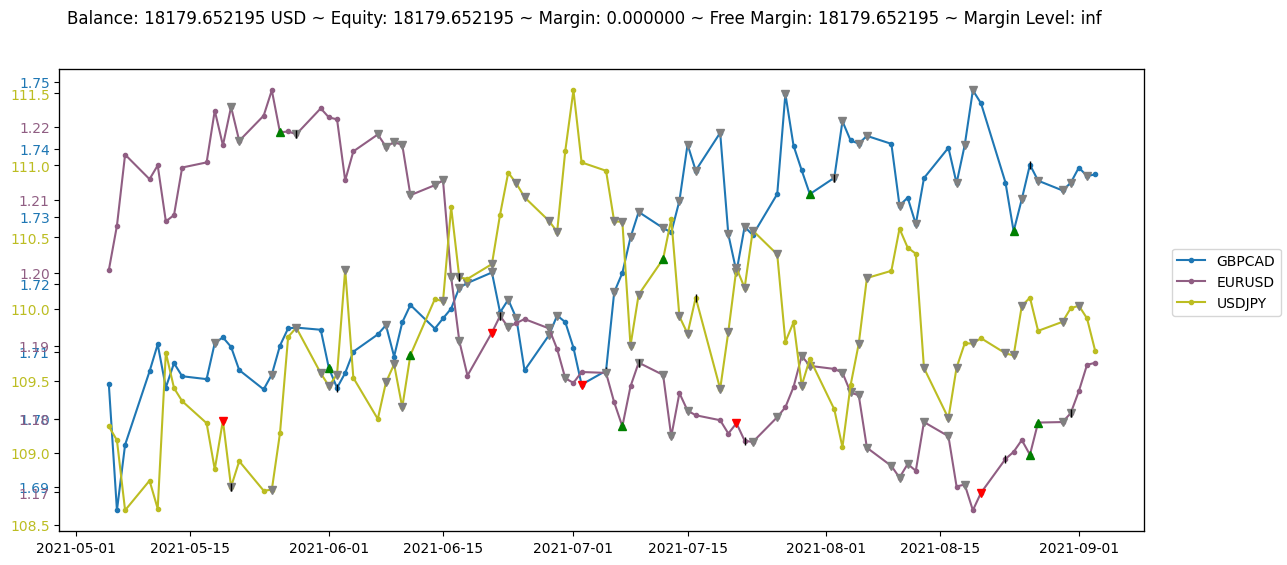
Render in simple_figure mode
- Each symbol is illustrated with a separate color.
- The green/red triangles show successful buy/sell actions.
- The gray triangles indicate that the buy/sell action has encountered an error.
- The black vertical bars specify close actions.
env.render('simple_figure')
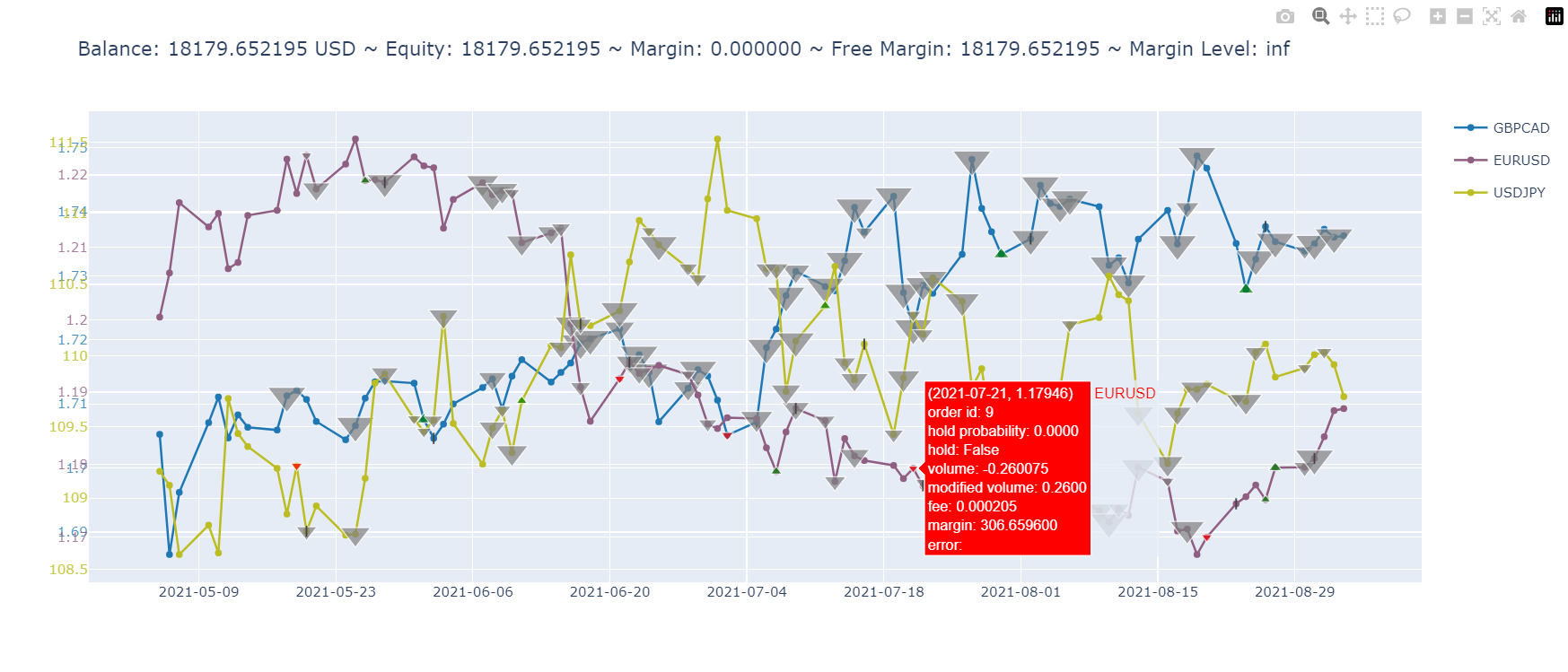
Render in advanced_figure mode
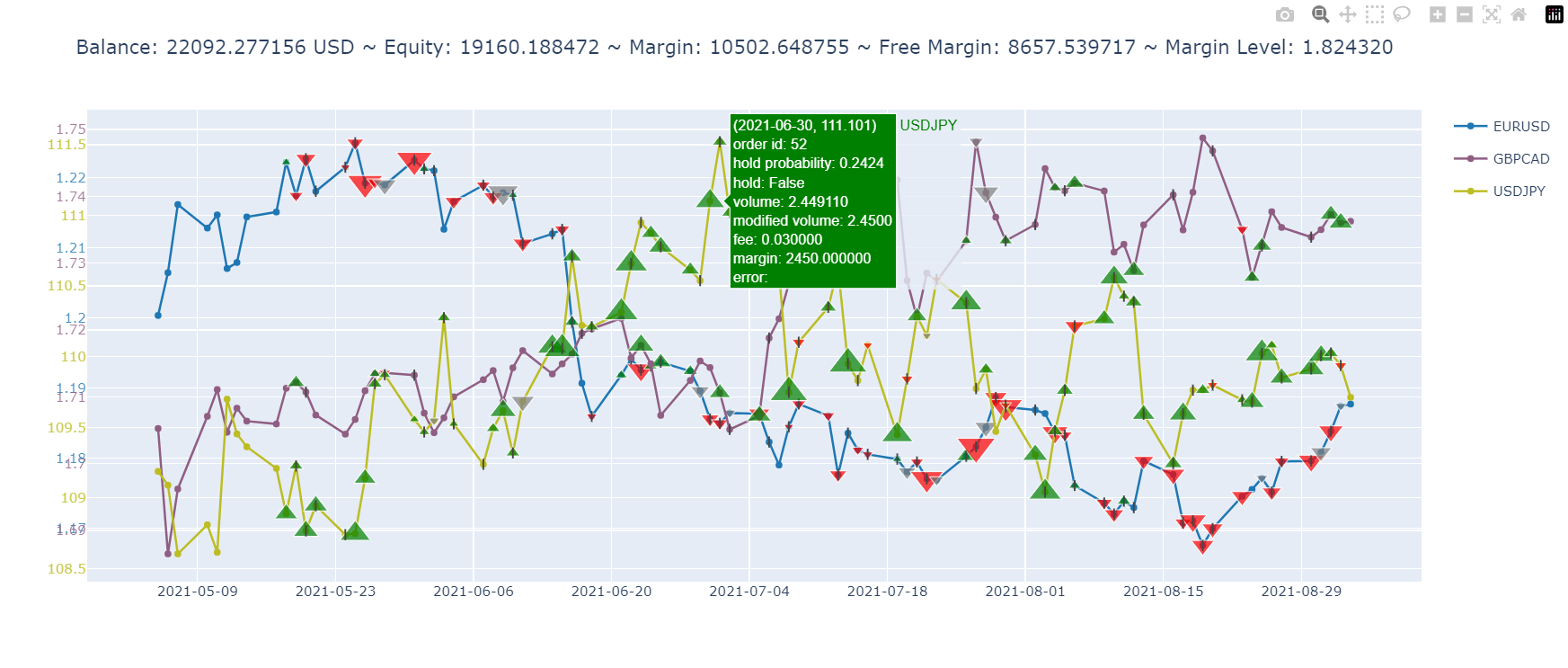
- Clicking on a symbol name will hide/show its plot.
- Hovering over points and markers will display their detail.
- The size of triangles indicates their relative volume.
env.render('advanced_figure', time_format="%Y-%m-%d")
A Complete Example using stable-baselines
import gymnasium as gym
from gym_mtsim import (
    Timeframe, SymbolInfo,
    MtSimulator, OrderType, Order, SymbolNotFound, OrderNotFound,
    MtEnv,
    FOREX_DATA_PATH, STOCKS_DATA_PATH, CRYPTO_DATA_PATH, MIXED_DATA_PATH,
)
from stable_baselines3 import A2C
from stable_baselines3.common.vec_env import DummyVecEnv
import random
import numpy as np
import torch

env_name = 'forex-hedge-v0'

# reproduce training and test
seed = 2024
random.seed(seed)
np.random.seed(seed)
torch.manual_seed(seed)

env = gym.make(env_name)
model = A2C('MultiInputPolicy', env, verbose=0)
model.learn(total_timesteps=1000)

observation, info = env.reset(seed=seed)

while True:
    action, _states = model.predict(observation)
    observation, reward, terminated, truncated, info = env.step(action)
    done = terminated or truncated

    if done:
        break

env.unwrapped.render('advanced_figure', time_format='%Y-%m-%d')
References
- https://www.mql5.com/en/docs/python_metatrader5
- https://www.metatrader5.com/en/terminal/help/trading_advanced/margin_forex
- https://admiralmarkets.com/education/articles/forex-basics/margin-in-forex-trading-margin-level-vs-margin-call
- https://www.investopedia.com/articles/forex/12/calculating-profits-and-losses-of-forex-trades.asp