Open Interface

Control Your Computer Using LLMs
Open Interface
- Self-drives your computer by sending your requests to an LLM backend (GPT-4o, Gemini, etc) to figure out the required steps.
- Automatically executes these steps by simulating keyboard and mouse input.
- Course-corrects by sending the LLM backend updated screenshots of the progress as needed.
Full Autopilot for All Computers Using LLMs

Demo 💻
"Solve Today's Wordle"
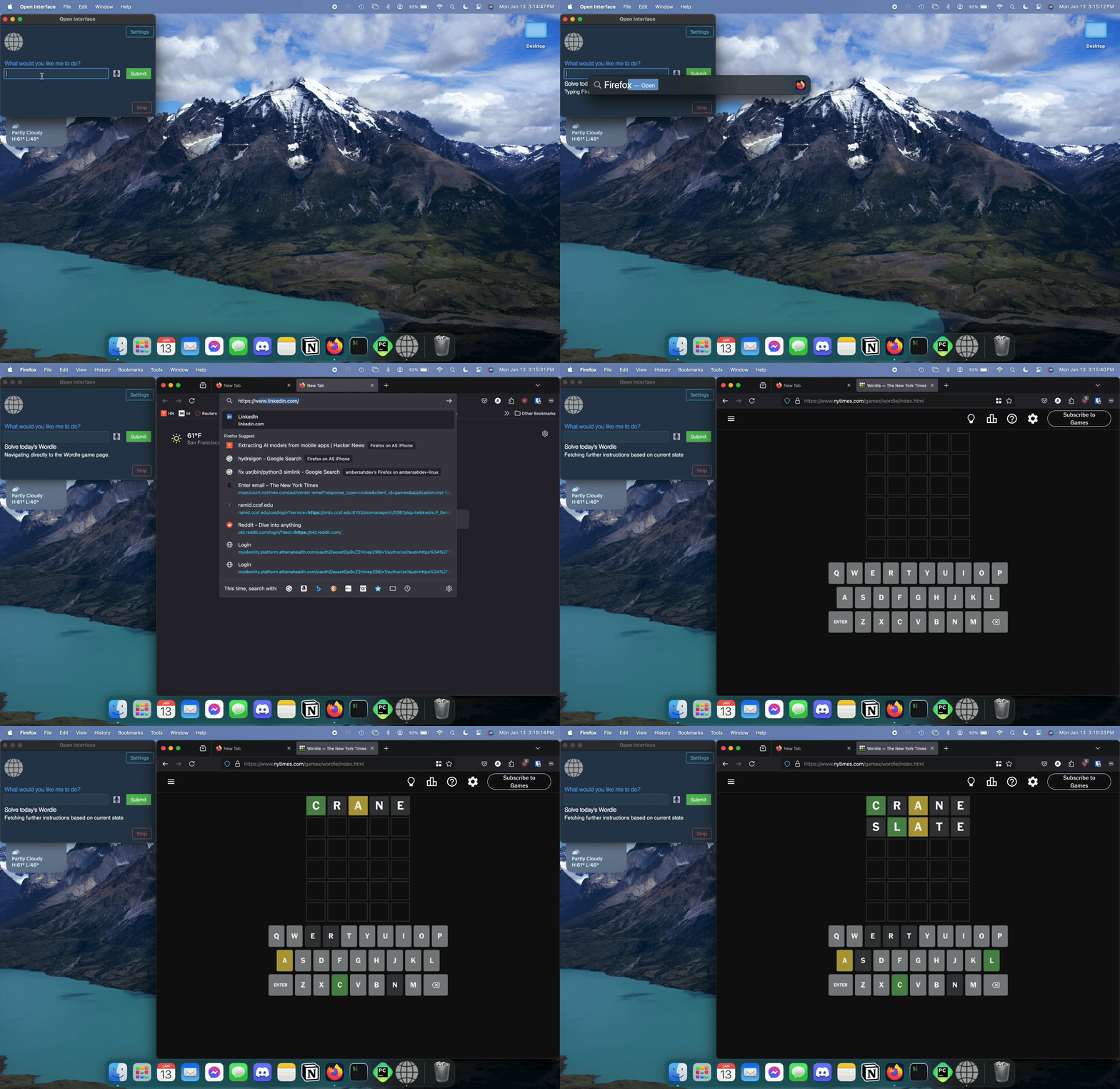
clipped, 2x
"Make me a meal plan in Google Docs"

"Write a Web App"

Install 💽
 MacOS
MacOS
Download the MacOS binary from the latest [release](https://github.com/AmberSahdev/Open-Interface/releases/latest).
Unzip the file and move Open Interface to the Applications Folder.

Apple Silicon M-Series Macs
Open Interface will ask you for Accessibility access to operate your keyboard and mouse for you, and Screen Recording access to take screenshots to assess its progress.
In case it doesn't, manually add these permission via System Settings -> Privacy and Security


Intel Macs
Launch the app from the Applications folder.
You might face the standard Mac "Open Interface cannot be opened" error.

In that case, press "Cancel".
Then go to System Preferences -> Security and Privacy -> Open Anyway.


Open Interface will also need Accessibility access to operate your keyboard and mouse for you, and Screen Recording access to take screenshots to assess its progress.


Lastly, checkout the [Setup](#setup) section to connect Open Interface to LLMs (OpenAI GPT-4V)
 Linux
Linux
    Linux binary has been tested on Ubuntu 20.04 so far.
    Download the Linux zip file from the latest [release](https://github.com/AmberSahdev/Open-Interface/releases/latest).

        Extract the executable and checkout the [Setup](https://github.com/AmberSahdev/Open-Interface?tab=readme-ov-file#setup) section to connect Open Interface to LLMs, such as OpenAI GPT-4V.
 Windows
Windows binary has been tested on Windows 10.
Download the Windows zip file from the latest [release](https://github.com/AmberSahdev/Open-Interface/releases/latest).
Unzip the folder, move the exe to the desired location, double click to open, and voila.
Checkout the [Setup](https://github.com/AmberSahdev/Open-Interface?tab=readme-ov-file#setup) section to connect Open Interface to LLMs (OpenAI GPT-4V)
 Run as a Script
  Install Python 3.12 or newer.
  Clone the repo git clone https://github.com/AmberSahdev/Open-Interface.git
  Enter the directory cd Open-Interface
  Optionally use a Python virtual environment

      Note: pyenv handles tkinter installation weirdly so you may have to debug for your own system yourself.
      pyenv local 3.12.2
      python -m venv .venv
      source .venv/bin/activate


  Install dependencies pip install -r requirements.txt
  Run the app using python app/app.py
Setup 🛠️
Set up the OpenAI API key
-
Get your OpenAI API key
- Open Interface needs access to GPT-4o to perform user requests. GPT-4o keys can be downloaded from your OpenAI account at platform.openai.com/settings/organization/api-keys.
- Follow the steps here to add balance to your OpenAI account. To unlock GPT-4o a minimum payment of $5 is needed.
- More info
-
Save the API key in Open Interface settings
- In Open Interface, go to the Settings menu on the top right and enter the key you received from OpenAI into the text field like so:
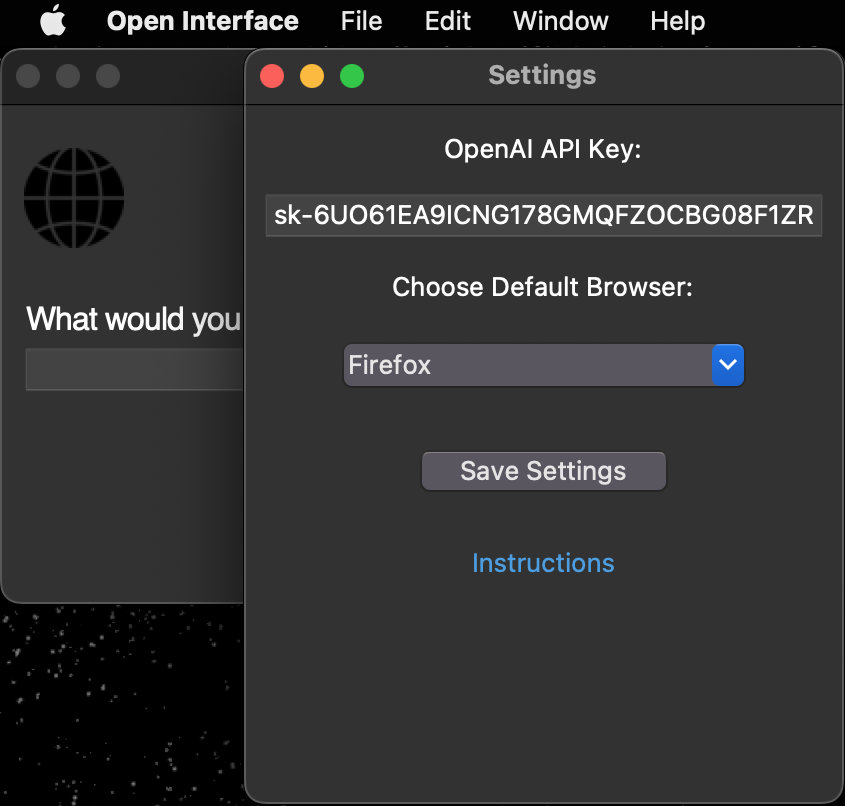
-
After setting the API key for the first time you'll need to restart the app.
Set up the Google Gemini API key
- Go to Settings -> Advanced Settings and select the Gemini model you wish to use.
- Get your Google Gemini API key from https://aistudio.google.com/app/apikey.
- Save the API key in Open Interface settings.
- Save the settings and restart the app.
Optional: Setup a Custom LLM
-
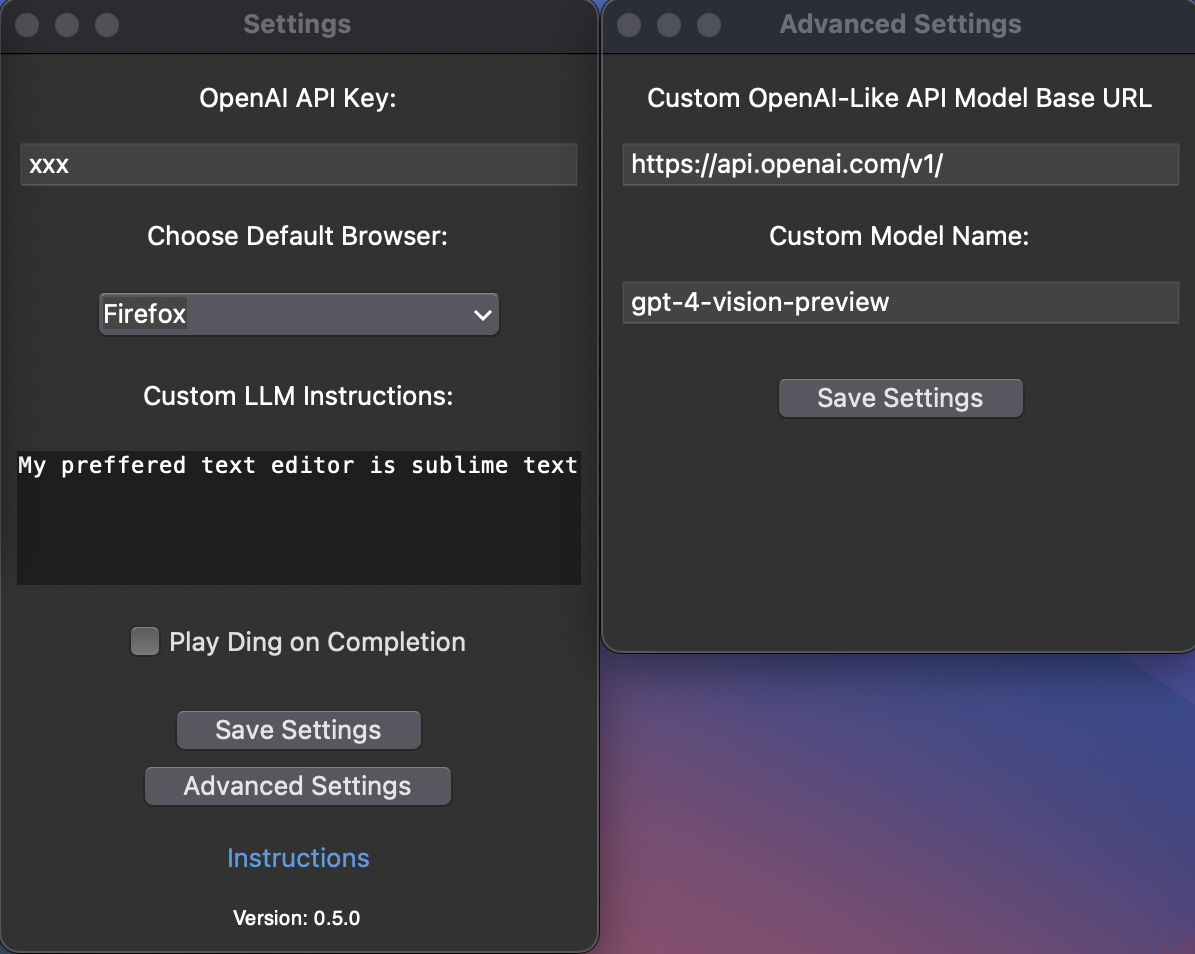
Open Interface supports using other OpenAI API style LLMs (such as Llava) as a backend and can be configured easily in the Advanced Settings window.
-
Enter the custom base url and model name in the Advanced Settings window and the API key in the Settings window as needed.
-
NOTE - If you're using Llama:
-
You may need to enter a random string like "xxx" in the API key input box.
-
You may need to append /v1/ to the base URL.
-
-
If your LLM does not support an OpenAI style API, you can use a library like this to convert it to one.
-
You will need to restart the app after these changes.
Stuff It’s Error-Prone At, For Now 😬
- Accurate spatial-reasoning and hence clicking buttons.
- Keeping track of itself in tabular contexts, like Excel and Google Sheets, for similar reasons as stated above.
- Navigating complex GUI-rich applications like Counter-Strike, Spotify, Garage Band, etc due to heavy reliance on cursor actions.
The Future 🔮
(with better models trained on video walkthroughs like Youtube tutorials)
- "Create a couple of bass samples for me in Garage Band for my latest project."
- "Read this design document for a new feature, edit the code on Github, and submit it for review."
- "Find my friends' music taste from Spotify and create a party playlist for tonight's event."
- "Take the pictures from my Tahoe trip and make a White Lotus type montage in iMovie."
Notes 📝
- Cost Estimation: $0.0005 - $0.002 per LLM request depending on the model used.
(User requests can require between two to a few dozen LLM backend calls depending on the request's complexity.)
- You can interrupt the app anytime by pressing the Stop button, or by dragging your cursor to any of the screen corners.
- Open Interface can only see your primary display when using multiple monitors. Therefore, if the cursor/focus is on a secondary screen, it might keep retrying the same actions as it is unable to see its progress.
System Diagram 🖼️
+----------------------------------------------------+
| App                                                |
|                                                    |
|    +-------+                                       |
|    |  GUI  |                                       |
|    +-------+                                       |
|        ^                                           |
|        |                                           |
|        v                                           |
|  +-----------+  (Screenshot + Goal)  +-----------+ |
|  |           | --------------------> |           | |
|  |    Core   |                       |    LLM    | |
|  |           | <-------------------- |  (GPT-4o) | |
|  +-----------+    (Instructions)     +-----------+ |
|        |                                           |
|        v                                           |
|  +-------------+                                   |
|  | Interpreter |                                   |
|  +-------------+                                   |
|        |                                           |
|        v                                           |
|  +-------------+                                   |
|  |   Executer  |                                   |
|  +-------------+                                   |
+----------------------------------------------------+
Star History ⭐️

Links 🔗
-
Check out more of my projects at AmberSah.dev.
-
Other demos and press kit can be found at MEDIA.md.