
Open-source, agent-agnostic CLI that gives AI coding agents eyes.
Your agent builds a feature — ProofShot records video proof it works.
Works with Claude Code · Cursor · Codex · OpenCode · Gemini CLI · Windsurf · GitHub Copilot · any agent that runs shell commands
Why ProofShot?
AI coding agents build UI features blind. They write code but can't verify the result looks right, works correctly, or throws no errors.
ProofShot closes the loop: an open-source CLI that plugs into any AI coding agent and gives it a verification workflow — test in a real browser, record video proof, collect errors, and bundle everything for the human to review.
The human gets a video recording, screenshots of key moments, and a report of any console or server errors found. View artifacts locally, or run proofshot pr to upload everything to the GitHub PR as an inline comment. No vendor lock-in. No cloud dependency.
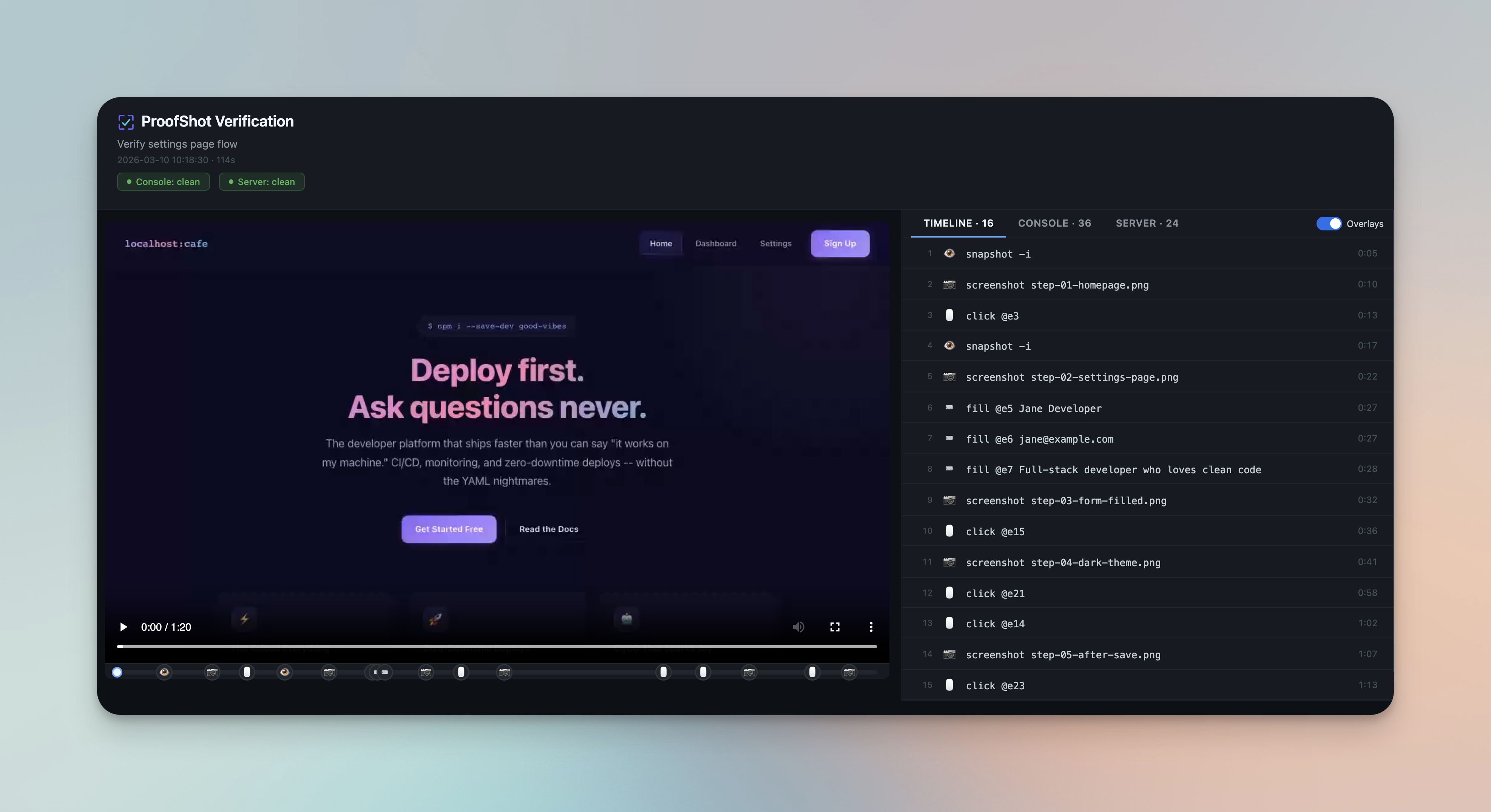
The interactive viewer: video recording with scrub bar, action markers, and step-by-step timeline
How Is This Different?
The #1 question: "Why not just use Playwright MCP / Chrome DevTools MCP / agent-browser directly?"
Short answer: those tools control a browser. ProofShot is a verification workflow that bundles proof artifacts for human review.
| Playwright MCP | DevTools MCP | agent-browser | ProofShot | |
|---|---|---|---|---|
| Browser control | ✅ | ✅ | ✅ | ✅ (via agent-browser) |
| Video recording | ✅ | ❌ | ✅ | ✅ |
| Screenshot capture | ✅ | ✅ | ✅ | ✅ |
| Console error collection | ❌ | ✅ | ✅ | ✅ |
| Dev server log capture | ❌ | ❌ | ❌ | ✅ |
| Error detection (10+ languages) | ❌ | ❌ | ❌ | ✅ |
| Action timeline with timestamps | ❌ | ❌ | ❌ | ✅ |
| Interactive HTML viewer | ❌ | ❌ | ❌ | ✅ |
| Video-synced log playback | ❌ | ❌ | ❌ | ✅ |
PR comment upload (proofshot pr) |
❌ | ❌ | ❌ | ✅ |
Visual diff (proofshot diff) |
❌ | ❌ | ❌ | ✅ |
| Agent-agnostic skill install | ❌ | ❌ | ❌ | ✅ |
| Compact element refs (vs full a11y tree) | ❌ | N/A | ✅ | ✅ |
ProofShot sits on top of agent-browser. It adds session management, server log capture, error detection, video trimming, timestamp synchronization, the interactive viewer, and the PR upload workflow. The browser primitives come from agent-browser — ProofShot is the verification layer.
Use Playwright MCP or DevTools MCP if you want live debugging or DOM inspection during development. Use ProofShot if you want bundled proof artifacts you can review in seconds or attach to a PR.
Install
npm install -g proofshot
proofshot install
The first command installs the CLI and agent-browser (with headless Chromium). The second detects your AI coding tools and installs the ProofShot skill at user level — works across all your projects automatically.
How It Works
Three-step workflow: start, test, stop.
# 1. Start — open browser, begin recording, capture server logs
proofshot start --run "npm run dev" --port 3000 --description "Login form verification"

# 2. Test — the AI agent drives the browser
agent-browser snapshot -i                                    # See interactive elements
agent-browser open http://localhost:3000/login               # Navigate
agent-browser fill @e2 "test@example.com"                    # Fill form
agent-browser click @e5                                      # Click submit
agent-browser screenshot ./proofshot-artifacts/step-login.png # Capture proof

# 3. Stop — bundle video + screenshots + errors into proof artifacts
proofshot stop
The skill file teaches the agent this workflow automatically. The user just says "verify this with proofshot" and the agent handles the rest.
Output Artifacts
Each session produces a timestamped folder in ./proofshot-artifacts/:
| File | Description |
|---|---|
session.webm |
Video recording of the entire session |
viewer.html |
Standalone interactive viewer with scrub bar, timeline, and Console/Server log tabs |
SUMMARY.md |
Markdown report with errors, screenshots, and video |
step-*.png |
Screenshots captured at key moments |
session-log.json |
Action timeline with timestamps and element data |
server.log |
Dev server stdout/stderr (when using --run) |
console-output.log |
Browser console output |

Generated artifacts for a single verification session
The viewer also includes tabs for browsing console and server logs, with error highlighting and timestamps synced to the video:
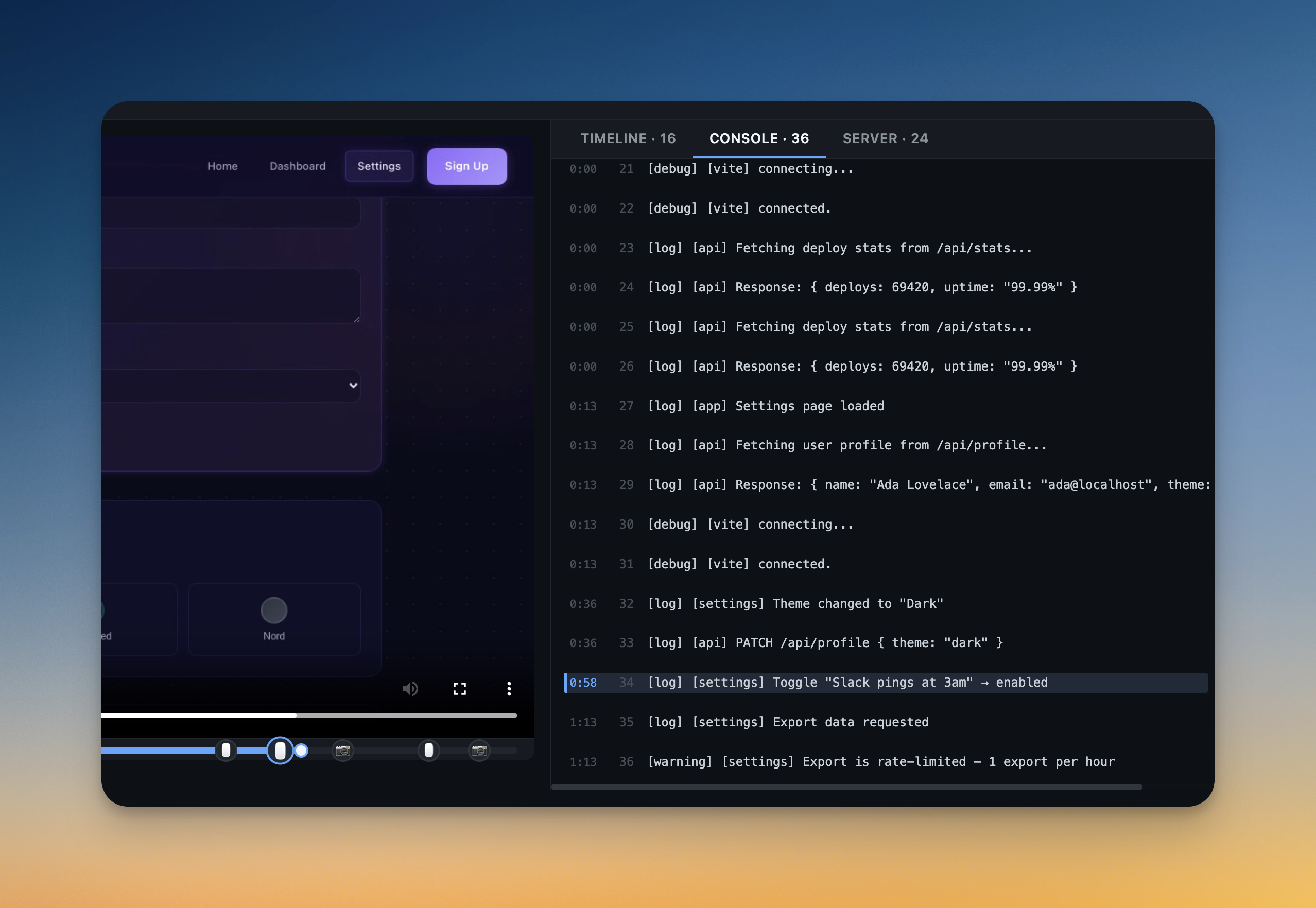
Console logs tab with error highlighting and video-synced timestamps
Commands
proofshot install
Detect AI coding tools on your machine and install the ProofShot skill. Run once per machine.
proofshot install               # Interactive tool selection
proofshot install --only claude  # Only install for specific tools
proofshot install --skip cursor  # Skip specific tools
proofshot install --force        # Overwrite existing installations
proofshot start
Start a verification session: browser, recording, error capture.
proofshot start                                        # Server already running
proofshot start --run "npm run dev" --port 3000         # Start and capture server
proofshot start --description "Verify checkout flow"    # Add description to report
proofshot start --url http://localhost:3000/login       # Open specific URL
proofshot start --headed                                # Show browser (debugging)
proofshot start --force                                 # Override a stale session from a previous crash
You can also configure browser launch behavior in proofshot.config.json:
{
  "browser": {
    "configPath": "./agent-browser.local.json",
    "ignoreHttpsErrors": true,
    "executablePath": "/Applications/Google Chrome.app/Contents/MacOS/Google Chrome"
  }
}
Set browser.configPath when you need ProofShot to run agent-browser against a project-specific config instead of inheriting ~/.agent-browser/config.json. Relative paths are resolved from the directory that contains proofshot.config.json.
proofshot stop
Stop recording, collect errors, generate proof artifacts.
proofshot stop              # Stop session and close browser
proofshot stop --no-close   # Stop but keep browser open
proofshot exec
Pass-through to agent-browser with automatic session logging. Captures timestamps, element data, and resolves screenshot paths.
When a ProofShot session is active, proofshot exec reuses the same isolated agent-browser session that proofshot start created for that run. This keeps screenshots, console logs, video recording, and browser actions pointed at the same browser session.
proofshot exec click @e3
proofshot exec screenshot step-checkout.png
proofshot diff
Compare current screenshots against a baseline for visual regression.
proofshot diff --baseline ./previous-artifacts
proofshot pr
Upload session artifacts to GitHub and post a verification comment on the PR. Finds all sessions recorded on the current branch, uploads screenshots and video, and posts a formatted comment with embedded screenshots.
proofshot pr              # Auto-detect PR from current branch
proofshot pr 42           # Target a specific PR
proofshot pr --dry-run    # Preview the markdown without posting
proofshot pr --upload-provider github-web-attachments  # Use GitHub's internal attachment flow
By default, ProofShot uses the official GitHub repository contents API and uploads artifacts to a dedicated proofshot-artifacts branch. This works with normal gh authentication and GH_TOKEN.
The github-web-attachments provider is still available for inline GitHub-hosted media, but it relies on GitHub's internal web upload endpoint and may reject browser-based gh auth login OAuth sessions.
Converts .webm video to .mp4 if ffmpeg is available.
proofshot clean
Remove the ./proofshot-artifacts/ directory.
proofshot clean
proofshot doctor
Print the current ProofShot environment, including config path, browser mode, viewport, installed binaries, and any active session.
proofshot doctor
Supported Agents
proofshot install detects and configures skills for:
| Agent | Install location |
|---|---|
| Claude Code | ~/.claude/skills/proofshot/SKILL.md |
| Cursor | ~/.cursor/rules/proofshot.mdc |
| Codex (OpenAI) | ~/.codex/skills/proofshot/SKILL.md |
| OpenCode | ~/.config/opencode/skills/proofshot/SKILL.md |
| Gemini CLI | Appends to ~/.gemini/GEMINI.md |
| Windsurf | Appends to ~/.codeium/windsurf/memories/global_rules.md |
All skills install at user level — no per-project configuration needed.
Try It
The repo includes sample apps so you can see ProofShot in action without your own project.
git clone https://github.com/AmElmo/proofshot.git
cd proofshot
npm install && npm run build && npm link

# Set up the sample app
cd test/fixtures/sample-app
npm install
Open your AI agent in the test/fixtures/sample-app/ directory and prompt it:
Verify the sample app with proofshot. Start on the homepage, check the hero section, navigate to the Dashboard and check the metrics, then go to Settings and update the profile name. Screenshot each page.
Or run the automated test script without an agent:
bash test-proofshot.sh
Check proofshot-artifacts/ for the video, screenshots, and report.
Error Detection
ProofShot automatically detects errors from server logs across 10+ languages: JavaScript/Node.js, Python, Ruby/Rails, Go, Java/Kotlin, Rust, PHP, C#/.NET, Elixir/Phoenix, and more. Add patterns for new languages in src/utils/error-patterns.ts.
Documentation
- Architecture — How ProofShot works under the hood, why agent-browser was chosen, the session lifecycle, viewer internals, and design decisions.
- Test Apps — Three sample apps with ready-to-use prompts for testing ProofShot end-to-end across different UI patterns (SaaS dashboard, kanban board, chat interface).
Contributing
Contributions welcome! The project uses TypeScript (ESM-only) with tsup for builds and vitest for tests.
npm install
npm run build    # Build (required after changes)
npm test         # Run tests
npm run dev      # Watch mode
Three sample apps in test/fixtures/ cover different UI patterns for end-to-end testing: a SaaS dashboard (sample-app), a kanban board (todo-app), and a chat interface (chat-app).
Built on agent-browser by Vercel.