Video Podcast Maker

Automated pipeline to create professional video podcasts from a topic. Supports Bilibili, YouTube, Xiaohongshu, Douyin, and WeChat Channels with multi-language output (zh-CN, en-US). Combines research, script generation, local TTS (edge free, plus azure), Remotion rendering, and FFmpeg mixing. Current release: v5.3.0 — see CHANGELOG.md for version history.
Works with: Claude Code · OpenClaw · OpenCode · Codex · Pi — any coding agent that supports SKILL.md
Publish to: Bilibili · YouTube · Xiaohongshu · Douyin · WeChat Channels
No coding required! Just describe your topic in plain language — the coding agent guides you through each step interactively. You make creative decisions, the agent handles all the technical details.
Note: This project is still under active development and may not be fully mature yet. Your feedback is greatly appreciated — feel free to open an issue.
Features
- Topic → 4K video - research, narration script, TTS audio, Remotion composition, 4K render + BGM in one pipeline
- Local TTS backends - Edge (free, no key) and Azure — synthesized in-house, no external component skill required
- Asset engine - per-video manifest with license provenance; producers are user files, assetseeker stock, imagencn AI stills, videogencn AI B-roll, and Hyperframes overlays — paid generation always asks first
- 4K output + Remotion-native subtitles - 3840×2160; SRT rendered in React at 4K (legacy FFmpeg burn-in available)
- Design learning - extract style profiles from reference videos/images; auto-applied when topics match
- Vertical shorts - 9:16 highlight clips generated from long-form sections
- Multi-platform & multi-language - Bilibili / YouTube / Xiaohongshu / Douyin / WeChat Channels × zh-CN / en-US, with per-platform publish info
- Pronunciation control - global + per-project phoneme dictionaries for Chinese polyphones
Quick Start
1. Install: with the skills CLI, pointing at the full skill:
npx skills add Agents365-ai/video-podcast-maker/skills/video-podcast-maker -g
Drop the /skills/video-podcast-maker suffix to install all three variants (full, -lite, -nano), or clone this repo instead. Paths below are written from the repo root; under a skills CLI install the same files live in the agent's ${SKILL_DIR}.
2. Set up — Python 3.8+, Node.js 18+, FFmpeg, and a Remotion project:
brew install ffmpeg node python3          # macOS (Ubuntu: sudo apt install ffmpeg nodejs python3)
pip install -r skills/video-podcast-maker/requirements.txt
npx create-video@latest my-video-project   # or reuse an existing Remotion project
cd my-video-project && npm i
One-time cost: a fresh Remotion project downloads ~2.2 GB of npm packages plus a ~90 MB Chrome headless shell. Prefer reusing an existing Remotion project (with
node_modules/already installed) for your next video — the heavy install happens once per project, not per video. Lottie animations are optional (@remotion/lottie+lottie-web); install them per project only if you useLottieAnimation.
3. Configure — set TTS_BACKEND plus its API keys (see TTS Backends and Environment Variables).
4. Tell your agent:
"Create a video podcast about [your topic]"
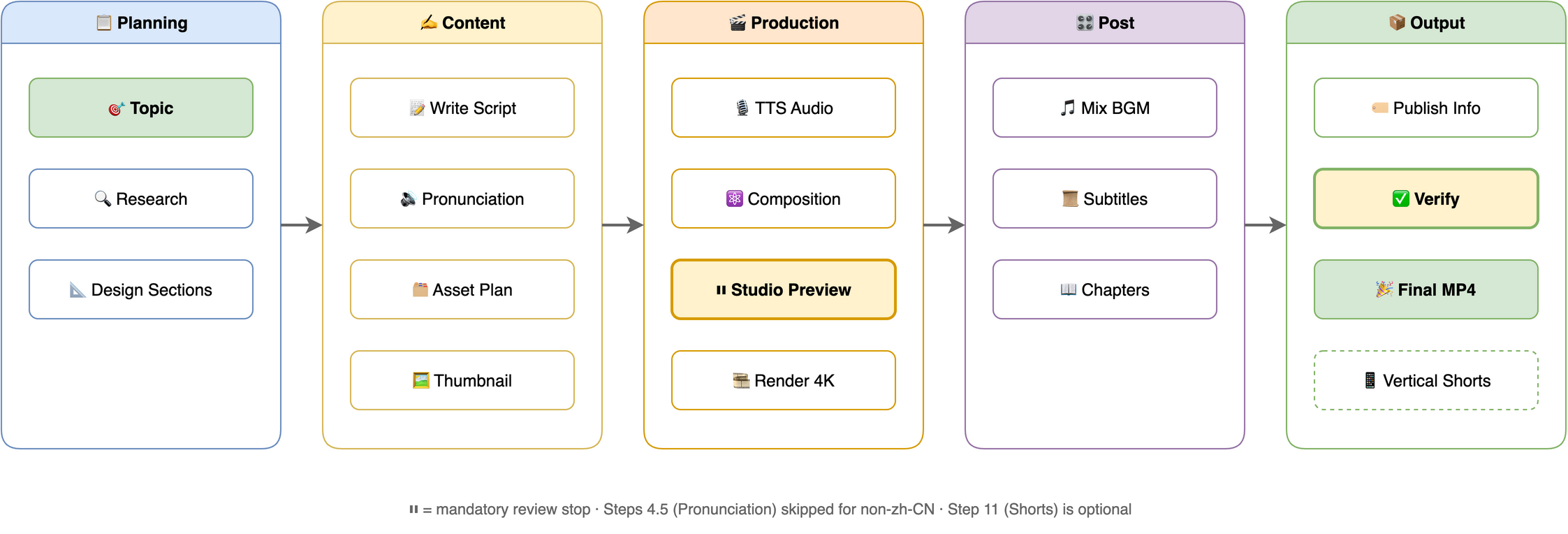
The agent runs the whole workflow (research → script → TTS → Remotion composition → Studio review → 4K render + BGM). Preview and iterate in Remotion Studio (npx remotion studio src/remotion/index.ts); the agent waits for your explicit "render 4K" confirmation before the final render.
⚠️ For the human reading this (not the AI): manually polish podcast.txt, repeatedly
This section is for you, the human — not the agent. Every downstream step — TTS narration, subtitles, section transitions, animation timing, final cut — is derived from this single
podcast.txt. A weak script renders into 4K garbage. No amount of polish downstream saves it.The AI-generated draft is a starting point, nothing more. Do these yourself — don't hand them off to the AI:
- Mentally read it as the narrator. Treat each sentence as one breath — if a line forces you to "catch your breath" or backtrack to parse, fix it. Where you stumble silently is where TTS stumbles audibly.
- Revise at least three times.
- Pass 1: typos, awkward phrasing, tongue-twisters
- Pass 2: cut filler, cut throat-clearing intros ("So today we're going to talk about…"), cut redundancy
- Pass 3: tune rhythm — where to pause, where to break a long sentence, which word carries the stress
- Read each
[SECTION:xxx]block end-to-end. Confirm each section opens with a hook and lands a clean transition into the next — not a bullet-point dump.- Audit numbers, proper nouns, and English terms separately. ~90% of TTS mispronunciations live here. If pronunciation is wrong, add it to
phonemes.json; if it just sounds awkward, rewrite it.- Know your length budget. Estimate ~280 zh-CN chars/min or ~150 en words/min. A 5–10 min video means ~1400–2800 chars / 750–1500 words. Don't pad to fill time.
The only acceptance test: read through it once in your head — does any line make you wince? If yes, don't move on to Step 7 (TTS) yet. Otherwise you're just rendering 4K of something even you don't want to hear.
Workflow
Related Skills
Variants in this repo (skills/):
- video-podcast-maker — the full production pipeline (this README's subject)
- video-podcast-maker-lite — minimal personal pipeline: Azure SSML TTS + Remotion, no bundled templates
- video-podcast-maker-nano — tool-agnostic, logic-only pipeline (any TTS backend, any video tool); autonomous by default, oversight configured per project
External skills:
- remotion-best-practices - recommended; core Remotion patterns and guidelines (built-in minimum rules if absent)
- assetseeker - optional; license-vetted stock photos/video/BGM/SFX/icons/fonts
- imagencn - optional; AI stills and thumbnails (paid APIs)
- videogencn - optional; AI video clips for B-roll (paid APIs)
- Hyperframes - optional; transparent overlay animations (Node 22+)
Requirements
| Software | Version | Purpose |
|---|---|---|
| macOS / Linux | - | Tested on macOS, Linux compatible |
| Python | 3.8+ | TTS script, automation |
| Node.js | 18+ | Remotion video rendering |
| FFmpeg | 4.0+ | Audio/video processing |
Installed through the skills CLI? SKILL.md, scripts, and templates then live under the agent's
${SKILL_DIR}; paths in this README are written from the repo-root perspective, which is what a clone gives you.
TTS Backends (local)
TTS synthesis is in-house — no external component skill required. Set TTS_BACKEND to a platform id; only the active platform's env vars are needed:
TTS_BACKEND |
Provider | Required env vars | Get Key |
|---|---|---|---|
edge (default) |
Microsoft Edge TTS | (none — free) | — |
azure |
Microsoft Azure Speech | AZURE_SPEECH_KEY, AZURE_SPEECH_REGION (default eastasia) |
Azure Portal |
Want more platforms? The former ttscn component skill (cosyvoice, doubao, tencent, baidu, minimax, xunfei, elevenlabs, openai, google) is no longer a dependency. Install it separately and call it directly if you need those.
Environment Variables
Add to ~/.zshrc or ~/.bashrc:
export TTS_BACKEND="edge"                  # edge (default) / azure
export TTS_VOICE="zh-CN-XiaoxiaoNeural"    # optional; unset = backend default
export TTS_RATE="+5%"                      # optional; also settable in user_prefs.json (global.tts.rate)
export TTS_STYLE="gentle"                  # optional; azure only
export AZURE_SPEECH_KEY="..."              # keys for azure (see table above)
export AZURE_SPEECH_REGION="eastasia"      # azure speech region
export GEMINI_API_KEY="..."                # optional: AI thumbnails (imagencn)
export DASHSCOPE_API_KEY="..."             # optional: AI thumbnails (imagencn; ark/hunyuan/zhipu/step also work)
Then reload: source ~/.zshrc
Configuration
Mutable user-level files live in ~/.video-podcast-maker/ (shared across projects, safe from skill updates); the rest live in the skill root (skills/video-podcast-maker/ in this repo, ${SKILL_DIR} when installed):
| File | Location | Purpose |
|---|---|---|
phonemes.json |
~/.video-podcast-maker/ |
Global polyphone dictionary; auto-created from the bundled template; per-project overrides in videos/{name}/phonemes.json |
user_prefs.json |
~/.video-podcast-maker/ |
Your preferences (TTS, BGM, platform, visual overrides, style profiles); auto-created from template |
user_prefs.template.json / phonemes.template.json |
Skill root | Default templates — sources for the user-level copies |
prefs_schema.json |
Skill root | JSON Schema for preference validation |
tsconfig.json |
Skill root | TypeScript config for Remotion templates |
Output structure — every video renders into its own videos/{name}/ directory:
videos/{video-name}/
├── topic_definition.md      # Topic direction
├── topic_research.md        # Research notes
├── podcast.txt              # Narration script
├── phonemes.json            # (Optional) pronunciation overrides
├── assets/manifest.json     # Asset registry (role / source / license)
├── podcast_audio.wav        # TTS audio
├── podcast_audio.srt        # Subtitles
├── timing.json              # Section timing (drives animation sync)
├── thumbnail_*.png          # Video thumbnails
├── publish_info.md          # Title, tags, description
├── output.mp4               # Raw 4K render
├── video_with_bgm.mp4       # With BGM
├── bgm.mp3                  # Background music
├── final_video.mp4          # Final output
└── shorts/                  # (Optional) 9:16 vertical shorts
Background music: bundled tracks live in skills/video-podcast-maker/assets/ — perfect-beauty-191271.mp3 (upbeat) and snow-stevekaldes-piano-397491.mp3 (calm piano). Per-platform behavior (thumbnails, chapters, CTA, publish formats) is documented in the skill's references/platform-matrix.md.
❤️ Support
If this project helps you, consider supporting the author:

WeChat Pay

Alipay

Buy Me a Coffee

Give a Reward
👤 Author
Agents365-ai
- Bilibili:
- GitHub:
📄 License
MIT — Permission is hereby granted, free of charge, to any person obtaining a copy of this software.