CleanYourTV is an open-source toolkit that disables ad and bloat packages on Android TV and Google TV over Wi-Fi, then installs a small Apple TV–style home launcher. The cleanyourtv github repository is Gathin23/cleanyourtv; the project site is cleanyour.tv. According to the README, nothing is rooted, nothing is uninstalled, and a restore script can undo the package disables.
What CleanYourTV Is
Checked against the GitHub README, LICENSE, Releases, and cleanyour.tv on October 30, 2026 (America/Los_Angeles):
- Job: back up package/settings state, disable manufacturer telemetry, ad services, content rows, and other preloads with Android’s
pm disable-user, then build and set a compact native launcher as Home. - Network path: TV and computer on the same Wi-Fi; the tools talk to network ADB (commonly port 5555). The README also documents Wireless debugging pairing when 5555 stays closed.
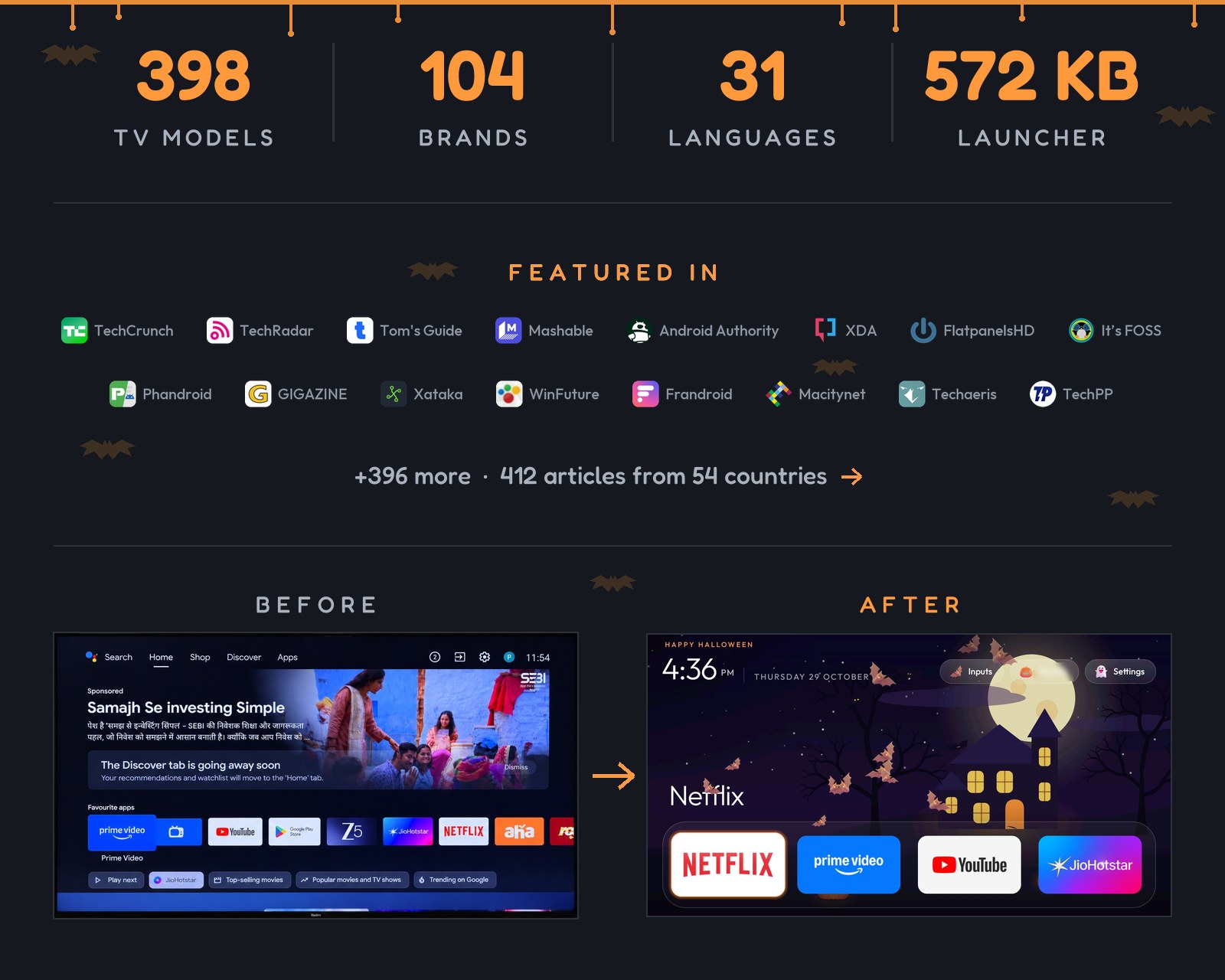
- Launcher: README describes a plain-Java home about 572 KB,
minSdkAndroid 8.0 (API 26), no network permission and no background services in that description. - License: MIT (
LICENSE, Copyright 2026 Gathin). - Repo pulse (GitHub API at check): about 46,882 stars and 5,789 forks; repository created 2026-10-17. Latest tagged release at check: v3.2.0 (“The Halloween update”), published 2026-10-29 UTC. Release assets list no prebuilt APK; the project tells you to build with
launcher/build-and-install.sh. - Naming: README says the project was called tv-vibehack until 19 October 2026; official domains are cleanyour.tv and this GitHub repo. It warns that other domains such as cleanyourtv.com are not run by the project (issue #1004).
- Press context: the maintainers’
docs/PRESS.mdlists coverage including TechCrunch (19 Oct 2026). That confirms media attention; it is not a quality score.
→ Open-source rankings: browse rising projects on AI Rank
Steps Overview (From the Docs)
The README’s Quick start is written for a coding assistant on a computer that shares Wi-Fi with the TV. Requirements named there: a shell, Python 3, a JDK 17–22, and Android SDK platform 34 with build-tools 34. Assistants listed include Claude Code, Codex, Gemini CLI, and Antigravity CLI. You can also run the same job by hand under Doing it by hand, or use the community Android phone app at cleanyour.tv/app (no laptop).
High-level path (paraphrased from README; always follow the live repo):
- On the TV: Settings → Device Preferences → About → press OK on Build seven times → Developer options → turn USB debugging on (and Network/ADB debugging if shown). Keep the TV on.
- On the computer:
git clone https://github.com/Gathin23/cleanyourtv, open that folder in the assistant, pastePROMPT.md, and fill in the TV model. Cloning matters so the assistant reusestools/disable.shandlauncher/build-and-install.shinstead of inventing scripts. - Follow along: accept “Allow USB debugging?” on the TV, then answer the checklist (apps you use, dock layout, voice assistant, Chromecast, updates).
By-hand tooling (README examples): tools/tv.py for probe/shell, tools/disable.sh / tools/restore.sh with a debloat.txt list, and launcher/build-and-install.sh to build and switch Home. PowerShell twins exist for Windows.
Android TV Debloat Scope and Other Platforms
| Platform | README stance |
|---|---|
| Android TV / Google TV | Debloat + launcher |
| Fire TV | Debloat half only; Fire OS will not hand Home to a third-party launcher. 2015 Fire TV Box (Fire OS 5): even pm routes refused |
| Some China-market TCL sets | May refuse any launcher install; called out in device list headers |
| Samsung Tizen, LG webOS, Roku, Vizio, Hisense VIDAA | Not supported (no ADB). Site points to cleanyour.tv/not-android for remote-only tracking toggles |
Contributor example lists live under examples/ and are searchable at cleanyour.tv/tvs. Full model tables stay on the site search page and under examples/ in the repo; counts in the README change as lists are merged.
Risks, ADB Hygiene, and Restore
The project FAQ states packages are disabled in the user profile, not flashed, rooted, or deleted. The named risk is disabling something the TV still needs—lists are meant to be applied carefully with restore ready. Settings → Apps can re-enable packages without the computer; if the set will not boot far enough, the FAQ points to a factory reset from recovery as a usual last resort.
Restore (README): keep the list you applied, then one line undoes disables. Example shape:
TV_HOST=192.168.1.50 tools/restore.sh examples/<your-tv>/debloat.txt
TV_HOST=192.168.1.50 tools/restore.sh examples/<your-tv>/debloat.txt com.google.android.apps.tv.launcherx
Before changes, tools/disable.sh writes state under ~/.cleanyourtv/. The launcher APK stays installed until you remove it in Settings → Apps.
After firmware updates: the README says updates reinstall over the cleaned system—packages and stock Home can return. Re-open ADB, then tools/check.py against your list (--fix to re-apply).
Close debugging when finished: network ADB on port 5555 is plaintext; the FAQ treats leaving it open as a real exposure. Turn off USB / Network / Wireless debugging, revoke authorisations, reboot, and confirm with tools/adb-closed.py <tv-ip> that the port refuses connections. The launcher keeps working with debugging off.
Home safety: install scripts only disable recognised stock launchers after the new Home answers HOME; tools/disable.sh skips disabling the current Home owner if nothing else can take HOME. Google TV notes warn about setupwraith crash-loops and Wi-Fi credentials tied to that package—see the live Troubleshooting docs before disabling it.
Project disclaimer (Legal section): CleanYourTV is independent and not affiliated with TV makers; it uses Developer options, ADB, and pm disable-user (same class of switch as Settings → Apps → Disable). You run it on a TV you own, at your own risk; the README says changing software may affect warranty or support. Software is provided as-is under MIT. For legal wording, read the repository Legal section in full.
Official Links
- Site: https://cleanyour.tv/
- Source: https://github.com/Gathin23/cleanyourtv
- Prompt: https://github.com/Gathin23/cleanyourtv/blob/main/PROMPT.md
- Releases: https://github.com/Gathin23/cleanyourtv/releases
- Phone app (community): https://cleanyour.tv/app
- Non-Android tracking tips: https://cleanyour.tv/not-android
Sources
- CleanYourTV README – https://github.com/Gathin23/cleanyourtv/blob/main/README.md
- CleanYourTV site – https://cleanyour.tv/
- LICENSE (MIT) – https://github.com/Gathin23/cleanyourtv/blob/main/LICENSE
- Release v3.2.0 – https://github.com/Gathin23/cleanyourtv/releases/tag/v3.2.0
- GitHub repository API snapshot (stars/forks/created) – https://api.github.com/repos/Gathin23/cleanyourtv
- TechCrunch, “People are using AI to make their smart TVs dumb again” (19 Oct 2026) – https://techcrunch.com/2026/10/19/people-are-using-ai-to-make-their-smart-tvs-dumb-again/
Keep exploring: see which open-source AI projects are rising today in the open-source rankings on AI Rank.
Or 📱 get the AI Rank app to follow them on your phone.
Cover image: official project card art; cropped to 1600×900 by AI Rank.
Prepared with automated editorial assistance and checked against the official repository, site, and dated GitHub API figures on October 30, 2026. We did not run CleanYourTV on a TV for this article.