Voice-Pro
The best AI speech recognition, translation, and multilingual dubbing solution 🚀


🎙️ An AI-powered web application for speech recognition, translation, and dubbing
 한국어 ∙
한국어 ∙
 English ∙
 中文简体 ∙
 中文繁體 ∙
 日本語 ∙
日本語 ∙
 Deutsch ∙
 Español ∙
 Português
Voice-Pro is a state-of-the-art web app that transforms multimedia content creation. It integrates YouTube video downloading, voice separation, speech recognition, translation, and text-to-speech into a single, powerful tool for creators, researchers, and multilingual professionals.
- 🔊 Top-tier speech recognition: Whisper, Faster-Whisper, Whisper-Timestamped
- 🎤 Zero-shot voice cloning: F5-TTS, E2-TTS, CosyVoice (incl. Fun-CosyVoice3 — Korean and 8 more languages)
- 📢 Multilingual text-to-speech: Edge-TTS, kokoro (optional Azure TTS with your own keys — see Azure services)
- 🎥 YouTube processing & audio extraction: yt-dlp
- 🌍 Instant translation for 100+ languages: Deep-Translator (optional Azure Translator with your own keys)
A robust alternative to ElevenLabs, Voice-Pro empowers podcasters, developers, and creators with advanced voice solutions.
⚠️ Please Note
- Due to WeConnect development work, Voice-Pro development and updates are not possible for the time being.
- We have made all Voice-Pro code open source and completely free. Voice-Pro can now be freely distributed and modified by anyone.
- It works well on Windows with NVIDIA GPU. Operation on Mac and Linux has not been verified.
- Please leave your requests on the
or
pages.
- Troubleshooting: In most cases, issues can be resolved by deleting the
installer_filesfolder and then runningstart.batagain (a clean reinstall takes only a few minutes; downloaded AI models inmodel/are kept). Errors are shown in the WebUI as red toasts that stay until closed.
📰 News & History
version 4.0
- ⚡ Migrated the installer from Miniconda/pip to uv — dramatically faster, fully reproducible installs from a committed
uv.lock. Everything stays insideinstaller_files/(uv, Python, packages). - 🐍 Upgraded runtime: Python 3.12, Torch 2.8.0+cu128 (RTX 50-series supported), Gradio 6.20.
- 🎙️ Latest ASR stack: faster-whisper 1.2.1 (large-v3-turbo, distil-large-v3.5), openai-whisper 20250625, whisper-timestamped 1.15.9. whisperX was removed (its dependency pins blocked the Gradio 6 upgrade; existing configs fall back to faster-whisper).
- 🗣️ Latest TTS stack: F5-TTS 1.1.21, kokoro 0.9.4, edge-tts 7.x, and re-vendored CosyVoice (upstream main).
- 🇰🇷 New optional TTS model: Fun-CosyVoice3-0.5B — 9 languages including Korean, selectable in the CosyVoice tab (downloads from the official HF repo on first use).
- 🧹 CUDA Toolkit and Visual Studio Build Tools are no longer required — all dependencies ship prebuilt wheels, and PyTorch bundles the CUDA runtime.
- 🛡️ Friendly to restricted / corporate PCs: no administrator rights needed —
start.batauto-downloads a portable ffmpeg if it is not installed, Whisper model downloads self-heal after interrupted/corrupted transfers, and translation automatically retries with backoff when the network rate-limits the free Google endpoint (failed lines are reported, originals kept). - 🚨 Errors are now visible in the WebUI: every failure shows a red error toast that stays on screen until you close it (previously a 10-second warning that was easy to miss), with actionable messages for common causes (missing ffmpeg, no media registered, etc.).
- 🖥️ UI: migrated to Gradio 6 (full-width layout for all tabs, subtitle tracks shown directly in the video players).
- 🧽
uninstall.batno longer requires administrator rights and no longer force-reboots;uninstall.bat silentruns unattended.
version 3.2
-
We have been focusing on WeConnect development for the past few months and have not been able to manage Voice-Pro at all.
-
We have decided to open source all Voice-Pro code.
-
Voice-Pro is completely free and supports Windows, Mac, Linux.
-
WeConnect is an application for global cultural exchange.
-
Connect with people from all over the world for meaningful cultural exchanges, language learning, and international friendships.
    
version 3.1
- 🪄 Support for fine-tuned models of F5-TTS
- 🌍 Supported languages
- English & Chinese: SWivid/F5-TTS_v1
 Finnish: AsmoKoskinen/F5-TTS_Finnish_Model
 French: RASPIAUDIO/F5-French-MixedSpeakers-reduced
 Hindi: SPRINGLab/F5-Hindi-24KHz
 Italian: alien79/F5-TTS-italian
- Japanese: Jmica/F5TTS/JA_21999120
 Russian: hotstone228/F5-TTS-Russian
- Spanish: jpgallegoar/F5-Spanish
version 3.0
- 🔥 Removed the AI Cover feature.
- 🚀 Added support for m-bain/whisperX.
version 2.0
- 🐍 Built with Python 3.10.15, Torch 2.5.1+cu124, and Gradio 5.14.0.
- 🆓 Free trial supports media up to 60 seconds in length.
- 🔥 Added the AI Cover feature.
- 🎤 Introduced support for CosyVoice and kokoro.
- ⏳ Initial run downloads CozyVoice2-0.5B (9GB), which may take over an hour depending on network speed.
- 🎧 Voice samples for cloning will be continuously updated.
- 📝 Added spaCy for natural sentence-by-sentence translation and TTS.
- ☁️ Subscription version includes Microsoft Azure Translator and TTS.
- 🏪 Subscription offers unlimited usage (no 60-second limit) during the subscription period, available via
 .
.
🎥 YouTube Showcase
[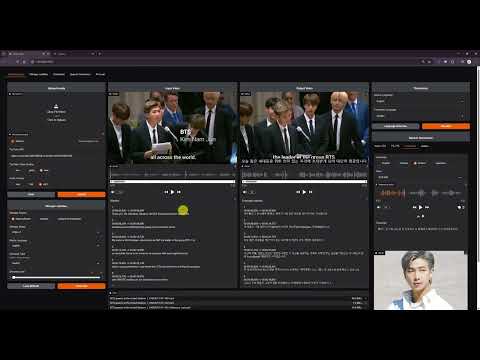
Demo for Voice-Pro (v2.0)](https://youtu.be/scC5CicZ6G0)
[
F5-TTS: Voice Cloning](https://youtu.be/Wfo7vQCD4no)
[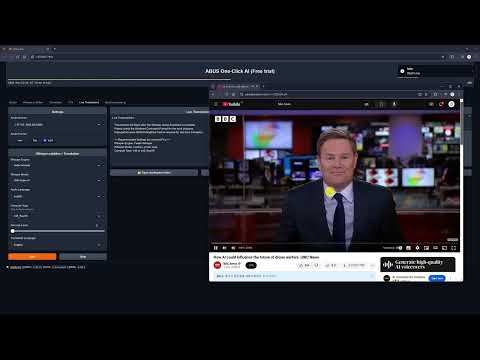
Live Transcription & Translation](https://youtu.be/GOzCDj4MCpo)
[
Multi-Lingual Voice Cloning: Korean - German](https://youtu.be/YdAq80wjtuQ)
[
Multi-Lingual Voice Cloning: English - Korean](https://youtu.be/Tu2okoHY174)
[
Multi-Lingual Voice Cloning: Korean - Japanese](https://youtu.be/dWCEwO56_7Y)
[
NVIDIA RTX Video Super-Resolution](https://youtu.be/HXomwoKS3V4)
[
AI Karaoke](https://youtu.be/lZK7pLJBHb4)
[
Multi-Lingual Voice Cloning: English - Korean](https://youtu.be/Co70lh95EsQ)
⭐ Key Features
1. Dubbing Studio
- YouTube video downloads & audio extraction
- Voice separation with Demucs
- Supports 100+ languages for speech recognition & translation
2. Speech Technologies
- Speech-to-Text: Whisper, Faster-Whisper, Whisper-Timestamped
- Text-to-Speech:
- Edge-TTS: 100+ languages, 400+ voices
- E2-TTS, F5-TTS, CosyVoice: Zero-shot cloning
- kokoro: Ranked #2 in HuggingFace TTS Arena
3. Real-Time Translation
- Instant speech recognition
- Multilingual translation on the fly
- Customizable audio inputs
🤖 WebUI
Dubbing Studio Tab
-
All-in-one hub: YouTube downloads, noise removal, subtitles, translation, & TTS
-
Supports all ffmpeg-compatible formats
-
Output options: WAV, FLAC, MP3
-
Subtitles & recognition for 100+ languages
-
TTS with speed, volume, & pitch controls

Whisper Caption Tab
- Subtitle-focused: 90+ languages
- Video-integrated subtitle display
- Word-level highlighting & denoise options
Translate Tab
-
Translation for 100+ languages
-
Supports subtitle files (ASS, SSA, SRT, etc.)
-
Real-time voice recognition & translation

Speech Generation Tab
-
Options: Edge-TTS, F5-TTS, CosyVoice, kokoro
-
Celeb voice podcasts & multilingual support

🎤✨ Reference Voice
- Please request the voice you want to add on the Issues page. Issues
English

Andrew Bustamante

Andrew Huberman

Avi Loeb

Ben Shapiro

Brett Johnson

Brian Keating

Coffeezilla

Dan Carlin

David Buss

David Fravor

David Kipping

Dennis Whyte

Donald Hoffman

Donald Trump

Douglas Murray

Duncan Trussell

Elon Musk

Garry Nolan

Jack Barsky

James Sexton

Jeff Bezos

Joe Rogan

John Mearsheimer

Jordan Peterson

Kanye 'Ye' West

Mark Zuckerberg

Michael Levin

Michael Saylor

Michio Kaku

MrBeast

Nick Lane

Paul Rosolie

Ryan Graves

Sam Altman

Sam Harris

Stephen Wolfram

Tucker Carlson

Vitalik Buterin

Yuval Harari
Chinese

迪丽热巴 (Dílì Rèbā)

蔡依林 (Cài Yīlín)

吴亦凡 (Wú Yìfán)

李易峰 (Lǐ Yìfēng)

杨幂 (Yáng Mì)

赵丽颖 (Zhào Lìyǐng)
Korean

BTS 진 (Jin)

BTS RM

IU (아이유)

이병헌

이정재

유재석
Japanese

綾瀬はるか (Ayase Haruka)
💻 System Requirements
- OS: Windows 10/11 (64-bit), Linux, Mac (Apple Silicon)
- GPU: NVIDIA GPU with a recent driver (>= 570 recommended; RTX 50-series supported). CUDA Toolkit installation is NOT required.
- VRAM: 4GB+ (8GB+ preferred)
- RAM: 4GB+
- Storage: 20GB+ free space
- Internet: Required
📀 Installation
Install Voice-Pro with ease using configure.bat and start.bat (use configure.sh and start.sh on Mac/Linux).
1. Get the Package
- Clone or download the latest release (Source code (zip)) from
git clone https://github.com/abus-aikorea/voice-pro.git
2. Install & Run
- 🚀 configure.bat (optional)
- Sets up git and ffmpeg system-wide (CUDA Toolkit / Visual Studio are no longer needed)
- Requires administrator rights; run once
- No admin rights? Skip it — start.bat downloads a portable ffmpeg automatically
- 🚀 start.bat
- Launches Voice-Pro WebUI
- First run downloads uv + Python 3.12 and installs all dependencies from the lockfile (minutes, not hours), then downloads AI models (~10GB — this is the slow part)
- GPU/CPU is auto-detected; override with the
GPU_CHOICEenvironment variable (G=NVIDIA,C=CPU) or by deletinginstaller_files\gpu_choice.txt - Retry after deleting installer_files if issues arise
3. Update
- 🚀 update.bat: Re-syncs the Python environment exactly to the committed lockfile (fast)
4. Uninstall
- Run uninstall.bat or delete the folder (portable install)
- No administrator rights required; add
silentfor unattended removal (uninstall.bat silent) - Only the
installer_filesfolder is removed — yourmodel/andworkspace/folders are kept
🔑 Azure services (optional, .env)
By default Voice-Pro uses free services: Deep-Translator (Google's free web endpoint) for translation and Edge-TTS for speech synthesis. If you have your own Microsoft Azure subscription, you can switch both to the Azure APIs:
- Copy
.env.exampleto.envin the project root:copy .env.example .env # Windows cp .env.example .env # Mac/Linux - Fill in your Azure credentials:
# Azure Speech Service (TTS) AZURE_SPEECH_KEY=your_azure_speech_key_here AZURE_SPEECH_REGION=eastus # Azure Translator Service AZURE_TRANSLATOR_KEY=your_azure_translator_key_here AZURE_TRANSLATOR_ENDPOINT=https://your-translator-resource.cognitiveservices.azure.com/ AZURE_TRANSLATOR_REGION=eastus - Restart Voice-Pro. Valid keys are detected automatically at startup — translation switches to Azure Translator and the first Speech Generation tab becomes Azure-TTS.
When is this worth setting up?
- 🏢 Corporate / restricted networks: security appliances often rate-limit or block the free
translate.google.comendpoint, which slows down or fails long subtitle translations. Voice-Pro retries with backoff and keeps the original text for failed lines (you will see a warning with the failure count), but Azure Translator avoids the problem entirely. - 🗣️ Higher-quality/consistent TTS voices and higher rate limits.
- Do NOT commit
.envto version control — it contains your private keys.
❓Tips & Tricks
If Browser does not run automatically
- Close the Windows-Commnad window and run start.bat again.
- Run the browser directly and enter the address displayed in the Windows-Command window (e.g. http://127.0.0.1:7870) in the address bar.
If a CUDA Out-Of-Memory error occurs
- Check the GPU memory status in Windows Task Manager - Performance tab.
- Set the Denoise level to 0 or 1. Denoise level 2 requires at least 8GB of GPU memory.
- Set Compute Type to int type. The float type has better quality, but requires more GPU memory.
How to improve the quality of subtitles?
- The quality of subtitles tends to improve with larger Whisper models, but this is not necessarily the case. large > medium > small > base > tiny
- Among compute types, float type has good performance. The int type is a model that reduces GPU usage and increases speed through model quantization. On the other hand, performance decreases.
- If you increase the denoise level, more background sounds will be removed, and only the remaining voice will be used for voice recognition. It does not always guarantee good results.
🚨 Notice
- Due to WeConnect development work, there will be no Voice-Pro updates for the time being.
- All Voice-Pro code has been made open source. It is now completely free to use.
- WeConnect is a communication platform for global cultural exchange.
⏳ SaaS Platforms for Subtitling, Translation, and TTS
The following table lists SaaS platforms supporting subtitling, translation, and text-to-speech (TTS/dubbing) functionalities. Costs are calculated for processing a 60-minute Korean video, including subtitle generation, English translation, and English dubbing, based on the latest available pricing data as of April 15, 2025.
| Platform | Subtitling | Translation | TTS/Dubbing | Cost for 60-min Video (USD, Approx.) | Key Features |
|---|---|---|---|---|---|
| Maestra | ✅ | ✅ | ✅ | $23.70 | 125+ languages, real-time captions, SEO keyword extraction, 15-min free trial. |
| Kapwing | ✅ | ✅ | ✅ | $30~$40 (Pro plan, per minute) | AI subtitles, 100+ language translations, auto lip-sync dubbing, free tier. |
| VEED.IO | ✅ | ✅ | ❌ | $24~$36 (Pro plan, partial) | 99.9% accurate subtitles, Instagram-optimized captions, intuitive editor. |
| HappyScribe | ✅ | ✅ | ✅ | $36~$48 (Pay-as-you-go) | 120+ languages, professional proofreading, secure, meeting transcription. |
| Sonix | ✅ | ✅ | ✅ | $30~$40 (Standard plan) | 54+ languages, 30-min free transcription, YouTube/Zoom integration. |
| Descript | ✅ | ✅ | ✅ | $36~$48 (Creator plan) | Text-based editing, Overdub TTS, filler word removal, 1-hour free transcription. |
| AppTek | ✅ | ✅ | ✅ | Custom pricing (Contact) | Media-focused, custom models, metadata generation, cloud-based Workbench. |
| Transkriptor | ✅ | ✅ | ❌ | $12~$18 (Pay-as-you-go) | 100+ languages, YouTube link transcription, 99% accuracy, simple editor. |
Cost Calculation Details
- Maestra: Premium Plan ($158/month, 1200 credits). 60-min video: 60 credits (subtitles) + 60 credits (translation) + 60 credits (dubbing) = 180 credits. Cost = (180/1200) * $158 = $23.70.
- Kapwing: Pro plan (~$24/month, limited minutes). Estimated $0.50~$0.67/min for subtitles+translation+dubbing (based on per-minute pricing trends). 60-min cost: $30~$40. Exact pricing requires confirmation.
- VEED.IO: Pro plan (~$24/month). Subtitles+translation estimated at $0.40~$0.60/min. No TTS, so partial processing. 60-min cost: $24~$36. Confirm at veed.io.
- HappyScribe: Pay-as-you-go (~$0.20/min transcription, $0.20/min translation, $0.20/min dubbing). 60-min cost: $36~$48 (assuming combined services). Confirm at happyscribe.com.
- Sonix: Standard plan (~$10/hour transcription, additional for translation/dubbing). Estimated $0.50~$0.67/min total. 60-min cost: $30~$40. Confirm at sonix.ai.
- Descript: Creator plan (~$24/month, limited hours). Estimated $0.60~$0.80/min for subtitles+translation+dubbing. 60-min cost: $36~$48. Confirm at descript.com.
- AppTek: Custom pricing for enterprise. No public per-minute rates. Contact apptek.ai for quotes.
- Transkriptor: Pay-as-you-go ($0.05~$0.10/min transcription, similar for translation). No TTS, so partial processing. 60-min cost: $12~$18. Confirm at transkriptor.com.
Notes
- Cost for 60-min Video: Costs are approximate and assume processing a 60-minute Korean video for subtitles, English translation, and English dubbing (where available). Platforms without TTS (e.g., VEED.IO, Transkriptor) reflect partial processing costs.
- Language Support: Most platforms support Korean and English. Verify specific language availability on their websites.
- Use Cases:
- Media/Entertainment: AppTek, Maestra
- Social Media: Kapwing, VEED.IO
- Podcasts/Interviews: Sonix, Descript
- E-learning/Global Content: Transkriptor, HappyScribe
- Pricing Updates: Pricing may vary due to plan changes or promotions. Check official websites for the latest details.
- For contributions or specific use case recommendations, open an issue or submit a pull request in this repository!
☕ Contributions
Hello, I'm David from the Voice-Pro team. Our team discovers the best AI technologies in the industry and provides them for anyone to use easily and conveniently. We are a small startup in Korea that has only been around for a year. We are working hard to help you and other creators produce great content.
Your ⭐⭐⭐⭐⭐ review would be greatly appreciated as it helps our business grow with you. Please help support our small team.
Thank you, ABUS Customer Service
-
If you want to participate in and help us with this project, feel free to create an Issues
-
If something goes wrong, please submit a Pull requests to improve this project.
-
Any type of contribution is welcome.
-
For inquiries related to purchases, business partnerships, technical tuning, investments, and other matters, please contact us by email. ()."
-
If you like this project, please star this repository. We would greatly appreciate it. ⭐⭐⭐
-
You can support Voice-Pro with a donation here:
📬 Contact
- Email:
- Homepage (Korean):
🙏 Credits
- Demucs:
- yt-dlp:
- gradio:
- edge-TTS:
- F5-TTS:
- openai-whisper:
- faster-whisper:
- whisper-timestamped:
- CosyVoice:
- kokoro:
- Deep-Translator:
- spaCy:
©️ Copyright
 by ABUS